

What is an EA (Expert Advisor)?

An EA is a program that automatically places and manages trades in FX on your behalf. It’s one of the most popular forms of systematic (algorithmic) trading.
It can open and close positions fully automatically and follow rules consistently—without being swayed by emotions.
Can I make money just by using an EA?
No. Using an EA alone won’t magically make you profitable. Picking the right EA is what matters.
I found a great EA. Its win rate is over 90% and it hardly ever loses. The equity curve is a beautiful straight line going up. I should buy it right now, right?
No. The higher the win rate and the “prettier” the curve, the more carefully you should evaluate it.
EAs can be made to look amazing in the short term—it’s surprisingly easy to lure traders with “perfect” results.
But those results often don’t last, and many traders end up buying expensive EAs only to suffer a large loss later.
In this article, I’ll explain the key points you should check so you don’t get fooled by dangerous EAs.
To run EAs properly, you need solid trading literacy.
An EA is not a “set it and forget it” money machine.
What truly matters when choosing and running an EA is robustness—how well it holds up when market conditions change.
In this complete guide, I’ll organize everything you need in a practical way: how EAs work, types of strategies, how to install and run them, how to use backtests and forward tests, what to look for by strategy type, how to validate results with tools like Myfxbook, and the basics of money and risk management.
Whether you’re just getting started or already running EAs, you’ll learn the common ways traders fail with EAs and what really matters if you want to stay profitable over the long term.

What is an EA (automated trading)? How it works and the basics (MT4/MT5)
Definition of an EA
An EA (Expert Advisor) is a program that automatically executes entries, exits, and risk controls based on pre-defined trading rules.
It runs on MT4/MT5 and places orders only when price data and indicators match the strategy logic.
Instead of relying on “feel,” it trades using rules that you can test and reproduce.
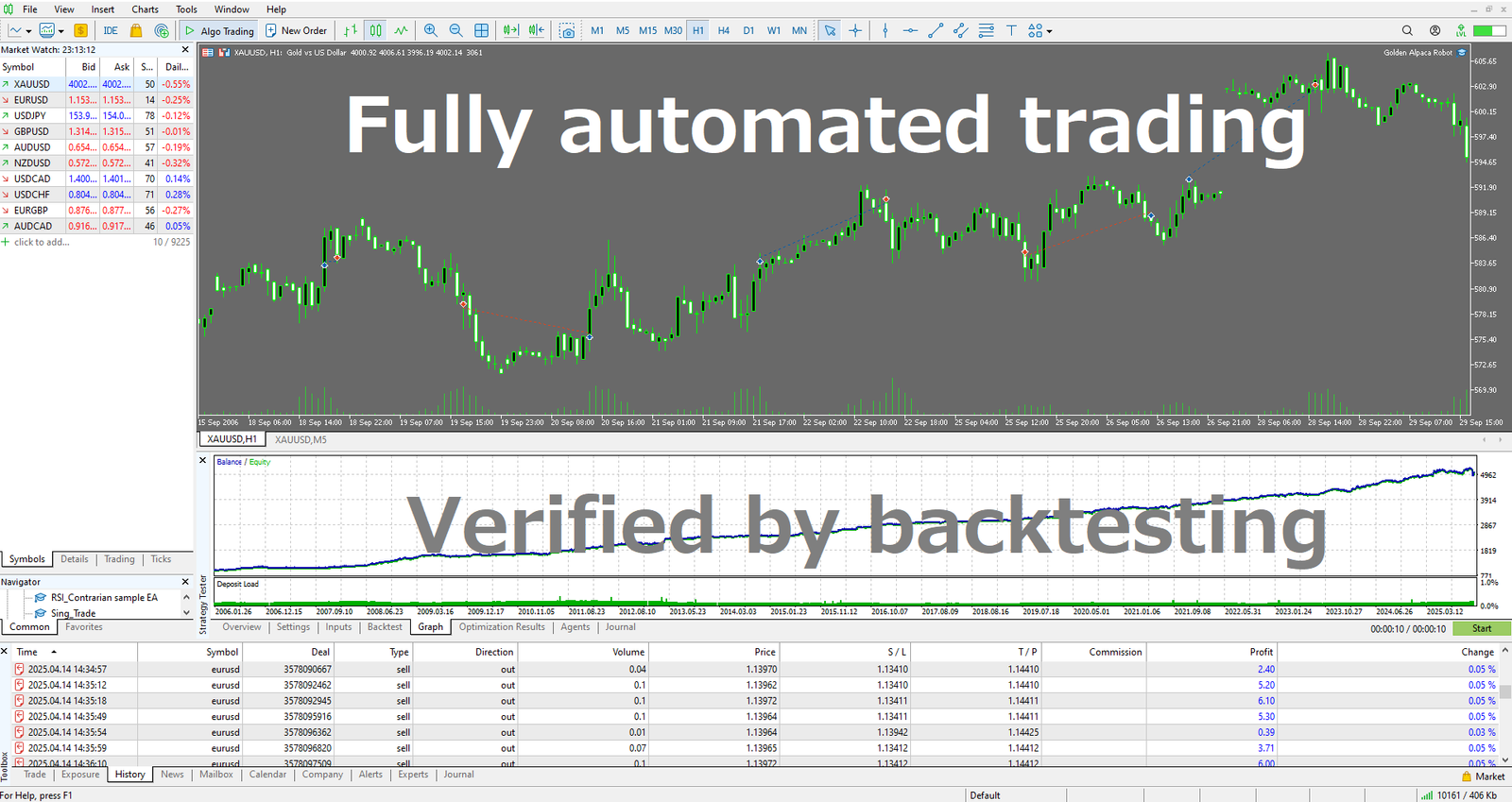
What an EA can and can’t do
- What it can do: Execute rules precisely, monitor and run 24/7, trade multiple pairs and timeframes at once, and automate stop-loss/take-profit, trailing stops, and lot sizing.
- What it can’t do: Understand the context of news, or react “intelligently” to server outages and extreme events unless you coded those rules. It only does what you define in advance.
Core building blocks of an EA
- Entry: Places orders automatically based on technical logic (trend, range, breakout, etc.). Order types include market, limit, and stop orders.
- Exit: Manages closes using fixed SL/TP, trailing stops, time-based exits, reversal signals, partial profit-taking, and more.
- Position sizing and risk control: Uses fixed lots, % risk based on account balance, volatility-based sizing, etc., to keep losses within a planned range.
- Execution and safeguards: Implements time/volatility filters, throttles repeated entries, and uses “circuit breaker” rules to stop trading under abnormal conditions.
How EAs differ from indicators and scripts
- Indicator: Displays information on a chart. It doesn’t trade.
- Signal tool: Shows buy/sell signals on a chart. It doesn’t trade.
- Script: Runs a one-time action (“one shot”). It doesn’t monitor the market continuously.
- EA: Continuously watches the market and automatically places and manages orders when conditions match.
Operating requirements and the basic setup
- The terminal (MT4/MT5) must be running. If your PC is off, the EA stops (a VPS is recommended).
- You need a stable internet connection.
- Server-side SL/TP (stop/limit orders stored on the broker’s server) remain active even if your terminal is offline.
For setup, you typically go in this order: install → enable → configure → verify operation.
The real value—and limits—of EAs
The value of an EA isn’t “automation.” It’s the ability to test a strategy and stick with it.
If your strategy has no edge, automating it doesn’t help.
Many strategies look great in a backtest but fail in live markets and suffer big losses.
Avoid over-optimization, and design strategies that are hard to break through robustness and solid money management.
Who EAs are (and aren’t) for
- Good fit: Traders who can keep running a system for the long haul—even through flat periods—and who care about compounding.
- Bad fit: “Get rich quick” mindsets, traders who keep overriding rules, or anyone with an extremely low tolerance for drawdowns.
Pros and cons of using EAs
Pros
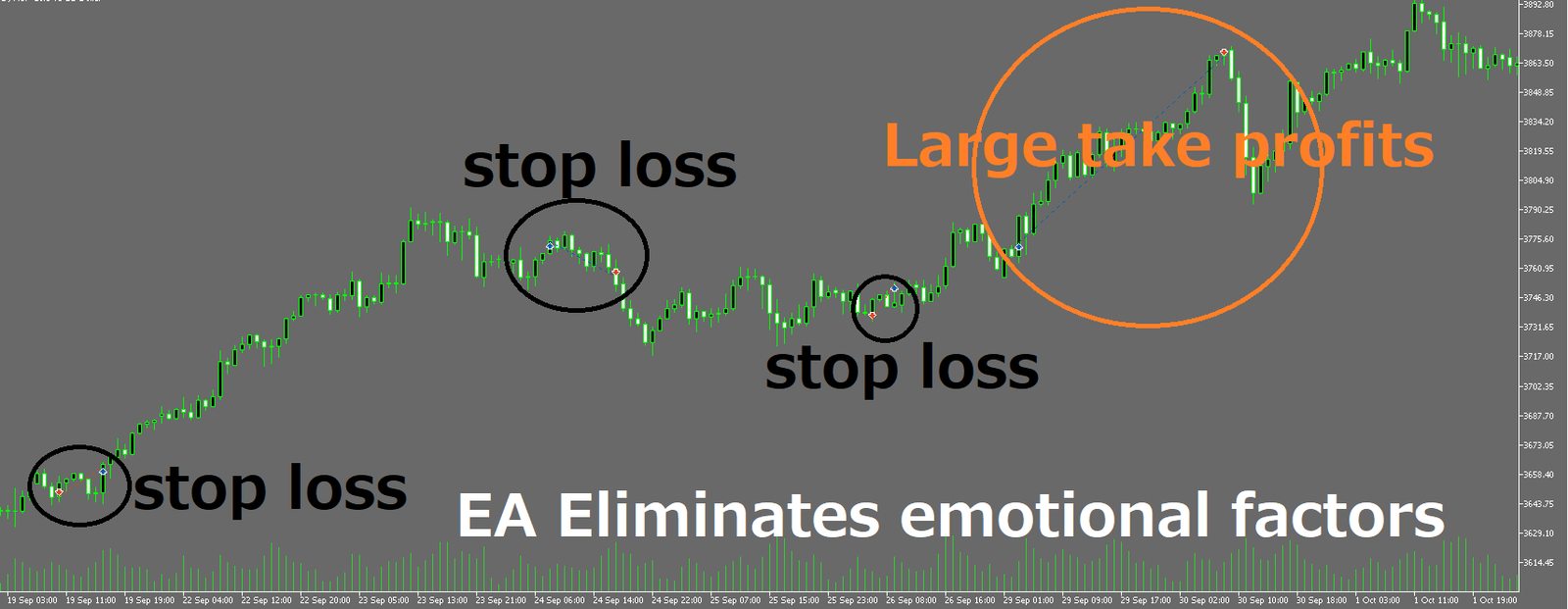
- Discipline, 24/7: Follows rules around the clock and removes hesitation and emotion.
- Repeatable and testable: You can track performance with backtests and forward tests and validate whether an edge exists.
- Easy to run in parallel: Run multiple pairs, timeframes, and strategies at once (better diversification and faster learning).
- Costs become measurable: You can design strategies with spreads, commissions, and slippage in mind.
- Fewer human errors: Reduces mis-clicks, forgotten orders, and missing stop-losses.
Cons / risks
- You need a stable runtime environment: You must keep MT5 running 24/7. If your PC sleeps, loses power, or disconnects, trading stops (a VPS helps but adds fixed costs).
- The temptation to over-optimize: If you tune parameters to fit the past too closely, the strategy often breaks in live trading.
- Scammy EAs are everywhere: Many EAs are sold using cherry-picked backtests or short-term gains and exaggerated marketing. They often rely on high-risk methods. You can lose money twice—first on the purchase price, then on a blown account.
Which is better: EAs (systematic trading) or discretionary trading?
Trading is a probability game. EAs execute probability-based rules exactly as designed, and that discipline is a major advantage.
Discretionary trading usually falls apart because:
① the rules are vague, untested, and not validated with probability-based analysis, and
② emotions distort decisions—traders delay cutting losses because they “don’t want to admit” they’re wrong, and take profits too early because they “don’t want to lose” a gain.
An EA follows pre-defined rules mechanically, removes emotion, and makes probability-based trading more consistent.
The biggest benefit is that it cuts short-term hesitation and helps you focus on long-term expectancy.
If you trade with a technical focus, I believe EAs often have the edge.
On the other hand, if you rely on fundamentals (interpreting economic context, policy intentions, and so on), discretionary trading can still be stronger in many situations today.
AI tools like ChatGPT and Gemini have made it possible to integrate some fundamental inputs into EAs, but it remains difficult to backtest fundamental “context” cleanly.
Why EAs can be stronger (probability × discipline)
- Emotion-free execution: Repeat the same actions without fear or greed.
- Repeatable and testable: Build and validate strategies efficiently with backtests and forward tests.
- Faithful to expectancy: Easier to compound “win rate × payoff ratio − costs” over time.
When discretionary trading tends to be stronger
- Interpreting fundamentals: Nuance in central bank speeches, policy intent, geopolitical risk—hard-to-quantify information.
- Handling true surprises: Making decisions in situations your system never defined.
What is an EA backtest? How to do it and key precautions (MT5)
What is a backtest?
A backtest runs an EA on historical market data to simulate “what would have happened if this strategy had traded in the past.”
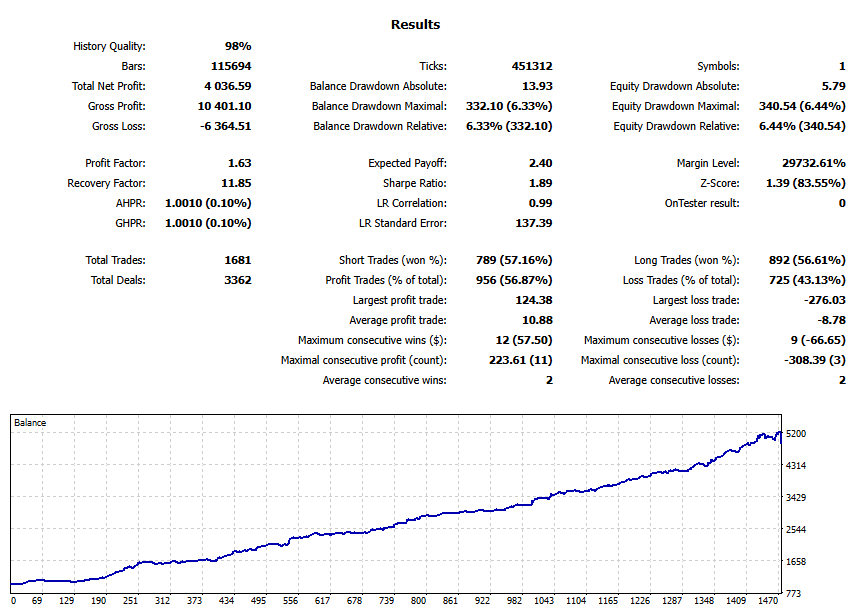
No real money moves, but you can check key stats—like profit/loss and maximum drawdown (DD)—before you trade live.
MT5’s EA backtesting features
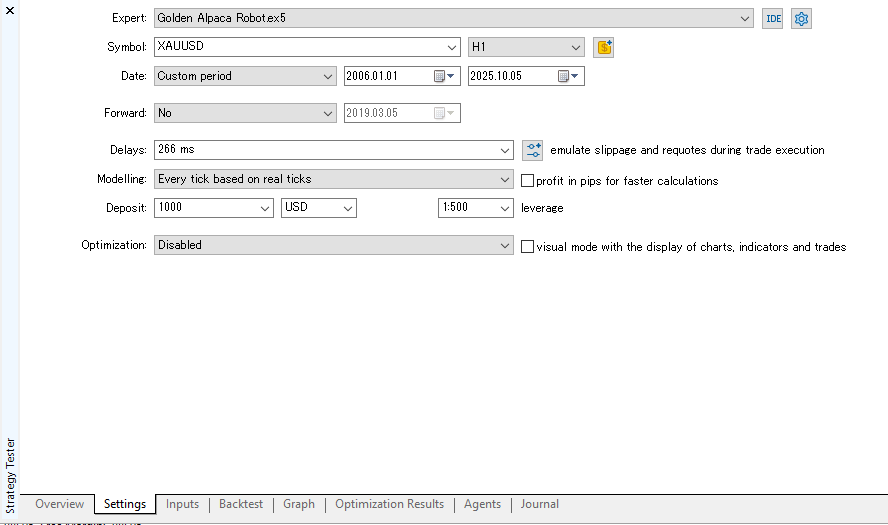
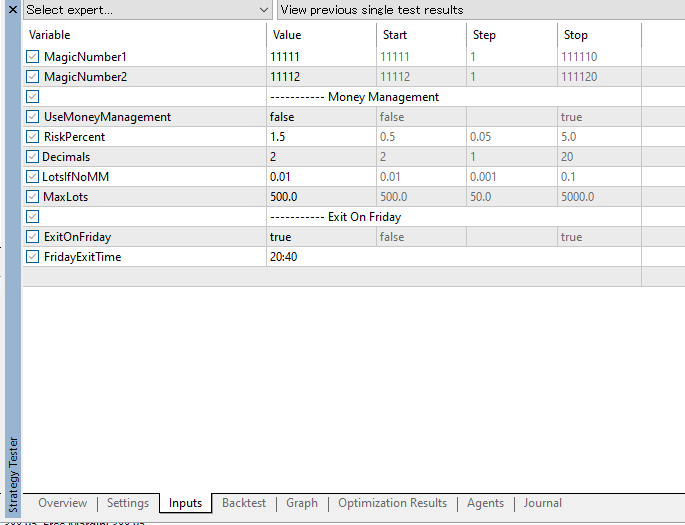
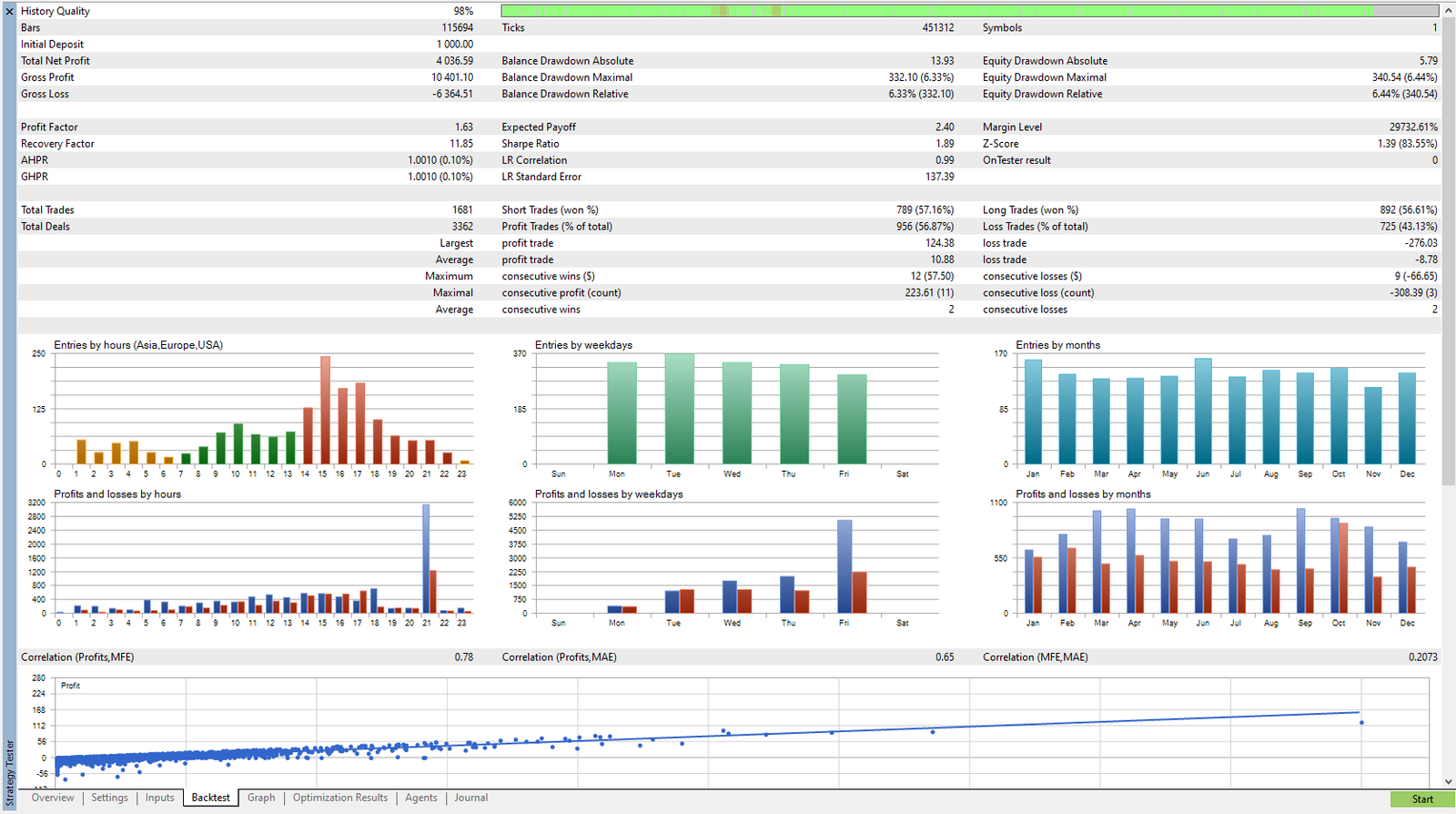
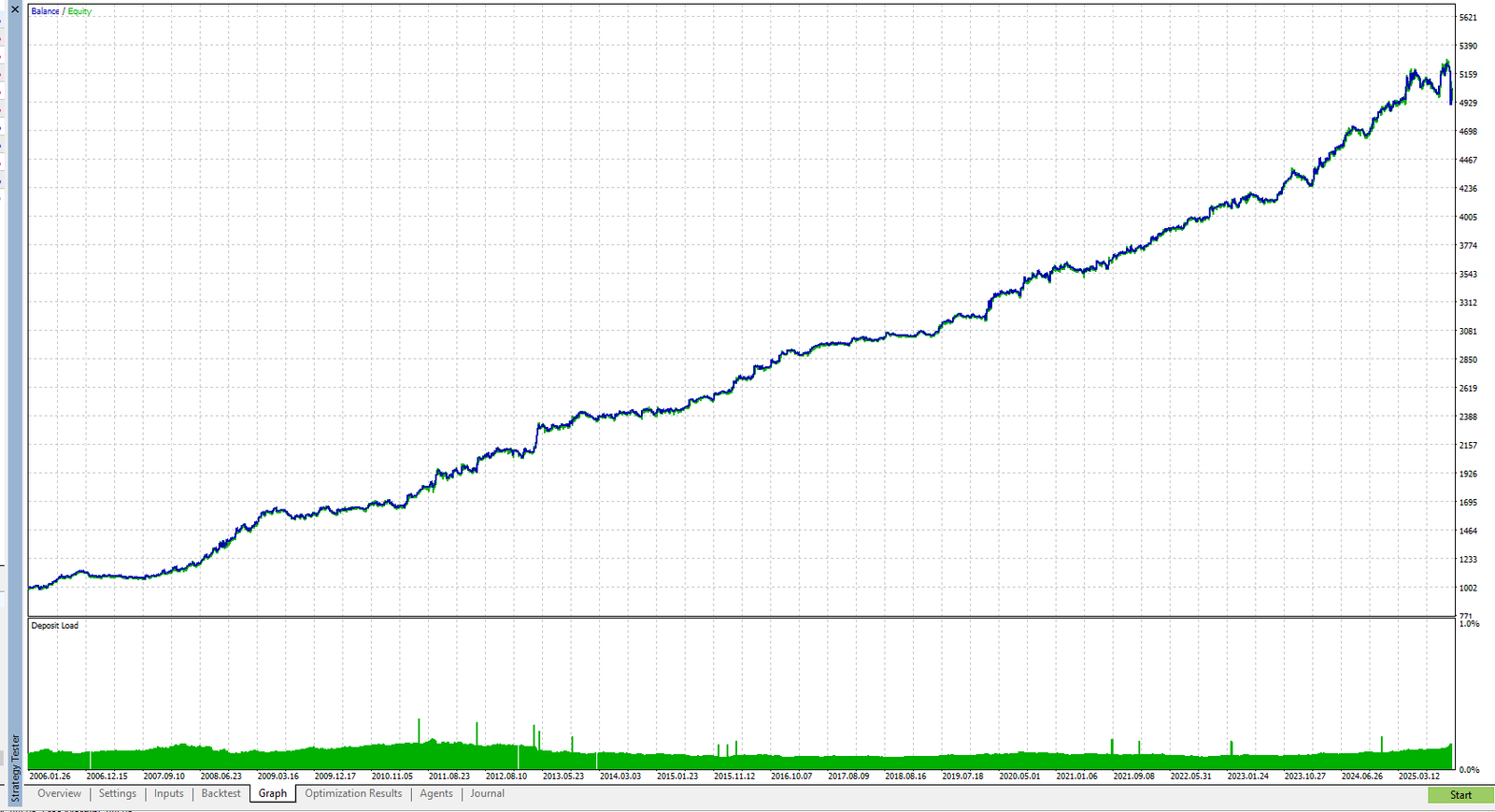
MetaTrader 5 (MT5) includes a powerful Strategy Tester, which is essential for validating EAs.
It recreates trading using historical chart data and lets you confirm entry/exit logic behavior, and analyze metrics like return, drawdown, and Profit Factor (PF) in detail.
Because MT5 shows both balance and equity curves, you can also see how floating losses evolve and understand the strategy’s risk profile more intuitively.
For EA developers and system traders, this is a key tool for checking a strategy before going live.
Goals of backtesting
- Rule reproducibility: Do entries and exits trigger exactly as intended?
- Whether expectancy exists: With enough trades, does it stay profitable (not just luck)?
- Understanding risk: How big and how long are drawdowns, and how can the strategy fail?
Settings and model-quality pitfalls
- Data quality: If MT5’s historical data has gaps, your results become less reliable. Higher model quality is better.
- Testing model: “Open prices only” ignores intra-bar movement, so it’s less reliable. Use a setting closer to every tick than “1-minute OHLC” when possible.
- Spread and commissions: Match your real broker conditions. Also test with conservative costs (e.g., spread + 1.0 pip). Overly optimistic costs are not acceptable.
- Slippage: Live accounts can suffer worse fills. Use the tester’s delay settings to simulate slippage.
- Initial deposit and leverage: Match your broker account conditions.
- Trading hours and symbol limits: Match the EA’s intended setup.
How to think about test length and trade count
- Enough trades and enough time: More trades and longer periods increase reliability. As a rough guideline: 1,000+ trades and 20+ years with the same logic.
- Include multiple market regimes: Test across trend/range and high/low volatility periods. Some EAs do well only in ranges and collapse in trends. A 20+ year test usually covers multiple regimes.
Key metrics to review
- P/L curve + equity: Check equity, not just balance.
- Max drawdown (both % and amount) and duration: Is it a size and length you can realistically tolerate?
- Win rate, payoff ratio, average pips: Can it keep positive expectancy over long tests?
- Trade count and holding time: Is the sample size large enough? Is it holding positions excessively long?
Common traps
- Over-optimization: Over-tuning to the past so it fails in the future.
- Using only “convenient” periods: Excluding bad times. How it behaves in bad periods matters more.
- Ignoring costs: Fixed spreads, missing commissions, no slippage assumptions.
What is an EA forward test? How to validate on unknown markets
Goal of forward testing (reproducibility and live robustness)
A forward test runs an EA on real, incoming market data with small size to confirm whether backtest performance can be reproduced in reality.
Start on demo or minimum lot size, and check whether it can handle real-world frictions like slippage and spread widening—on top of normal trading costs.
Backtests validate the past, and with enough optimization you can make numbers look great.
Forward testing is a test on future markets, so “optimization magic” works less. You see the EA’s true behavior and its ability to survive live conditions.
Don’t evaluate an EA using backtests alone.
Checking your own EA (MT5 reports)
MT5 includes built-in reporting, so you can review your balance/equity curve, maximum drawdown, profit factor, monthly performance, and more.
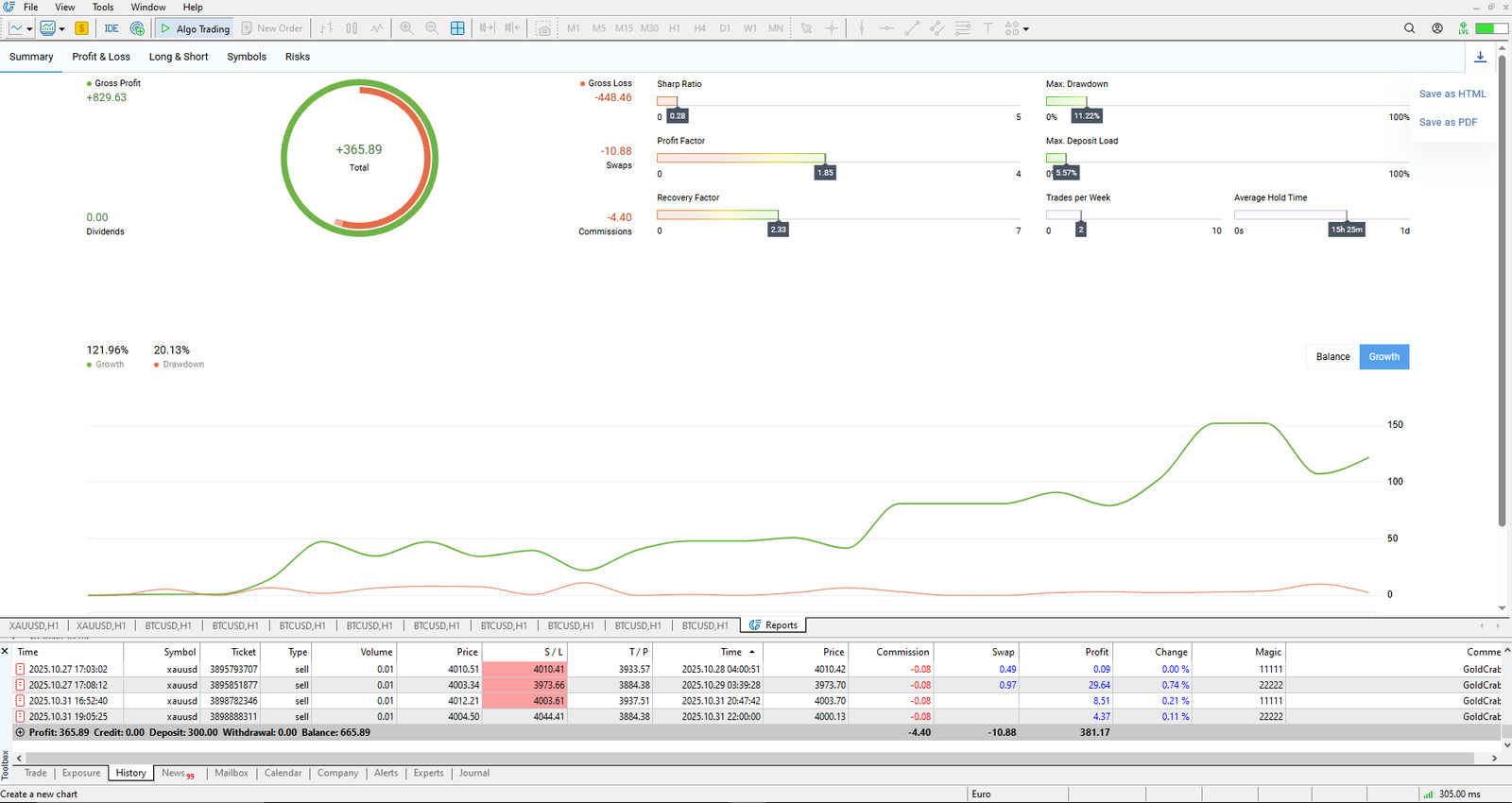
Checking a purchased EA (Myfxbook / MQL5)
If you’re considering buying an EA, you should confirm whether the seller provides public forward-test results.
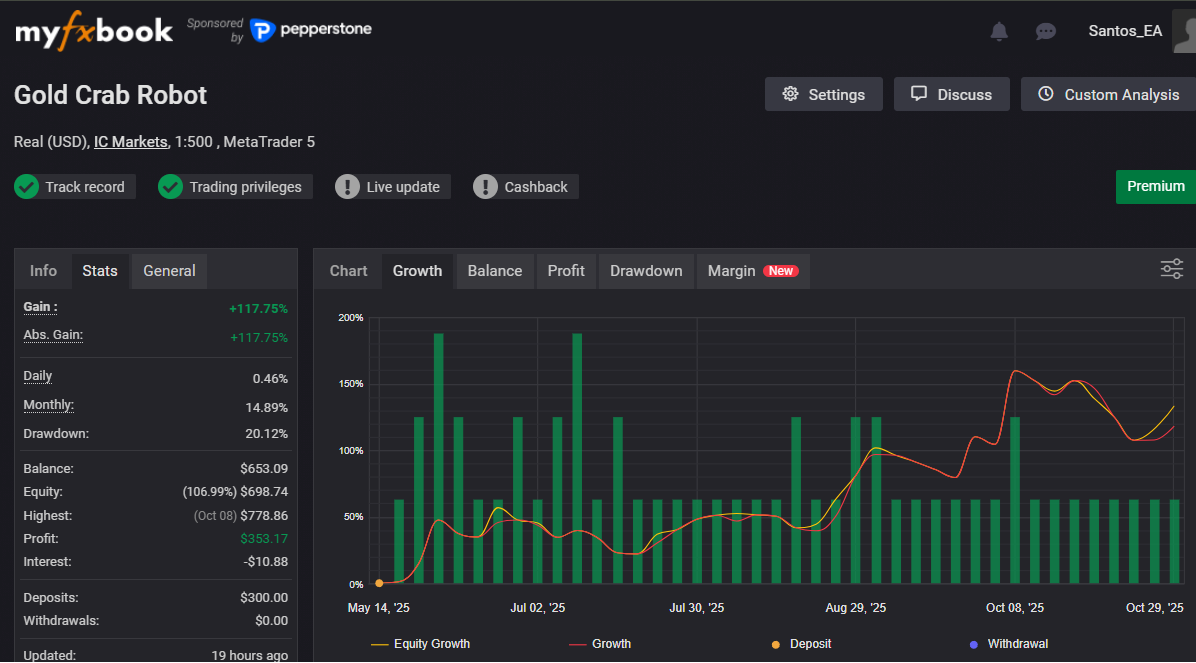
Some developers publish their EA’s live performance on third-party sites like Myfxbook or MQL5 Signals.
You should not trust an EA that only shows backtests.
That said, you shouldn’t blindly trust an EA just because its forward results look good.
Don’t focus only on the eye-catching numbers like profit, drawdown, and win rate.
You must review trade history, risk/reward, and other details to understand how the EA really behaves—and how it can fail.
I explain the exact checklist later in the section “How to read Myfxbook and MQL5 Signals results.”
Pitfalls (demo bias / changing settings / judging too quickly)
- Trusting demo results too much: Demo fills are often unrealistically good (less slippage), so results differ from live accounts. This matters especially for scalping EAs—some look profitable on demo and collapse live.
- Changing settings too often: If you keep changing parameters mid-test, you can’t validate the strategy.
- Making a short-term decision: Stopping after a few days. You shouldn’t judge an EA based on a few weeks or even a couple of months.
What is EA optimization? Chasing the “best settings” is dangerous
The right goal of optimization (find a stable zone)
Optimization means testing different parameter values to find settings that perform well consistently.
For example, in a moving average (MA) golden cross strategy, you might test MA periods (e.g., 20 vs 30) to see which performs better.
Optimization is not about finding “the single best combination” that fits the past.
The goal is to find a range of settings that stays stable.
The key is not to look only at the top-ranked setting.
It’s also important to choose EAs that don’t break when parameters change slightly.
How to run optimization in MT5
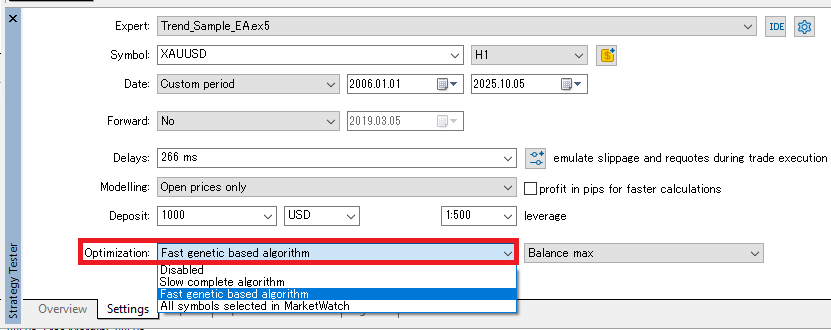
- Select the EA in Strategy Tester and enable Optimization. “Fast genetic based algorithm” is a practical starting choice.
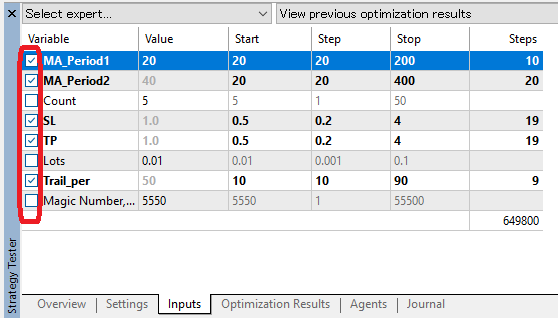
- In Inputs, check the parameters you want to vary and set Start / Step / Stop (min, increment, max). Start broad and rough, then narrow and refine.
- For Optimization criterion, don’t only maximize profit. Consider max DD, PF, and Recovery Factor as well (I recommend prioritizing drawdown control).
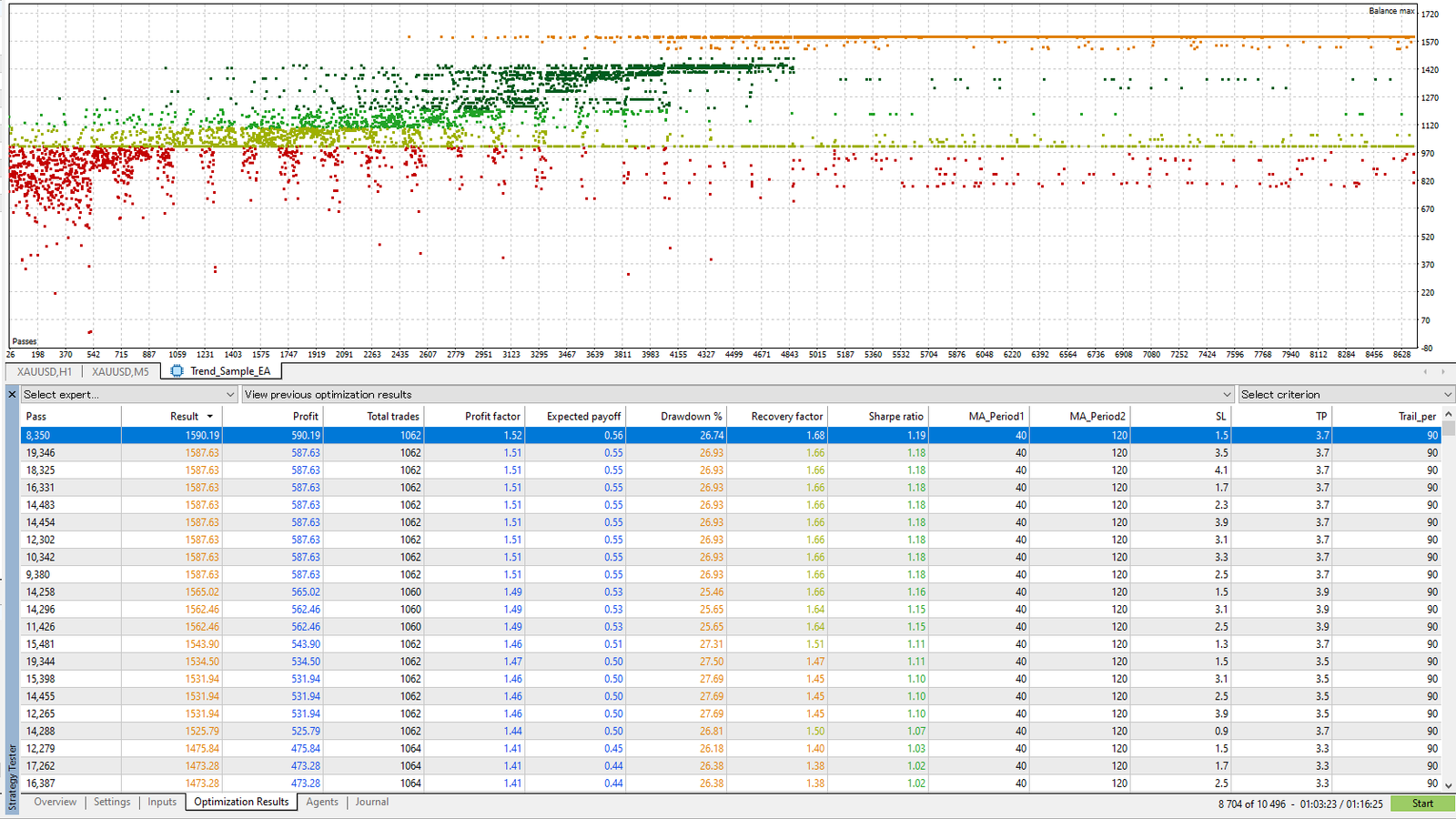
- After running, compare top candidates in Optimization Results, and use the distribution chart to confirm a “stable band” that doesn’t collapse in nearby settings.
What to optimize—and what not to
- Good candidates to optimize: Stop distance, take-profit distance, time filters, entry thresholds.
- Keep fixed (don’t optimize): Lot size, broker-spec-dependent values, and operational rules (like weekend close) should be fixed.
- High-risk parameters: Grid spacing / Martingale multiplier (lot scaling). These are inherently dangerous—optimization often just searches for settings that “haven’t blown up yet,” but live risk remains high.
Optimization best practices
- Don’t look only at the best setting: Check whether results collapse across most settings. If most parameter sets end in losses, avoid that EA.
- Assume real costs: Always include spreads, commissions, and slippage.
- Split validation: Separate the optimization window from the walk-forward (out-of-sample) window.
Why robustness matters most: what “hard to break” EAs look like
What robustness means (resistance to changing conditions)
Whether an EA can maintain good results over the long run on a live account depends heavily on robustness.
Robustness means the EA’s expectancy doesn’t collapse even if market conditions, trading costs, or execution quality change somewhat.
Why it matters
- Markets are not stationary: As trends/ranges and volatility shift, what worked best in the past can stop working.
- Live trading friction: Wider spreads, slippage, and execution delays can erase expectancy.
- Operational realities: You need designs that tolerate real-world issues like PC downtime and internet drops.
In real trading, a strategy that doesn’t collapse instantly when conditions change—despite having drawdowns and flat periods—often has more value than an EA with a “perfect” curve and an extreme win rate.
Traits of robust EAs
- Stable over long backtests: Verified across many years and multiple market conditions. It has drawdowns and flat periods, but it doesn’t break long-term.
- Asymmetric payoff: Uses logic that cuts losses and lets winners run, aiming for strong risk/reward.
- Higher spread tolerance: Often uses mid- to longer-term logic (typically M30 or higher) rather than ultra-short scalping.
- Edge holds across pairs: Even when backtested on other currency pairs, it can keep Profit Factor (PF) above 1.0.
- Balanced long/short logic: Not dependent on only buying or only selling; it adapts more evenly to direction.
- Always sets SL/TP: By storing SL/TP on the broker server, you reduce risk even if your VPS/PC or MT5 goes down.
Traits of non-robust EAs (signs of fragile design)
- Great only on demo: Demo environments often have unrealistically clean execution and stable spreads, so many scalping EAs fail live.
- Profitable only in backtests: A classic sign of curve fitting (over-optimization)—it fails in forward tests or live trading.
- Grid / averaging down / Martingale: It may draw a beautiful rising curve, but in strong trends floating losses can explode and the account can be wiped out.
- Unnaturally high PF or win rate: Often “balances the books” by avoiding real stop-losses, then one large loss wipes out most or all profits.
These EAs can look attractive in the short term, but they tend to fail with high probability in long-term operation.
A “pretty curve” does not mean safety.
Robust EAs prioritize stability that doesn’t break over time, not short-term fireworks.
A system that can keep positive expectancy across many different environments is what survives in real trading.
Warning signs to watch closely
- Performance changes dramatically with small parameter tweaks (classic over-optimization; weak underlying edge).
- Balance climbs smoothly, but equity suffers large drawdowns.
- Win rate or PF is extremely high, but average profit per trade is tiny and cost tolerance is weak (especially scalpers).
- Results get much worse when you expand the backtest period.
- Results get much worse when you test other currency pairs.
Common misconceptions
- High win rate / high PF does not automatically mean a good EA: Even with a modest win rate or PF, stable and repeatable strategies often survive better live.
- More parameters does not mean “more advanced”: More parameters increase the risk of over-optimization.
- Don’t trust demo results: Demo execution often looks better. Re-evaluate using live forward testing.
Common strategy types (trend, range, breakout, scalping, news, grid, etc.)
EAs come in many strategy styles. Below are the core characteristics of each.
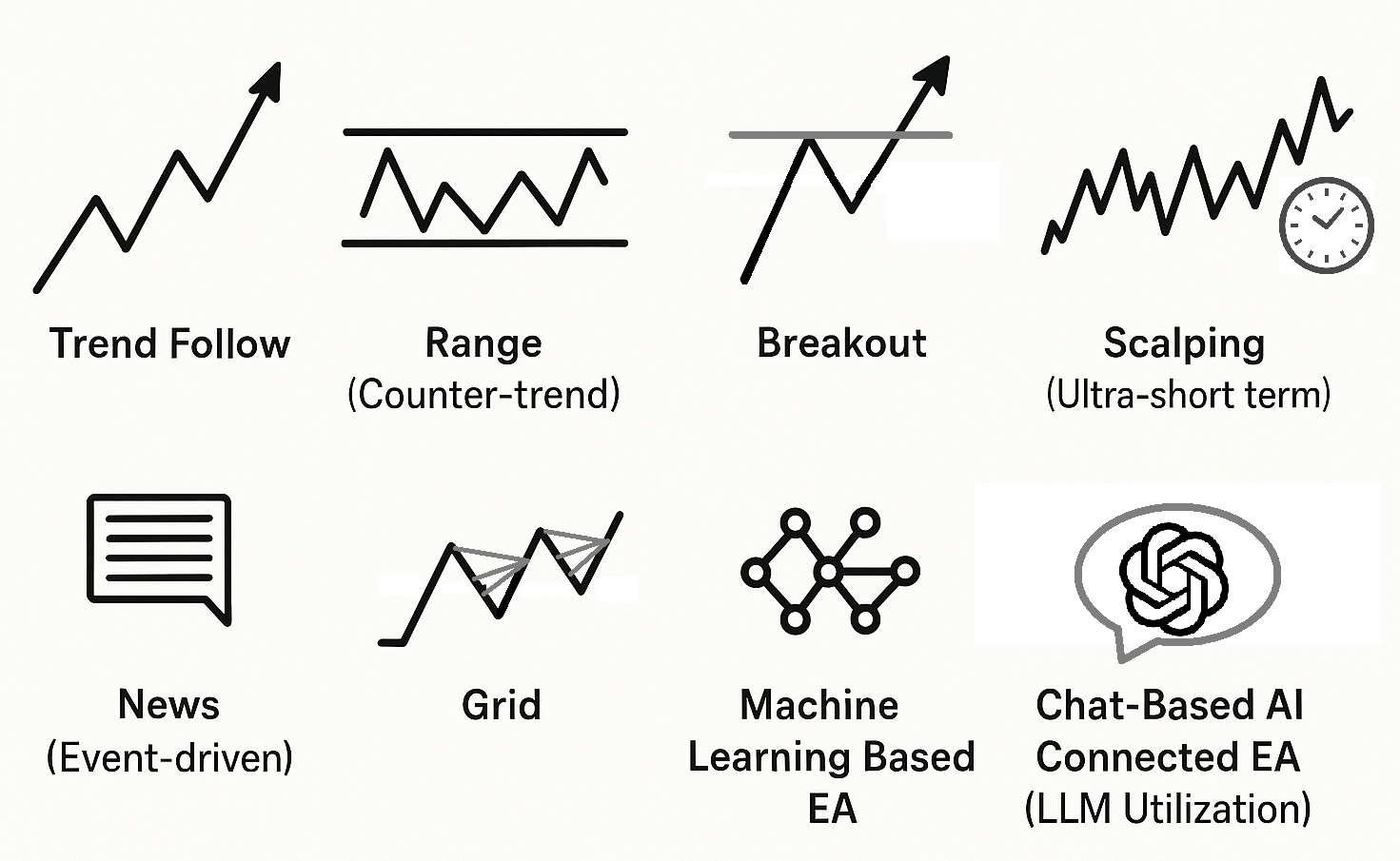
Trend-following
- Goal: Ride upward or downward trends.
- Typical logic: MA slope/cross, higher highs/lows (or lower highs/lows).
- Pros: Lets winners run; can make big gains in strong trends.
- Cons: More false signals in ranges, often more losing streaks. Win rate tends to be lower.
- Cost tolerance: Medium to strong (average move is larger).
Range (mean reversion)
- Goal: Capture reversals near the edges of a trading band.
- Typical logic: Bollinger Bands, RSI “overbought/oversold,” etc.
- Pros: Easier to maintain a decent win rate; can produce winning streaks; more trade opportunities.
- Cons: Stops can be delayed, and strong trends can cause large losses.
- Cost tolerance: Medium (moderate profit targets; spreads still matter).
Breakout
- Goal: Join a move as price breaks key highs/lows.
- Typical logic: Stop orders beyond recent range, session high/low breaks.
- Pros: Big payoff when it runs; can catch early trend moves; strong risk/reward setups are possible.
- Cons: Fake breakouts are common. Vulnerable to slippage on stop orders. Win rate can be low.
- Cost tolerance: Medium (slippage control is critical).
Scalping (ultra-short term)
- Goal: Stack small edges (a few to ~10+ pips) at high frequency.
- Typical logic: Micro trend/mean-reversion while avoiding low-liquidity times.
- Pros: Fast turnover; can smooth equity growth in calm conditions.
- Cons: Extremely sensitive to spreads, commissions, and slippage. Highly environment-dependent.
- Cost tolerance: Weak (must be designed with real costs from day one).
News
- Goal: Capture large moves right after economic releases or major headlines/speeches.
- Typical logic: Pause before events → resume, breakout follow-through, gap fade, etc.
- Pros: Large moves in a short time window.
- Cons: High execution risk: gaps, heavy slippage, re-quotes/rejections.
- Cost tolerance: Weak (needs safety systems for abnormal spreads/slippage).
Grid (including averaging down and Martingale)
- Goal: Add positions at fixed intervals and close as a basket on a pullback to collect the difference.
- Typical logic: Price-interval grids, time-based grids, volatility-based spacing.
- Pros: Can look stable while ranges persist; tends to have many “active days.”
- Cons: Floating losses can surge in strong trends. Equity can drop sharply, and the account can be wiped out quickly.
- Cost tolerance: Medium (profits can stack, but watch swaps and long drawdowns).
AI-driven EAs
In recent years, EAs that use AI have appeared, and this area will likely grow.
But AI is not a “holy grail.” AI can be a powerful analysis aid, but it doesn’t guarantee a winning EA, and it can even increase risk.
AI models can fit past data too well, leading to a common pattern:
amazing backtest → collapse on a live account.
They’re also easy to use in exaggerated marketing, so be careful.
AI-based EAs generally fall into two categories:
Machine-learning-based EAs
- Overview: Uses historical prices and indicators to predict future movement using statistical models or deep learning.
- Pros: Can use Random Forest, XGBoost, neural networks (e.g., LSTM). May capture complex relationships and edges that are hard to hard-code.
- Cons: High risk of overfitting. Data leakage (future information sneaking in) and “feature engineering after the fact” can produce unrealistic backtest outliers.
- Practical tips: Use strict validation (time-series CV / walk-forward), require out-of-sample testing, always include real costs (spread/commission/slippage), and scale up from small lots.
Chat-based AI connected EAs (LLM-based)
- Overview: Connects to an LLM (Large Language Model) like ChatGPT or Gemini, and uses real-time text analysis (news, social media, speeches) to support decisions.
- Example: The AI summarizes central bank headlines and classifies the tone as “risk-on/risk-off,” then passes that as an input to the EA’s logic.
- Pros: Can process language and context and incorporate market sentiment that traditional indicators can’t capture easily.
- Fit: LLMs are language models and are generally not well-suited for direct price time-series prediction. Don’t make them the core engine for numeric forecasting or fast execution.
- Caution: Latency, vague outputs, and hallucinations. A safer design does not let an LLM make the final trading call (e.g., text → flags → EA executes with separate rules).
AI EA red flags (don’t fall for these)
- “AI never loses” is an illusion: Every model is just one approach in a probability game. Losses will happen.
- Beware the backtest myth: ML models can overfit easily, and it’s easy to “win” in backtests. Only forward tests reveal real value.
- Don’t misuse LLMs: They can help with summarizing and classifying news, but they are weak at price time-series forecasting.
- Beware hype: Phrases like “AI can’t lose” or “learning makes it permanently optimal,” and systems that show only demo results or hide equity/trade history are major red flags. Grid/Martingale combos are especially good at creating that false “holy grail” impression.
- Transparency matters: At minimum, demand live forward results on Myfxbook/MQL5 Signals and review the trade behavior in detail.
AI should stay “assistive”
- AI should support your discretion, rules, and statistics. Don’t over-trust it—run it with human risk control and discipline.
- Follow the process: backtest → forward test.
- Ignore “AI is unbeatable” marketing, and prioritize robustness when selecting systems.
How to read Myfxbook and MQL5 Signals: a checklist to spot dangerous EAs
EA sellers sometimes publish forward-test performance on sites like Myfxbook or MQL5 Signals.
Publishing forward results (not just backtests) is a good step.
But don’t assume “a smooth, never-dipping upward profit curve = a good EA.”
Grid / averaging-down EAs often avoid stop-losses and simply wait until positions return to profit. That tends to produce a steadily rising balance in the short term, so the results look very attractive.
In reality, floating losses often swell behind the scenes and equity can sink deeply. In a strong trend, they may not survive the drawdown and a margin call can wipe out the account—in an instant.
You must review published results carefully so you don’t get tricked by high-risk EAs.
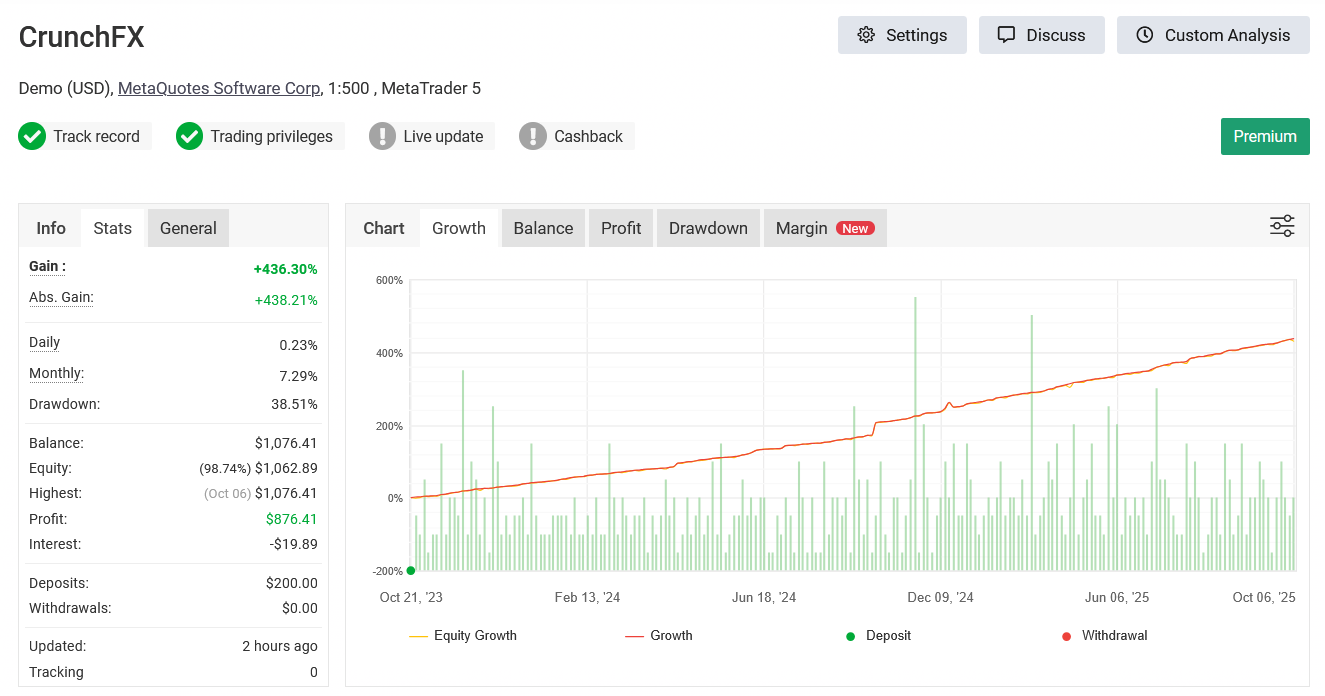
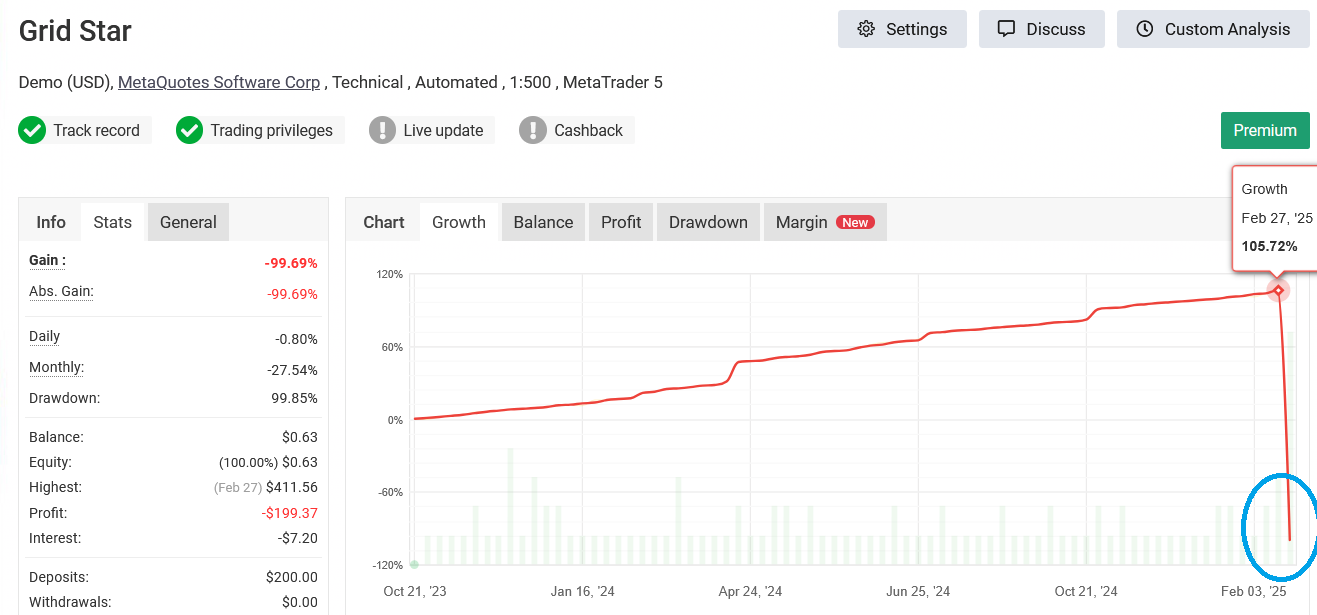
Don’t judge an EA by a “pretty balance curve” alone. Check equity and drawdown (DD), how positions are held, and how lot size changes over time—together.
Reliability checks
- Account type: Is it Real or Demo? Demo results are far less reliable.
- Verification status: Are deposits/withdrawals and trading history marked as “verified” (less room for manipulation)?
- Broker info: Is it a reputable major broker? Some “EA results” are manipulated using shady broker look-alikes, so broker credibility matters too.
How to read Balance vs Equity (a gap is a danger sign)
- Balance: Cumulative realized P/L.
- Equity: Includes floating P/L, so it reveals the real drawdown. This is where an EA’s true risk shows up. However, note that Myfxbook charts may not fully reflect the complete equity path in every view.
- What to look for: If balance keeps climbing while equity repeatedly sinks deeply, that’s a sign of high-risk operation.
Interpreting drawdown (DD)
- “No DD” is suspicious: If balance shows virtually no drawdown, be careful. Healthy EAs cut losses with stop-losses, so some drawdown and flat periods are normal.
- Floating DD matters: Don’t focus only on realized DD. Pay attention to the equity “bottom” (could it survive before closing?).
Key metrics to judge trade quality
| Metric | How to read it |
|---|---|
| Profit Factor (PF) | Be cautious with extremely high values (e.g., over 2–3). Even 1.3–1.6 can be plenty. |
| Average pips per trade | Does it still hold up after spreads/commissions/slippage? Demo scalping often fails to reproduce live—high caution. |
| Win rate × payoff ratio | A high win rate can still collapse if losses are large. Ideally, on a pips basis, average win > average loss (cut losses, let winners run). |
| Average holding time | If positions are held for extremely long periods, suspect a no-stop-loss, high-risk approach. |
| Number of trades | More trades and a longer track record are better. With only a few dozen trades, randomness dominates. |
How to spot dangerous grid / averaging-down / Martingale behavior
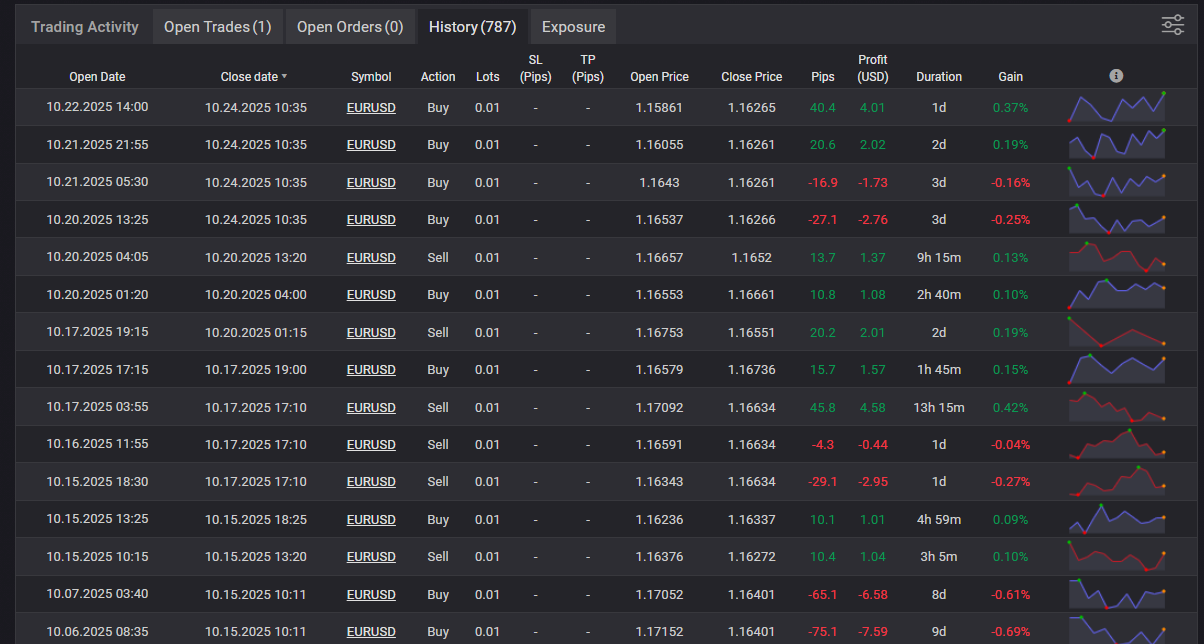
- Don’t rely on the curve alone—always review the trade history list and the trade plot chart.
- Look for many positions stacked in the same direction (same symbol, similar prices), then closed together at the same timestamp.
- Look for lot sizes that increase in steps (Martingale-style scaling).
- Check if equity or margin usage shows sharp event-like drops (spikes).
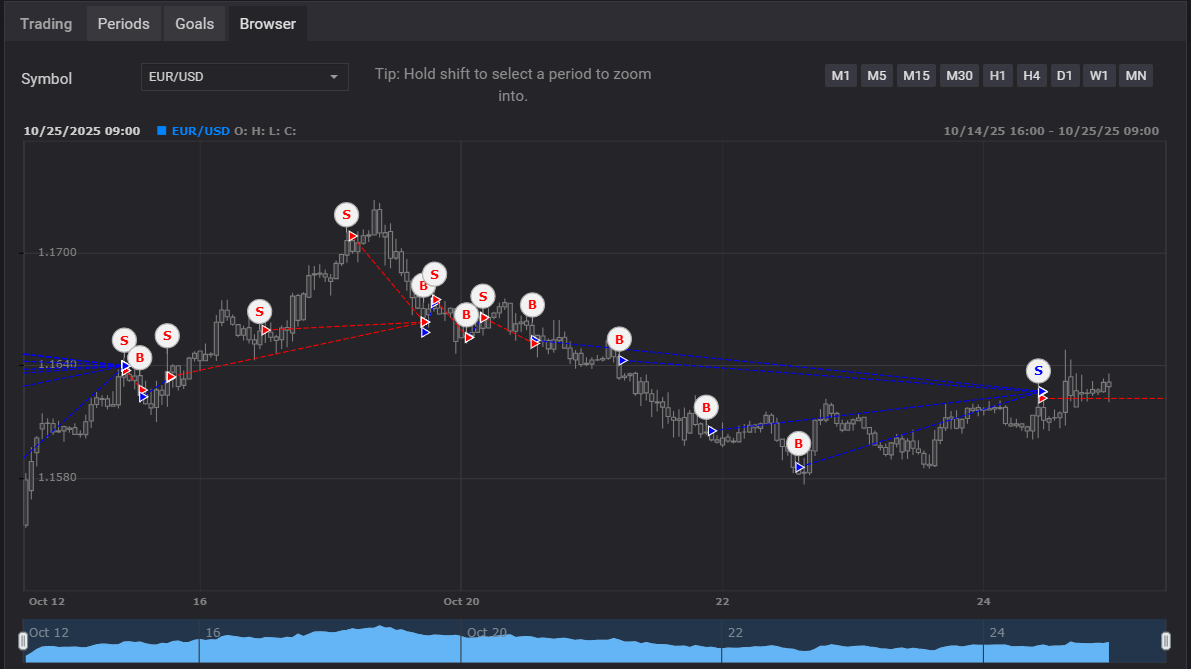
Red flags (check before buying)
- Equity shows deep, repeated dips while balance looks smooth—plus signs like increasing lot size, many same-direction positions, or holding heavy floating losses over weekends. (Possible grid/Martingale.)
- Extremely high PF or win rate based on a short period / few trades (insufficient data + possible no-stop-loss logic).
- Frequent deposits/withdrawals (deposits to avoid a margin call during equity drawdowns; withdrawals to make returns look better).
Case study: robust EA vs fragile EA
Purpose of this section
If you plan to buy an EA from a third party, you need to read backtest and forward-test results and identify what’s really going on under the hood. Here are two typical patterns to compare.
Case A: Robust EA (trend/breakout-leaning, risk capped per trade)
- Traits: Every position has SL/TP. Lot size is based on a fixed % risk model.
- How the curves look: Balance and equity stay relatively close and move mostly together.
- Average pips: Medium to large; not a scalper. Less sensitive to trading costs (spread/slippage).
- Win rate: Not high (around 40–60%), but risk/reward is strong.
- Drawdowns: It has drawdowns and flat periods, but overall stays profitable. (Drawdown isn’t “bad”—it often means the EA is actually cutting losses.)
Case B: Fragile EA (grid / averaging down / aggressive lot scaling)
- Traits: Adds positions as price moves against it, sometimes increasing lot size. SL tends to be very wide—or absent.
- How the curves look: A very smooth, beautiful upward curve. Equity may form deep valleys at times.
- Average pips: Small, scalping-like logic. Results swing heavily based on trading costs.
- Win rate: Abnormally high (80–90%).
- Drawdowns: Almost none on the balance curve.
What you need to run an EA reliably (VPS / internet / power)
An EA only trades while it’s running.
If it stops, trading stops immediately—and in some cases you can suffer unexpected losses because stops or take-profits aren’t executed as intended.
To prevent these “accidents,” you need a stable environment that keeps your EA running.
- To keep MT4/MT5 running 24/7, a VPS is usually better than a home PC.
- If you set SL/TP and have them stored on the broker server, they can still trigger even if your EA or terminal stops.
- Auto-recovery and alerting for disconnects/reboots adds peace of mind.
PC/VPS settings
- No sleep mode: If your PC sleeps, MT5 and the EA stop. Be especially careful if your PC has auto-sleep enabled.
How to choose a VPS
- Pricing: An expensive VPS reduces your net returns. Lower-cost providers are often more practical.
- Specs: Minimum guideline: 2 vCPU / 4GB RAM / SSD. Needs vary by how many MT5 terminals, EAs, and indicators you run.
- Location: Choose a region close to your broker server to reduce latency (London/NY, etc.). If you’re not scalping, you don’t need to obsess over this.
Auto-start and auto-recovery for MT can help
Not required, but the following features can help you recover quickly if your PC/VPS stops:
- Startup registration: Configure MT to launch automatically after OS reboot (Task Scheduler, etc.).
- VPS monitoring: Use services like UpTimeRobot to monitor uptime and receive alerts if the VPS goes down.
How to install and run an EA (MT5/MT4): from setup to live operation
Prerequisites
- MT5 (or MT4) terminal installed
- EA file:
.ex5(MT5) or.ex4(MT4) - Stable internet connection (ideally a VPS)
.mq5 and .mq4 are source-code files, so they won’t run as-is. You must compile them in the MQL editor into .ex5 (MT5) or .ex4 (MT4).
Placing the EA file
- Open MT and click File → Open Data Folder.
- Copy the EA into
MQL5 > Experts(MT4:MQL4 > Experts). - Restart MT, or right-click in the Navigator and select Refresh.
Attach to a chart
- From Expert Advisors in the Navigator, drag and drop the EA onto the target chart.
- In the Properties window, under Common:
・Check “Allow algorithmic trading”
・(If needed) check “Allow DLL imports” - Under Inputs, set your initial parameters (lot size, SL/TP, trading hours, etc.).
- Turn the Algo Trading button ON (green) at the top of the terminal.
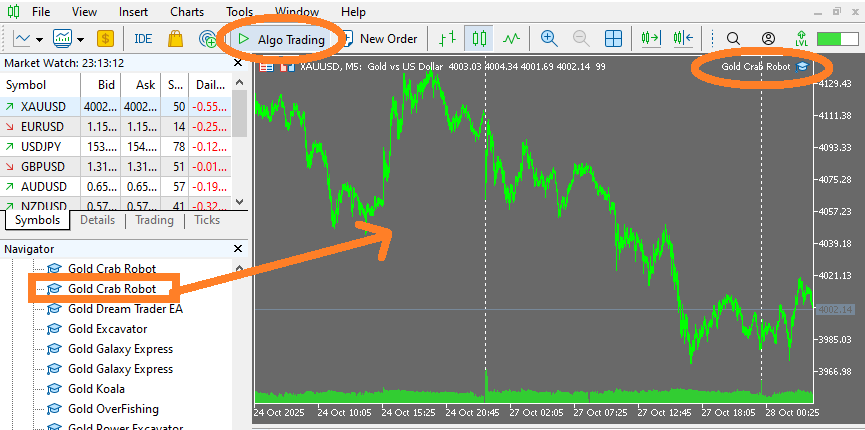
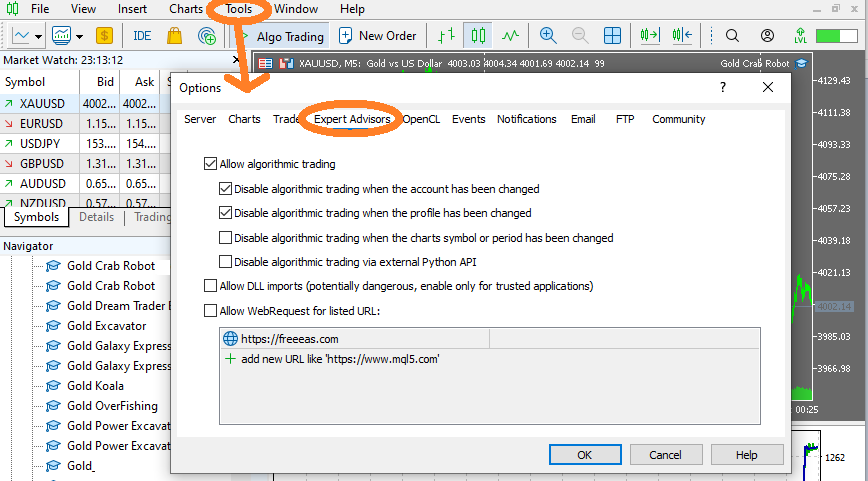
Verify it’s working
- Start on a demo account and check the logs (Terminal → Experts / Journal) for errors when attaching the EA.
- Watch 1–2 trades to confirm behavior.
- Confirm SL/TP are stored on the broker server (you can see SL/TP in the orders list).
Common setup mistakes
- Algo Trading is OFF (top button or not allowed in EA properties).
- EA file placed in the wrong folder (Indicators or Scripts instead of Experts).
- “Allow DLL imports” not checked when required.
- Account not logged in / invalid, or Market product authorization not completed.
Steps before going live
- Run a backtest in Strategy Tester (confirm behavior with default settings first).
- Test on a demo account (safer than jumping straight to live).
How trading costs affect performance (spread / commission / slippage / swap)
An EA’s results come down to:
gross P/L − trading costs.
If costs rise even slightly, short-term strategies like scalping can lose their edge immediately.
Here, “trading costs” include not just spread, commission, and slippage, but also swap (overnight interest).
Many traders don’t treat swap as a cost. But for mid- to long-term positions, it can be significant and will compress returns.
Before you run an EA, always test with effective costs (spread + commission + average slippage + swap) included.
Choosing an EA with strong cost tolerance—and choosing a broker with low costs and favorable swap terms—matters a lot.
Cost components and definitions
- Spread
- The difference between Ask and Bid. A visible cost you pay when you enter.
- Commission
- A fixed per-round-turn fee on ECN-style accounts. Convert it into pips to evaluate properly.
- Slippage
- The difference between your requested price and the actual fill price. Often widens during news or low liquidity.
- Swap
- Daily interest paid or received based on the rate differential between the two currencies. It accumulates and affects P/L when you hold trades longer.
A simple evaluation formula
Net expectancy = Gross average pips − (average spread + commission-in-pips + average slippage + average swap)* Convert swap into pips as: average holding days per trade × daily swap (in pips).
Example (numbers)
- Gross average move: 5.0 pips
- Average spread: 1.2 pips
- Round-trip commission: $7/lot → about 0.7 pips
- Average slippage: 0.6 pips
- Average swap: 0.2 pips (negative per day held)
→ Total effective cost = 1.2 + 0.7 + 0.6 + 0.2 = 2.7 pips
→ Net expectancy = 5.0 − 2.7 = 2.3 pips (costs reduce it by about 55%)
Impact by strategy type (major pairs like EURUSD)
| Strategy type | Typical average move | Cost tolerance | Key caution |
|---|---|---|---|
| Scalping (short-term) | 2–8 pips | Weak | Spreads/slippage can kill the edge. Swap impact is smaller, but consider pausing around rollover. |
| Day trade / breakout | 10–30 pips | Medium | Watch stop-order slippage. Include a few days of swap when evaluating. |
| Swing | 30–100 pips | Strong | Swap can accumulate significantly. Always check positive/negative swap conditions. |
The average pips above assumes EURUSD and USDJPY. Instruments like XAUUSD or BTCUSD typically move much more.
Summary: trading costs
- Evaluate an EA after subtracting effective costs (spread + commission + slippage + swap).
- The shorter the strategy (scalping), the weaker the cost tolerance. Swap matters less, but immediate costs matter more.
- For swing and mid-term EAs, swap can materially affect profitability.
Money and risk management (lot size / SL / TP / risk of ruin)
The mindset (extremely important)
Your results depend more on how much you risk (lot size) and where you exit (SL/TP) than on where you enter.
Lose small, and occasionally win big—if that balance collapses, your edge won’t survive over time.
Keeping risk per trade small and consistent reduces your long-term risk of ruin and gives you more chances to grow the account.
By contrast, methods like averaging down or Martingale (increasing size as you lose) can win short-term but raise the probability of eventual failure.
Lot sizing basics (use fixed % risk)
First decide what % of your account you’re willing to lose on a single trade, then calculate lot size from that.
- Allowed loss per trade = account balance × risk % (e.g., $1,000 balance × 1% = $10)
- Use SL (pips) and pip value per 1 lot to calculate lot size
Example: On EURUSD, SL is 50 pips. If 1 lot = $10 per pip,
Lot size = allowed loss ÷ (SL pips × $10) = 10 ÷ (50 × 10) = 0.02 lots
Widen SL → reduce lot size. Tighten SL → increase lot size. This keeps the cash loss consistent.
SL/TP (exit rules)
- Stop-loss (SL): fixed price/pips, beyond recent swing highs/lows, or ATR-multiple based.
- Take-profit (TP): fixed target, or an R-multiple (e.g., 2R = twice the SL distance).
- Trailing stop: move SL up as profit grows.
- Time-based exit: close at session end, or Friday night to avoid weekend exposure.
- Store on the broker server: When SL/TP are registered server-side, they can still trigger even if your terminal stops.
What you must not do
- Increase lot size to “win it back” after a losing streak (a classic blow-up pattern).
- Remove SL or move it further away.
- Underestimate drawdowns and run with too little capital or too large a lot size.
Copy trading vs EAs: what’s the difference?
Both methods “trade automatically,” but copy trading replicates someone else’s trades, while an EA runs in your own environment and trades based on its programmed rules.
The dependency, transparency, and control are very different.
- Copy trading: You subscribe to a provider (signal). The provider’s decisions become your trades.
- EA: A program runs on your MT4/MT5 and executes predefined logic when conditions are met. The decision-maker is the program.
Pros and cons (key points)
| Copy trading | EA | |
|---|---|---|
| Ease of setup | ◎ (just subscribe and link) | ◯ (installation and settings required) |
| Transparency / reproducibility | △ (provider discretion is a black box) | ◯–◎ (fixed logic, testable) |
| Latency / slippage | △ (signal → copy delay can worsen fills) | ◯ (orders placed directly on your account) |
| Scaling / diversification | ◯ (diversify across multiple signals) | ◎ (easy to diversify across EAs and accounts) |
| Control | △ (mostly stop/lot adjustments; method unclear) | ◎ (you define parameters and stop conditions) |
| Dependency risk | High (fully dependent on provider behavior) | Medium (dependent on your settings) |
| Cost structure | Subscription fee (fixed) + execution costs | Purchase/dev cost + execution costs + VPS cost |
How failure patterns differ
Copy trading failure examples
- The method isn’t disclosed, so you can’t validate it (no backtest/analysis) → dangerous trades blow up your account.
- You can’t react quickly if the provider suddenly changes approach (aggressive lot scaling, averaging down, etc.).
- Results differ due to broker differences between provider and subscriber; your performance diverges.
- After subscription fees, you end up net negative unless you trade at meaningful size.
- The advantage is you can judge by live results (but the true causes behind performance are harder to see).
EA failure examples
- Blindly trusting backtests or a short forward test, then buying an expensive, high-risk EA (grid/Martingale are typical).
- Ignoring real execution costs and slippage—especially swap—and then watching it collapse on a live account.
- On the other hand, if you understand the logic and can validate and improve it yourself, an EA can become a strong foundation for long-term trading.
FAQ: common questions
- Do I need a VPS? Can I run an EA on my home PC?
- Because EAs are designed to run 24/7, a VPS (virtual private server) is recommended. Home PCs can stop due to power outages, sleep mode, or internet drops. That doesn’t just mean missed opportunities—it can also lead to unexpected losses. If your EA sets SL/TP that are stored on the broker server, you can reduce risk even if your VPS stops.
- Why does an EA lose live even though it backtests well?
- Your test period may be biased toward a specific market regime, or the EA may be over-optimized. Re-evaluate with forward testing (unknown data), different time windows, and different brokers. In live trading, “effective costs” like spread, slippage, and execution delays also matter.
- Can scalping EAs be profitable?
- Scalping EAs stack small profits at high frequency, but they’re heavily affected by spread and slippage. Because results depend strongly on the trading environment, reproducibility on a live account is often weak, and maintaining an edge is not easy.
- Are grid and Martingale EAs dangerous?
- They can look stable in the short term, but when a trend continues, floating losses can expand rapidly and equity can sink deeply. Designs that can’t clearly control the number of layers, max open positions, and a hard loss cap are extremely dangerous. Prioritize “clear failure prevention” over a smooth-looking curve.
- What should I look at when reviewing EA performance on Myfxbook or MQL5?
- Don’t look at Balance alone—check how Equity behaves as well. If the profit curve looks “too perfect” or the win rate is “too high,” it often means the strategy hides risk and can later suffer a large loss. Also check max drawdown, average pips, number of trades, deposits/withdrawals, and lot-size changes. Pay special attention to the grid/Martingale signature: positions added in one direction and then closed as a basket, often with increasing lot sizes.
- Should I stop my EA during major news events?
- It depends on the strategy. Some breakout EAs can perform better during news. On the other hand, mean-reversion or grid/averaging-down systems can take large losses when prices spike. In any case, spreads and slippage often widen sharply during news, which makes trading costs worse.
- Do results change depending on broker or account type?
- Yes—significantly. Differences in spread, commission, execution speed, and Stop Level (minimum distance) can change P/L. The same EA can perform multiple times better or worse depending on the broker. Scalping EAs, in particular, can vary dramatically by broker and account type.
- How much capital do I need to start running an EA?
- You should secure enough balance to withstand drawdowns based on your minimum lot size and stop distance. Estimate drawdowns using a long backtest at the minimum 0.01 lot. As a rough guideline, if you use 0.01 lots with a 30–50 pip SL per trade, around $200–$300 is a practical minimum. Too little capital with too large a lot size is a recipe for failure. With grid/Martingale strategies, account size is even more critical because multiple positions and lot scaling directly increase blow-up risk.
 MQL5
MQL5
 Myfxbook
 YouTube
 X
X
 GOGOJUN