

Introduction: VPS vs Home PC—Which One Keeps Your EA Running?
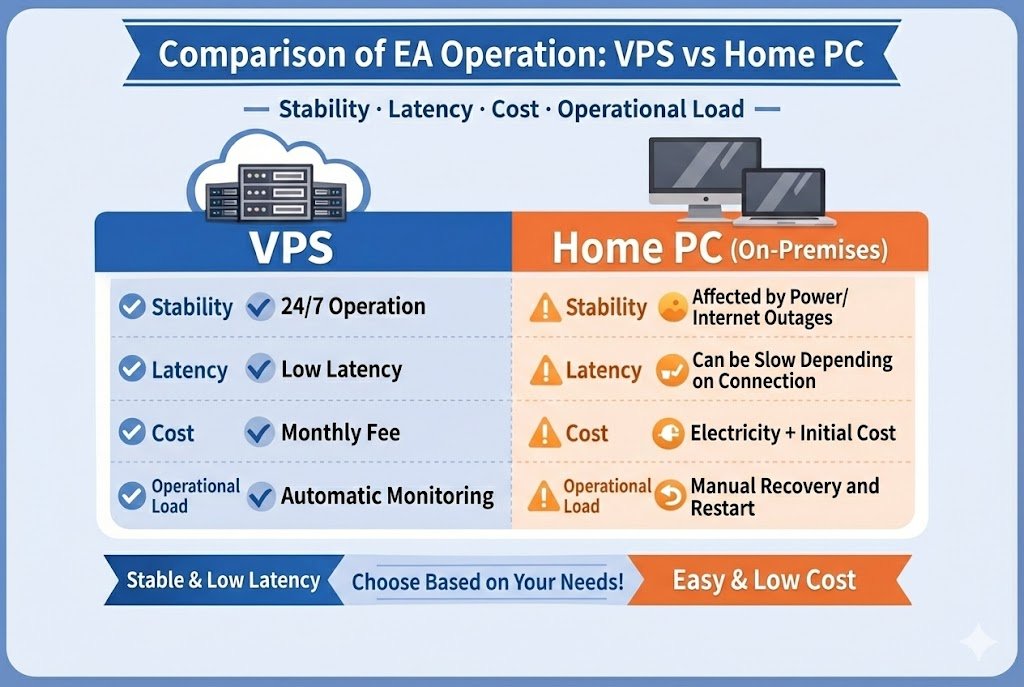
When you want your MT4/MT5 automated trading (EA) to run reliably, the big decision is usually this: use a VPS, or run it 24/7 on your home PC (on-prem).
This article breaks it down using four practical angles—total cost (including electricity), stability, latency, and operational workload—so you can choose what fits your style and goals.
Related: What Is a Forex EA (MT4/MT5)? An Automated Trading Guide
Who This Article Is For
- You want to compare the real total cost: VPS monthly fee vs your home PC electricity bill
- You’re unsure whether you should subscribe to a VPS
- You want to run MT4/MT5 EAs 24 hours (24/5–24/7) without interruptions
- You trade scalping/news strategies and care about latency
- You want fewer home-PC headaches (shutdowns, reboots, internet issues, updates)
Quick Answer: If You’re Not Sure, Use This Rule
- You want to “try EAs first” / not sure you’ll go all-in → Start on a home PC (easier to learn, lower upfront cost)
- Testing-focused / short sessions / one or two accounts → A home PC can work (but estimate downtime risk + electricity)
- You don’t want it stopping at night / you run multiple accounts & EAs → VPS is usually better
- Scalping / arbitrage → VPS is close to mandatory (distance often equals speed)
- Electricity cost rough guide: a light-load laptop (MT5 2–3 instances) can be a few dollars per month, while a small desktop/mini PC is often around $10+/month depending on power draw
The smoothest path: Start on a home PC to learn and confirm the setup → move to a VPS when “you want it running overnight,” “downtime hurts,” or “you add accounts/EAs.”
A VPS won’t increase your home electricity bill. Instead, you pay a monthly fee to buy “less downtime” and “lower latency.”
VPS vs Home PC: Quick Comparison + The Only Points That Really Matter
First, use the table to get the big picture. Then check the key points below. If you’re still unsure, the “Which one should you choose?” section makes it simple.
| What to Compare | VPS | Home PC (24/7 on-prem) |
|---|---|---|
| How easy to start | △ (sign up, initial setup, RDP connection) | ○ (easy if it’s your usual PC) |
| Stability / uptime | ◎ (data-center quality, redundancy) | △ (power, internet, OS updates) |
| Latency | ◎ (choose a location near broker servers) | △–× (depends on geography + home internet) |
| Upfront cost | ◎ (usually minimal) | △ (PC + UPS + SSD, etc.) |
| Monthly cost | △ (subscription) | ◎ (mostly electricity: from a few to tens of dollars/month) |
| Operational workload | ○–◎ (built for remote ops; easier to automate recovery) | △ (more manual work when something goes wrong) |
| Security | ○ (RDP controls, 2FA, IP allowlist) | △ (home usage + unsafe exposed RDP risks) |
| Scalability | ◎ (upgrade plans, clone, snapshots) | △ (hardware upgrades, heat, cabling) |
| Best for | Scalping/news, multiple accounts, always-on | Swing trading, testing, small/simple setups |
Key Points That Usually Decide It
① Ease of Starting: Home PC Is Best for “Trying It First”
Home PC wins for getting started—you can test on the same machine you already use. If you’re not sure you’ll commit to EAs long-term, it’s the easiest way to learn the basics.
VPS has an initial hurdle (sign-up, RDP access, first setup). It’s not hard, but it’s extra steps on day one.
If you run on a home PC, you must set it up so it won’t randomly sleep or reboot. See: Home PC settings for running MT5 EAs reliably (Japanese)
② Uptime: If Downtime Hurts, VPS Is Strong
VPS runs in a data-center environment, so it’s less affected by local power or consumer-grade internet issues. It’s also easier to configure auto-login + auto-launch MT4/MT5 after a reboot.
Home PC is more vulnerable to power outages, router issues, Windows updates, and ISP problems. If it stops overnight, you often lose opportunities.
Related: MT5 EA power-outage protection guide (Japanese)
③ Latency: Short-Term EAs Care About Distance
VPS lets you choose locations near broker servers (LDN/NY/SG, etc.), which can reduce latency. Scalping and news strategies often feel the difference.
Home PC depends on your physical location and your internet quality. With overseas brokers, latency can increase and fluctuate by time of day.
Related: VPS Location for MT4/MT5 EAs: Latency Targets, Equinix NY4/LD4/TY3, and How to Choose
④ Cost: Don’t Ignore “Electricity + Downtime Loss” on a Home PC
VPS is easy to budget: fixed monthly fee.
Home PC can look cheap if you only think about electricity, but the real hidden cost is downtime (missed trades, missed exits, missed risk management).
⑤ Operations & Security: VPS Is Easier to Harden; Home PCs Are Easier to “Get Lazy” With
VPS is built for remote operation, so it’s easier to automate monitoring and lock down access (2FA, IP allowlists, etc.).
Home PC often gets used by family members or has unsafe remote access settings. Exposed RDP is a common mistake.
Related: EA VPS Setup Guide: Prevent MT5 Lag, Freezes, and Unexpected Downtime
So Which One Should You Choose? (Simple)
- You’re not sure you’ll commit / you want to try first → Start on a home PC
- You want it running overnight / downtime is a problem / you travel a lot → Move to a VPS
- You run scalping/news EAs and latency matters → VPS from the start is safer
Recommended flow: learn and test on a home PC → move to VPS when you want “always-on,” you scale accounts/EAs, or latency/downtime becomes a real issue.
Electricity Cost & Total Cost (VPS vs Home PC)
How to think about it: A VPS fee typically includes power, cooling, and connectivity—so your home electricity bill won’t increase. With a home PC, you pay directly based on power draw (W) × time × your local rate.
Assumptions & Formula
- Formula: Electricity cost = (W ÷ 1000) × 24h × 30 days × rate
- Typical power draw (rough guide)
- Laptop (screen off, no external monitor, MT5 2–3 instances, light–mid load)… 15–25W
- Small desktop / low-power mini PC (conservative)… around 60W
- Heavier multi-instance use (e.g., MT5 × 10, mid load)… around 120W
- Example electricity rate: $0.20/kWh (replace with your local rate for accuracy).
- If you want accuracy, use a power meter and take a 24–48h average.
Scenario Examples: Monthly Electricity Cost (USD)
Assumed electricity rate: $0.20/kWh.
| Scenario | Continuous Power | Monthly kWh | Monthly (USD) |
|---|---|---|---|
| Laptop, light load (MT5 × 2–3) | 20W | 14.4 kWh | ~$2.90/month |
| Laptop, mid load (more indicators) | 40W | 28.8 kWh | ~$5.80/month |
| Small desktop / mini PC (conservative) | 60W | 43.2 kWh | ~$8.60/month |
| Multi-instance (e.g., MT5 × 10) | 120W | 86.4 kWh | ~$17.30/month |
Note: Real costs vary based on EA load, chart count, peripherals, and OS settings.
At $0.10/kWh, the numbers above are roughly half; at $0.30/kWh, they’re roughly 1.5×.
A VPS doesn’t raise your home power bill, but you’re paying for lower downtime risk and more stable connectivity/latency with a monthly fee.
Use Cases: Which One Fits You? (Important: “Stop Risk” Depends on Order Type)
Before choosing VPS vs home PC, there’s one key premise: your risk during downtime changes a lot depending on the EA’s order style—especially whether SL/TP is registered on the server.
First check: When your PC/VPS stops, what keeps working—and what stops?
- Still works even if your PC/VPS stops (server-side)
- Stop Loss (SL) / Take Profit (TP) attached to the position (= server-side SL/TP)
- Pending orders (limit/stop orders) placed on the server (execution happens server-side)
- Stops working (requires MT4/MT5 + EA running)
- EA entries/exits (market entries, time-based exits, reversals, etc.)
- Trailing stop (updates are client-side, so it stops updating)
- Partial exits, break-even moves, spike-avoidance logic, position monitoring rules
- Virtual SL (SL not placed on server) and “EA-must-run” risk control such as grid/martingale averaging
Bottom line: VPS matters more for EAs where “stopping” breaks risk control. For details: MT5 EA Safety: Order Types, Server-Side SL/TP, Pending Orders, and Latency Risk
When a VPS Makes More Sense (and why)
- Scalping / news trading / thin-liquidity sessions
With these EAs, even a few seconds or minutes of delay can change results. Home internet hiccups often lead to missed fills, bigger slippage, and missed exits. A VPS near the broker server usually gives you a more stable baseline.
Related: Scalping EAs: Why They Often Fail on Live Accounts (Costs, Slippage, Execution) - The EA manages risk assuming it’s always running
Examples: trailing, break-even moves, time exits, reversals, partial exits, spike-avoidance. If your terminal stops, that logic disappears. If server-side SL is thin or the EA relies on a “virtual SL,” downtime can cause bigger damage. In these cases, a VPS adds real value. - You run multiple brokers / accounts / EAs 24/5–24/7
The more you run, the more dangerous “one of them stopped” becomes—and the more annoying recovery gets. A VPS is easier to build for always-on operation, including monitoring and auto-recovery (auto-login, auto-start MT). - You want to reduce distance (latency) to an overseas broker
Home PCs usually get higher latency and bigger time-of-day variation as distance increases. A VPS lets you pick a location that keeps conditions more consistent. - Averaging/grid/martingale EAs (extra caution)
These often depend on the EA being active to add positions, close baskets, and adjust lots. If the terminal stops, the planned “exit” can disappear. If server-side SL is not solid, consider revisiting the risk design before anything else.
Related:
» Why Grid Forex EAs Blow Up
» Martingale EAs: Why They Blow Up
When a Home PC Can Still Work (with conditions)
- Swing trading, where speed matters less
If you hold trades for days or weeks, milliseconds matter less than “not having catastrophic downtime” and “losses staying bounded.” - Testing & development (backtests / short forward tests)
For learning and refining settings, a home PC is simple. Just note that frequent downtime can break logs and make evaluation harder—so it helps to set a clear operating schedule. - You can accept some downtime (e.g., only run during the day)
This assumes the EA is designed not to blow up when it stops—ideally with server-side SL/TP. If trailing or virtual SL is “the whole safety net,” 24/7 home-PC operation is a risky combo.
Fast decision: Which EA type do you have?
- Type A (safer): server-side SL/TP is placed at entry, worst loss stays bounded even if you stop → home PC is easier to start with
- Type B (caution): SL/TP exists, but performance relies heavily on running logic (trailing/time exits, etc.) → VPS value increases
- Type C (risky): virtual SL, grid/martingale assumes EA is always running; if it stops, exits disappear → VPS recommended (and reconsider risk design)
Choose Your Setup by “Stage”: Home PC → VPS Is the Least Painful Path
You don’t need to jump straight into a 24/7 production setup. A practical approach is:
Start on a home PC → move to VPS when you want it always on → scale resources when you add accounts/EAs.
This keeps early costs low while still letting you scale smoothly later.
Stage 1: Try EAs on a Home PC (Start here)
- Goal: learn installation, settings, and how to read logs (you’re not sure you’ll commit yet)
- Best for: “I’m not sure I’ll keep using EAs” / “I want to run one EA first”
- OS: Windows 10 / 11
- Suggested baseline: i5-class CPU or better / 8GB RAM / SSD (NVMe preferred)
- Typical use: MT4/MT5 × 1, EA × 1–2, minimal charts
- Minimum must-do settings:
- Disable sleep (the #1 reason “it stopped”)
- Windows updates can reboot your PC—so it’s fine to set operating hours at this stage
- Before using a real account, validate behavior on demo or tiny risk
Stage 2: Build a “Less Likely to Stop” Setup on VPS (The doorway to 24/7)
- Goal: run more reliably even overnight or while you’re away (move toward 24/5–24/7)
- Best for: “I don’t want manual recovery” / “downtime is starting to hurt”
- OS: Windows Server
- Suggested baseline: 2 vCPU / 4GB RAM / 80–100GB SSD
- Typical use: MT5 × 2–3, multiple light EAs, monitoring tools
Stage 3: Scale VPS for Serious Operation (Multiple accounts / multiple EAs)
- Goal: run multiple MT5 instances and scale without lagging or becoming fragile
- Best for: “I added accounts” / “I added EAs” / “I want monitoring + recovery as a system”
- OS: Windows Server
- Suggested baseline: 3–4 vCPU / 6–8GB RAM (adjust to your load)
- Typical use: always-on operation with multiple MT5 instances/accounts/EAs
- Note for scalping/short-term EAs: latency can change results, so picking a VPS near your broker (LDN/NY/SG, etc.) helps keep conditions consistent.
FAQ
- Q1. Is a VPS required to run EAs? (How to decide vs home PC)
- A. No, it’s not required. It depends on how painful downtime is for you.
- Home PC can work: testing, daytime only, swing-style EAs where latency matters less
- VPS is strongly recommended: overnight operation, frequent travel, multiple accounts/EAs, scalping/news EAs
Also, downtime risk depends on whether your EA uses server-side SL/TP or relies on client-side running logic (trailing, time exits, virtual SL). The more “must-run” your EA is, the more a VPS helps.
- Q2. What VPS specs should I start with? (MT4/MT5 baseline)
- A. A safe starting point is 2 vCPU / 4GB RAM / 80–100GB SSD. If you run MT5 × 2–3 with light EAs, this is usually fine. Then scale up as you add accounts, charts, and heavier logic.
- Q3. How do I estimate my home PC electricity cost for 24/7 EA operation?
- A. Use this formula: (W ÷ 1000) × 720h × rate. A light-load laptop running MT5 × 2–3 is often just a few dollars per month. Heavier loads and multiple instances can push it toward $10–$20+/month.
To avoid bad decisions, consider not only electricity but also downtime opportunity loss (missed trades/exits).
- Q4. Does lower latency really matter?
- A. For scalping/news EAs where entries and exits happen fast, latency can show up as real performance differences. For swing trading, it usually matters less than stability and controlled downside.
Summary: The Practical Way to Choose (VPS vs Home PC)
- If you value stability, low latency, and scalability, a VPS is the standard choice.
- If you’re testing first or running a small/simple setup, start on a home PC and move to VPS when you’re ready.
- Make the decision using a combined view: VPS monthly fee vs home electricity + downtime risk.
- The key is building “it comes back fast”: auto-login, auto-start, monitoring, plus a risk design that won’t break if the terminal stops (server-side SL/TP, etc.).
 MQL5
MQL5
 Myfxbook
 YouTube
 X
X
 GOGOJUN