

Introduction: When VPS Location Matters for an EA—and When It Doesn’t
Latency is the delay (round-trip response time) when your PC/VPS communicates with your broker’s trading server. It’s usually shown in milliseconds (ms). In general, the lower the number, the faster your requests (orders, modifications, updates) reach the server.
With scalping that relies on Market entries and fights for a few milliseconds, VPS location can directly impact results. The slower the connection, the more likely you are to see price slippage, missed fills, or worse entry/exit prices.
On the other hand, an EA that mainly uses stop/limit pending orders (and manages exits with SL/TP) can run with orders stored on the broker’s server. Because the server handles triggering and execution decisions, latency tends to matter less—so you usually don’t need to obsess over location as much.
Trading “speed” is mainly affected by two things:
- Your PC/VPS where the EA runs
- Your broker’s trading server
The closer they are on the network (the lower the latency), the better. Same building or same city is typically fast, while cross-continent connections are usually slower.
That said, the closer you try to get to a broker’s server, the more likely the monthly VPS cost increases. Choosing an EA that is less sensitive to latency (for example, one that mostly uses pending orders) can help you avoid paying for an overly expensive VPS and keep fixed costs under control.
In the end, the smart approach is to balance how your EA places orders (Market-heavy vs. pending-order-heavy) with your VPS budget, and make a practical decision.
What Is Equinix? What Do NY4/LD4/TY3 Mean?
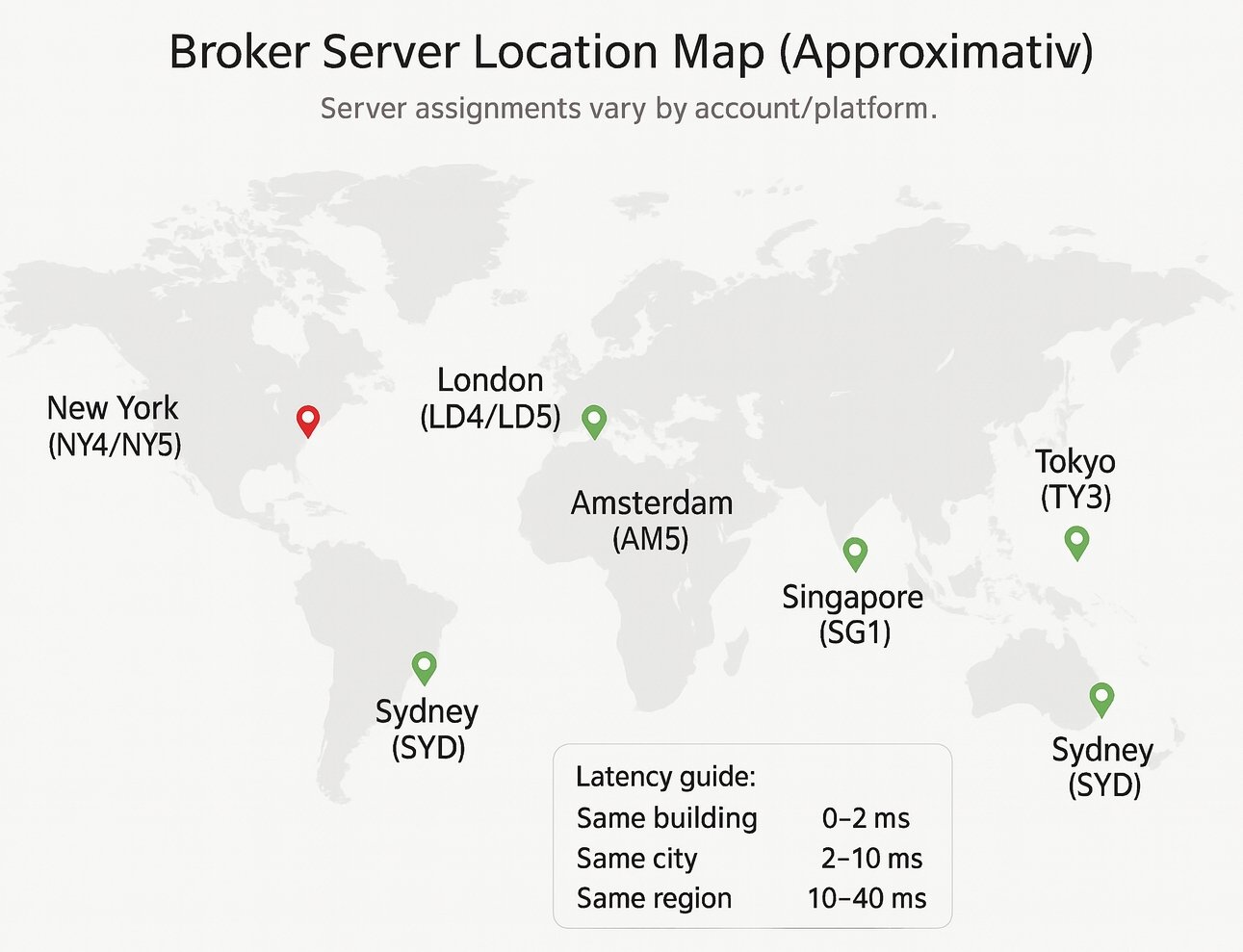
Equinix is a global data center operator with large facilities worldwide. Many financial firms—brokers, liquidity providers (LPs), and other market infrastructure—place servers in the same facility and connect with very short, direct network links. That’s why Equinix locations often show up in discussions about low-latency trading.
NY4/NY5/LD4/LD5/TY3 are names for specific Equinix sites (buildings or campuses):
- NY = New York area, LD = London area, TY = Tokyo area
- The number identifies the specific site (similar to a building/site code)
- Example: “a VPS in NY4” means it’s located inside (or very close to) the Equinix NY4 site
If your broker’s trading server and your VPS are in the same site (for example, NY4), you may see latency as low as 0–2 ms. Even within the same city (NY4 vs. NY5, or another nearby facility), it often stays around 2–10 ms in many cases.
Latency Targets: Practical Ranges by ms
There’s no single “perfect” number—what’s “fast enough” depends on the EA. As a rough reference, these ranges are a useful starting point:
- 0–2 ms: Same site. Often ideal for very short-term systems.
- 2–7 ms: Same city. Strong for many automated strategies.
- 7–15 ms: Nearby city. Usually fine for many EAs.
- 15–40 ms: Same region/continent. Often acceptable for mid-to-long timeframe trading.
- 40 ms+: Cross-continent. Can be a disadvantage for ultra-short-term scalping (depending on the strategy).
Don’t Judge by ms Alone: Packet Loss and Jitter Matter
Even if latency is low, high packet loss (dropped data) or high jitter (unstable/variable delay) can cause problems—disconnects, failed order modifications, and other reliability issues. The real goal is low latency + stable connection.
Why Pending-Order EAs Tend to Be Less Sensitive to Location
Reason: Pending Orders and SL/TP Are Handled on the Server
- Pending orders (stop/limit) and SL/TP are generally stored on the broker’s server.
- The server automatically triggers entries/exits when price conditions are met, so you don’t need to “send a signal” at the exact moment of execution.
- As a result, compared with frequent Market orders, latency often has a smaller impact.
Related: MT5 EA Order Types : Server-Side SL/TP, Pending Orders, and Latency Risk
When Location Still Matters (It’s Not Zero)
- When you place the order (sending pending orders, setting SL/TP)
- When you modify orders (lot size changes, break-even moves, resetting trailing conditions, etc.)
- When your logic frequently repositions orders (many updates, tight follow-ups)
Bottom line: Pending-order-heavy EAs often reduce location dependence, but the more often an EA updates orders, the more location can matter. Match your VPS spending to the strategy’s real needs.
How to Choose Your VPS Location: A Simple 3-Step Method
Step 1: Check Your Trading Server (Find the Region Hint)
In MT4/MT5, click near the connection/latency (ms) display in the bottom-right. You’ll see a server list. Many servers include hints like NY/LD/TY/SG/FR/AMS in the name—use that as your starting point.
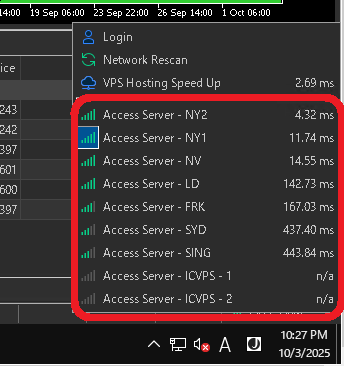
Step 2: Prioritize Same Site → Same City → Same Region
- If possible, choose a VPS that clearly offers the same Equinix site (e.g., NY4/LD4/TY3).
- If that’s not available, pick the same city (New York, London, Tokyo, Singapore, etc.).
- If you still can’t decide, choose a stable VPS in the same region/continent.
Step 3: Decide by Real Measurement (Most Important)
Once you have a VPS candidate, run MT4/MT5 on it and measure the response time (ms). Choose the server that stays low and stable. Even in the same city, routing and congestion can create noticeable differences—so real testing beats specs and marketing.
Extra Checks (Not Just ms)
- Network quality: low packet loss, low jitter
- Stability: reboot frequency, outage history, support quality
- Resources: enough CPU/RAM for your number of EAs (overloaded VPS can also slow execution)
By EA Type: When Location Is Critical vs. “Good Enough”
Location-Critical (Aim for the Same Site or Same City)
- Market-order-heavy scalping that wins by shaving a few milliseconds
- Strategies where timing directly affects performance (e.g., instant entry after news)
- EAs with frequent order modifications (repositioning and tracking very often)
Scalping EAs are often highly sensitive not only to latency, but also to trading costs—spreads, commissions, and execution quality. Broker choice, account type, and VPS network stability can change results significantly even with the same logic.
So from a reproducibility standpoint (getting similar results under similar conditions), scalping-style EAs tend to be harder to keep consistent.
Related: Scalping EAs: Why They Often Fail on Live Accounts (Costs, Slippage, Execution)
Less Sensitive (Same City to Same Region Can Be Practical)
- Pending-order-heavy systems (breakout stops, pullback limits, SL/TP managed on the server)
- Mid-to-long timeframe systems (not built around 1–5 minute ultra-short-term execution)
Because pending orders and SL/TP can be stored on the broker’s server, these EAs are often less affected by VPS location than Market-order-heavy scalpers. That means you can often avoid the most expensive “ultra-close” VPS plans and still run the strategy effectively.
Pending-order-based EAs often work especially well with breakout logic (using stop orders to catch a move), but pending orders are also widely used for pullbacks—waiting with limit orders for better entry prices.
Related: Do Breakout EAs Work? Backtest Results + Real Risks Explained
Summary: If You’re Not Sure, Use “Server Check → Close VPS → Measure”
If you’re unsure how to choose a VPS, start by checking your MT4/MT5 server name for location hints (NY/LD/TY/SG/FR/AMS, etc.). Then choose a VPS location using this priority: same site (NY4/LD4/TY3) > same city > same region.
But remember: not every EA needs the closest possible VPS. Market-order-heavy scalping and strategies that modify orders frequently can be sensitive to latency, while EAs that rely on server-stored pending orders and SL/TP are often less location-dependent (though frequent updates can still matter).
Finally, trust real measurement over marketing. Run MT4/MT5 on your VPS, compare multiple server options, and pick the one with low and stable response time (ms). Consider not only location, but also network stability and VPS reliability. The most practical choice is the one that fits your EA’s order style and your monthly VPS budget.
Related:
» Cheapest VPS for MT4/MT5 EAs: Windows Plans, Latency, and Total Monthly Cost
» EA VPS Setup Guide: Prevent MT5 Lag, Freezes, and Unexpected Downtime
FAQ
- Q. What are Equinix and NY4/LD4/TY3?
- A. Equinix is a major data center operator. NY4/LD4/TY3 are names for specific Equinix sites. If your broker and VPS are in the same site, you may see ultra-low latency such as 0–2 ms.
- Q. What latency is “good enough”?
- A. For Market-order-heavy short-term trading, aiming for the same city (2–7 ms) is a common target, and the same site (0–2 ms) can be ideal for the most timing-sensitive setups. For mid-to-long timeframe strategies, 15–40 ms can still be practical in many cases.
- Q. Why are pending-order EAs less sensitive to location?
- A. Because pending orders and SL/TP are stored on the broker’s server, the server triggers and executes them when price conditions are met. That reduces dependence on instant communication at the exact execution moment.
- Q. Why is a VPS often better than a home PC?
- A. A VPS can be placed closer to the broker’s server, reducing network distance and latency. For many strategies, VPS-to-broker proximity matters more than the speed of a home internet connection.
- Q. Why can latency be slow even in the same city?
- A. Network routing, congestion, and the VPS provider’s network quality can cause differences. Try another plan/provider, test another nearby site, and also check packet loss and jitter.
- Q. Will stop loss still work if my PC/VPS goes down?
- A. If SL/TP is already registered on the broker’s server, it can still trigger even if your PC/VPS is offline. However, any orders or modifications that were not sent to the server will not be applied, so make important updates early.
 MQL5
MQL5
 Myfxbook
 YouTube
 X
X
 GOGOJUN