

Introduction: Power Outages Are a Real-World Risk for EA Trading
When you run an automated strategy (an EA), it’s normal to wonder, “What happens if the power goes out?” If you trade on a home PC, you can’t fully eliminate risks like power outages, brief power flickers, or internet dropouts.
That said, you can reduce the damage a lot. The key is (1) how your EA places orders and manages exits, and (2) how stable your setup is (VPS/UPS/monitoring). In this article, we’ll break down what can go wrong during an outage and lay out practical steps you can take.
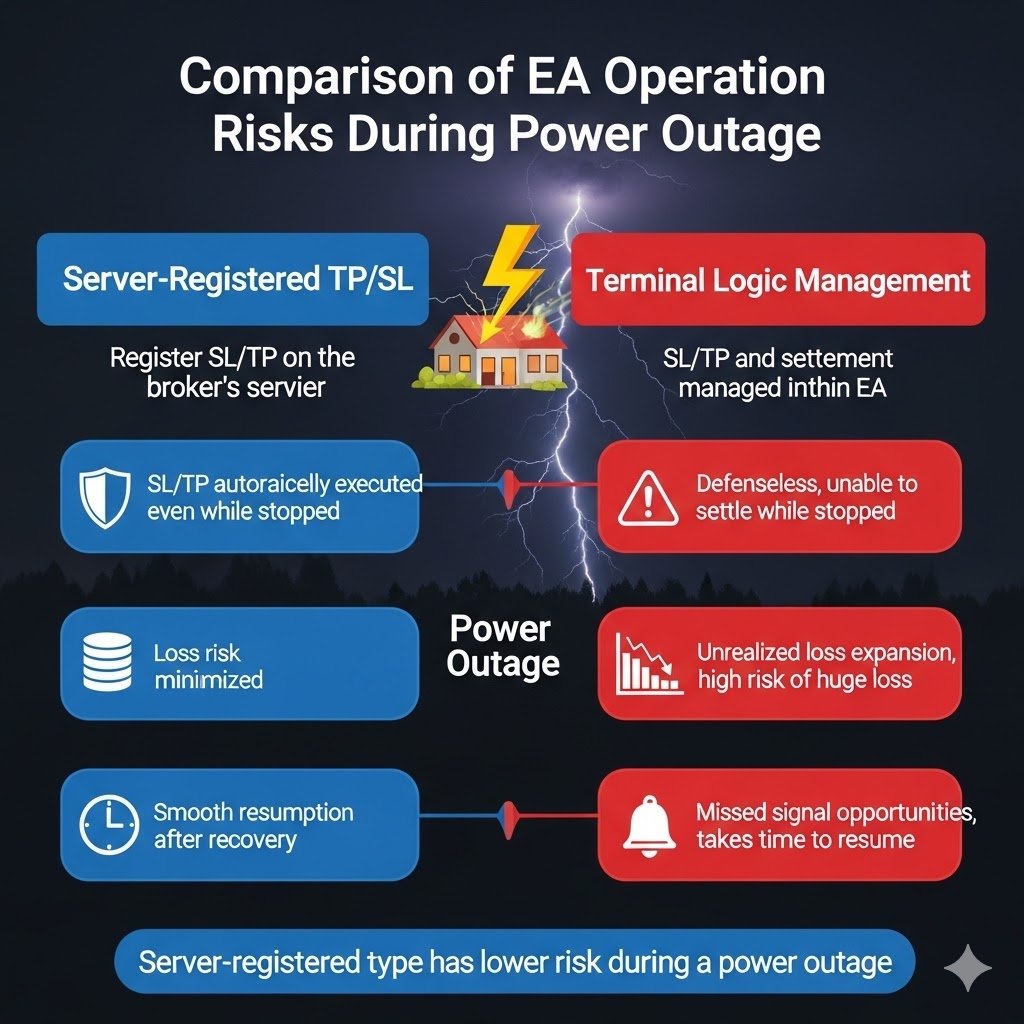
Bottom Line: The Biggest Difference Is Whether TP/SL Is Registered on the Broker’s Server
- An EA that sets TP/SL on the broker’s server when the order is placed is usually safer. Even if your terminal stops, your TP/SL can still work server-side.
- An EA that manages exits only inside the EA/terminal can become defenseless while it’s offline (no control until you recover).
- Latency-sensitive scalping is especially fragile. Even a short stop or delay can directly hit performance, so you need both good EA design and solid infrastructure.
How Far Should You Go? (Simple Step-by-Step Levels)
- Minimum: Choose an EA that places trades with TP/SL set at order time (server-registered). This keeps basic protection even if your platform goes offline.
- Recommended: Use a VPS to reduce outage risk. If VPS cost feels high at first, start by hardening your home PC setup, then move to a VPS step by step.
- More robust: VPS + monitoring + auto-recovery (restart/re-login) to shorten downtime.
- If you keep using a home PC: A laptop may survive on its internal battery, but desktops typically shut down immediately, so consider adding a UPS.
What Stops vs What Keeps Working During an Outage (MT5 Basics)
If your PC or VPS loses power, your MT5 terminal and your EA stop running. However, orders already registered on the broker’s server still exist and can be executed. Many traders mix these up, either overreacting or getting too relaxed—so it helps to separate them clearly.
| ⚠ Stops during the outage (terminal-dependent) | ✅ Keeps working (broker/server-side) |
|---|---|
| New entries/exits by the EA, position management, chart monitoring | Orders already sent to the broker (market orders, limit orders, stop orders, pending orders) |
| Trailing Stop and other features that update from the terminal | TP/SL (Take Profit / Stop Loss) that is registered on the broker’s server |
| “Virtual” SL/TP managed only inside the EA (EA-side calculations) | Margin rules and forced liquidation (stop-out) based on the broker’s system |
The key questions are: “Is TP/SL registered on the broker’s server when the order is placed?” and “Does the EA rely on terminal-only logic to exit?”
Related article: MT5 EA Order Types: Reduce Delay and Downtime Risk with Server-Registered TP/SL and Pending Orders
Main Risks During a Power Outage (What Actually Hurts)
1) Downtime: Your EA Can’t Do Its Job
During an outage, your EA stops. It can’t open new trades, manage existing positions, or update trailing logic. That creates a “dead zone” where your strategy is not behaving as designed.
2) Sudden Market Moves While You’re Holding Positions
If you have open positions and your setup goes offline, the market can move fast while you have no active control. Losses can grow quickly. Risk increases in cases like:
- No Stop Loss, or SL is managed only on the terminal side
- The EA manages multiple positions together and needs the EA to decide exits
- High-volatility periods (major news releases) overlap with downtime
3) Missed Signals and “Wrong Timing” After Recovery
While your system is down, you may miss entry/exit signals. That can reduce the strategy’s expectancy. Short-term, high-frequency approaches tend to suffer more, and after recovery the EA may resume in a different market phase than intended.
How Order/Exit Design Changes the Risk: Strong vs Weak EAs in Outages
Server-Registered Type: TP/SL Is Set on the Broker Side
- Even if your terminal stops, server-side TP/SL can still trigger
- Helps avoid worst-case scenarios and provides a stronger foundation for longer-term operation
Terminal-Managed Type: Exits Are Managed Only Inside the EA
- During downtime, the EA can’t close trades, so you may be exposed
- The longer it takes to recover, the higher the risk of losses expanding
Scalping: Market Orders + High Latency Sensitivity
- Even a few seconds of downtime or delay can hurt fill quality and results
- Because it’s fragile, it needs both server-registered TP/SL and a very stable infrastructure
- See also: Scalping EAs: Why They Often Fail on Live Accounts (Costs, Slippage, Execution)
Checkpoint: Always confirm whether the EA sets TP/SL at order time, and whether exits depend on terminal-only logic.
Practical Countermeasures: Choose VPS / UPS / Monitoring in the Right Order
Step 1: Use Server-Registered TP/SL (Best “Low Cost” Protection)
- Set TP/SL when placing the order so it is registered on the broker’s server
- Don’t overtrust terminal-based protection like Trailing Stop—assume your terminal can stop
- Prioritize designs that keep “minimum defense” even during outages
Step 2: Use a VPS (The Most Reliable Base Setup)
- Data centers typically have more stable power and networks than home setups
- Choosing a VPS region near your broker can also reduce latency
- Less maintenance and fewer surprise stops compared with home PCs
Step 3: If You Trade on a Home PC, Consider a UPS (Uninterruptible Power Supply)
A UPS (Uninterruptible Power Supply) is an external battery unit that keeps your PC powered during a power outage or brief power flicker. You plug your PC into the UPS, then the UPS into the wall. This prevents sudden shutdowns, can keep you running for a short time, and—most importantly—gives you time for a safe shutdown if the outage lasts longer.
When a UPS Helps Most
- Desktop trading PCs: Power loss usually means instant shutdown, so MT5/EA stops immediately
- Areas with frequent power flickers: Even a short flicker can knock your PC offline
- When you’re away from your desk: Combined with monitoring, you can detect “down” events quickly
Laptop vs Desktop (Built-In Battery)
- Laptops may keep running on the built-in battery during outages
- But if your router/ONU (modem/terminal unit) loses power, your internet can still go down, which can stop your trading setup
What a UPS Can Do for EA Trading
- Buffers brief outages to reduce sudden downtime
- Allows a safe shutdown to reduce file corruption or update failures
- “Controlled stop” is usually safer than an unexpected crash (fewer issues on restart)
UPS Limits (Common Misunderstanding)
- A UPS is not meant to solve long outages. It usually provides minutes to tens of minutes of backup time
- If your network gear (router/ONU) loses power, you can still lose connectivity
- For serious stability, a VPS is still the most realistic long-term solution
Related article: Run MT5 EAs 24/7 on a Home PC: Cooling, Sleep Settings, Internet Stability & Update Safety
Step 4: Monitoring + Auto-Recovery (Minimize Downtime)
- Monitor MT5/EA uptime (health checks) and latency to detect problems early
- Prepare auto-recovery steps: restart, re-login, re-open charts, re-attach the EA
- Use notifications (email/app) so you know what’s happening even when you’re away
Related article: MT5 EA VPS Monitoring: UptimeRobot Alerts + How to Catch “MT5 Stopped but VPS Is Up”
Summary: A Simple Checklist for Power-Outage Safety
- Most important: Does the EA set TP/SL at order time (server-registered protection)?
- Avoid: Exit logic that only works inside the EA (you may be exposed during downtime)
- Best foundation: A VPS is usually more stable than a home PC
- Home PC backup: If VPS cost is a concern, harden your home setup first and move gradually—but remember desktops stop instantly, so consider a UPS
You can’t prevent every outage. But you can reduce real risk by combining a design that still protects you when the terminal stops with an environment that stops less often.
FAQ
- Q. Will my Stop Loss still work during a power outage?
- A. If your order has TP/SL registered on the broker’s server, it can still work even if your terminal is offline. If SL is managed only on the terminal side, it may not trigger while the EA is down.
- Q. If I use a UPS, can my EA run forever during a power outage?
- A. Not really. A UPS is designed to provide a short backup window—usually minutes to tens of minutes. Its main value is keeping you online through brief flickers or giving you time for a safe shutdown.
- Q. If I trade on a laptop, do I still need a UPS?
- A. A laptop may keep running on its internal battery, but your internet equipment (router/ONU) may still lose power and disconnect you. If stability is your priority, a VPS is usually the strongest option.
- Q. Are scalping EAs more vulnerable to outages?
- A. Yes. Scalping often depends on market orders and low latency, so even short downtime or delays can hurt results. Server-registered TP/SL plus a stable VPS and monitoring becomes much more important.
 MQL5
MQL5
 Myfxbook
 YouTube
 X
X
 GOGOJUN