

High leverage is dangerous, right?

People often say “high leverage = dangerous,” but the real danger isn’t the leverage ratio itself—it’s using too large a position size (lots).
If your lot size and stop-loss distance are the same, changing leverage doesn’t change your profit/loss per trade. What changes is your required margin (free margin / breathing room).
So how should I choose leverage?
Start by setting risk per trade (e.g., 0.5%–1%) and a maximum lot size.
If you can trade within those rules, 1:25–1:50 is often enough.
On the other hand, an EA that insists on “high leverage required” is often built around adding positions—such as grid, averaging down, or martingale—so be careful.
Also, EAs can sometimes “run away” due to settings mistakes or bugs, so choosing lower leverage as a “safety brake” can be a smart approach.

Leverage in Forex: The Real Risk Isn’t the Ratio—It’s Position Sizing
In forex, people often say “higher leverage is more dangerous,” but that’s not the key point.
What actually leads to blow-ups is oversizing your position (too many lots).
Leverage mainly changes required margin (money tied up) and free margin (available buffer).
But your profit and loss (P&L) is driven mostly by lot size and the distance to your stop-loss.
So before talking about leverage, learn position sizing first—it’s the fastest way to trade more safely.
What you’ll learn in this article
- The relationship between leverage and margin in forex (with a simple formula)
- How to judge an EA’s “leverage dependence”
- How to choose leverage (simple rules when you’re unsure)
- When high leverage turns into real risk: weekend gaps / negative balance
- How to build a safer position-sizing plan
For EAs in particular, a design that pushes “high leverage required” can be a warning sign—often linked to grid/martingale-style averaging.
What Is Leverage in Forex? How It Works—and Common Misunderstandings
Leverage in forex lets you control a larger notional position by using your account funds (margin) as collateral.
A common misunderstanding is: “Higher leverage automatically means bigger profits and losses.”
In reality, P&L is determined mainly by your lot size and stop-loss size. The leverage ratio does not directly change your P&L.
Leverage changes “required margin” and “free margin”
- Higher leverage → lower required margin → more free margin (more buffer)
- Lower leverage → higher required margin → less free margin (less buffer)
More free margin is convenient—but the bigger the buffer looks, the easier it is to increase lot size without noticing. That’s the trap.
Required Margin: Simple Formula + Example (EURUSD)
A rough way to estimate required margin is:
Required margin ≈ Notional value ÷ Leverage
- Required margin ≈ Notional value ÷ Leverage
- Notional value = Lots × Contract size (e.g., 1 lot = 100,000) × Price
Note: Details vary by broker, account currency, and instrument (forex/gold/indices). But this simple shape helps you understand the idea fast.
Example: Hold 0.10 lots of EURUSD @ 1.1000
Notional value: 0.10 lots × 100,000 × price 1.1000 = 11,000 USD
| Leverage | Lots | Notional value (approx.) | Required margin (approx.) | Calculation |
|---|---|---|---|---|
| 1:1 | 0.10 lots | 11,000 USD | 11,000 USD | 11,000 ÷ 1 |
| 1:25 | 0.10 lots | 11,000 USD | 440 USD | 11,000 ÷ 25 |
| 1:500 | 0.10 lots | 11,000 USD | 22 USD | 11,000 ÷ 500 |
The key point: with the same lot size, your P&L per pip is the same.
Higher leverage only changes required margin (your buffer). If lot size stays the same, your P&L does not change.
An Extreme Example: Why a Tiny Account + High Leverage Can Be Dangerous
With 500:1 leverage, the math says you can hold 0.10 lots with about $22 of margin.
If your account balance is only $30, you have roughly $8 of free margin left.
If 0.10 lots equals roughly $1 per pip on EURUSD (it can vary by account currency and broker), then a move of just 8 pips against you can wipe out your buffer and push you close to a stop-out (the exact level depends on the broker).
So the real issue isn’t “high leverage is dangerous.”
It’s: your lot size is too big for your account (your buffer is too thin).
EAs and Leverage: You Can Spot Safety by Checking “Leverage Dependence”
One useful way to judge an EA’s safety is to run the same backtest with different leverage settings.
In general, an EA with a real stop-loss and disciplined position sizing tends to be less dependent on leverage.
But averaging down / grid / martingale systems often assume high leverage—and the difference shows up clearly in results and trade history.
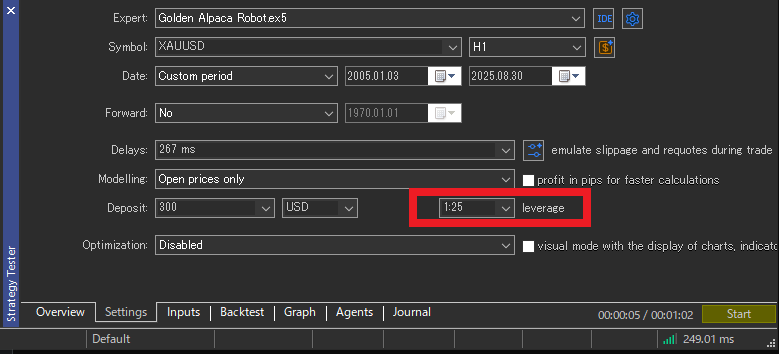
How to test it: Change “Test Leverage” in the MT5 Strategy Tester
In MT5’s Strategy Tester, you can set the test leverage (for example, 1:25).
Changing that single setting changes required margin (your buffer), so an EA that depends on leverage is more likely to break down.
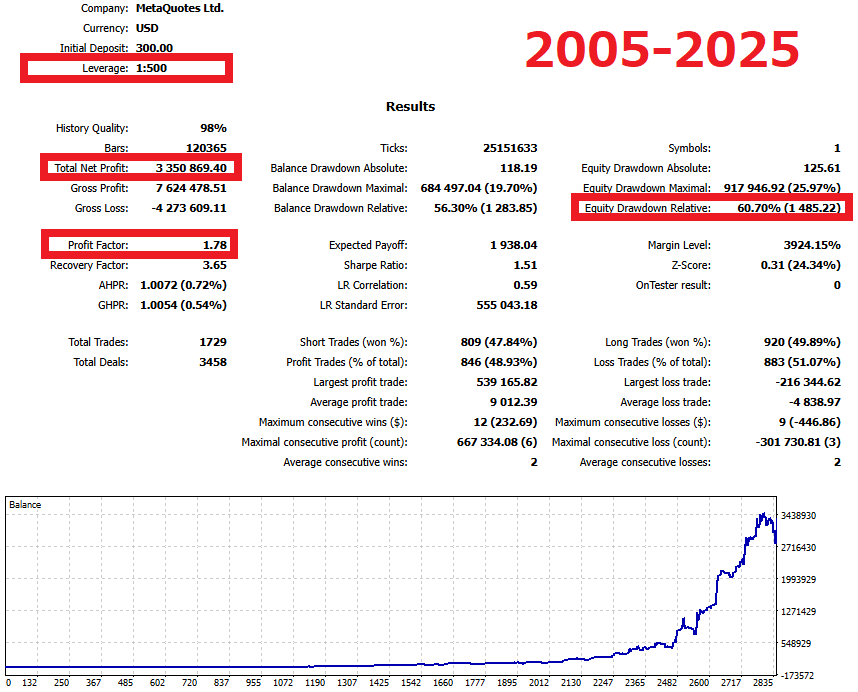
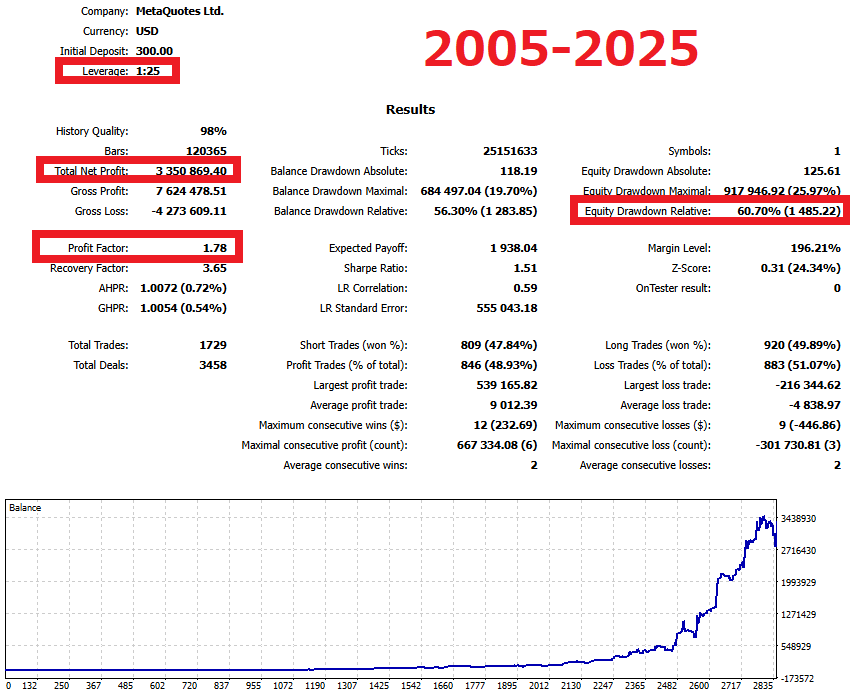
Example: A disciplined EA looks similar at 1:25 and 1:500
As an example, when I backtested Gold Alpaca Robot under the same conditions (initial deposit $300, variable lot sizing based on balance),
the results matched when I ran it at 1:500 and 1:25.
In other words, leverage did not change the outcome.
- Total Net Profit: $3,350,869.40
- Profit Factor: 1.78
- Equity drawdown (relative): 60.70%
When results stay stable even after changing leverage, the EA likely handles position sizing, stop-loss logic, and risk rules internally.
That’s often a healthy sign: it’s not “living off leverage.”
The opposite case: Grid / averaging down / martingale often assumes high leverage
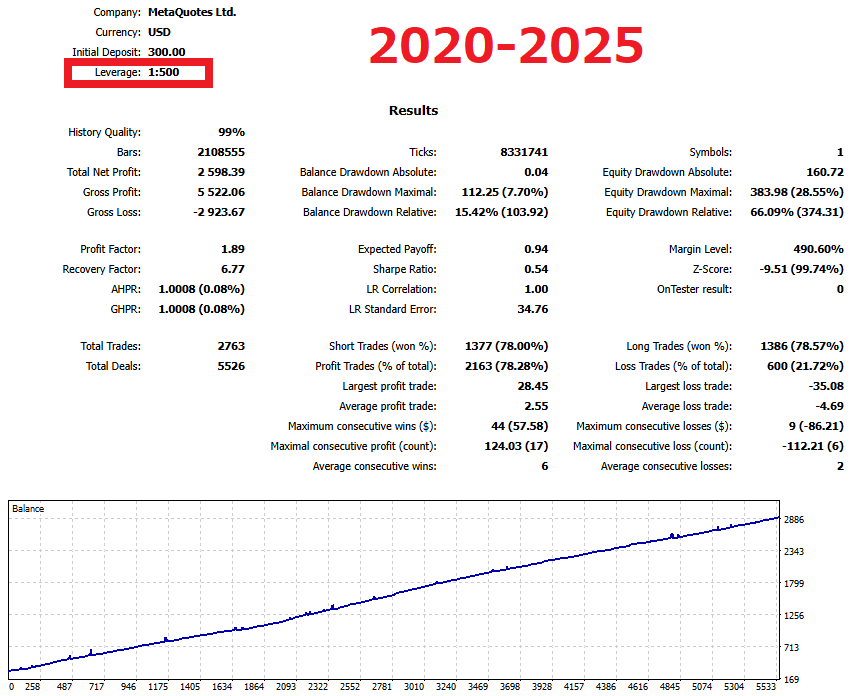
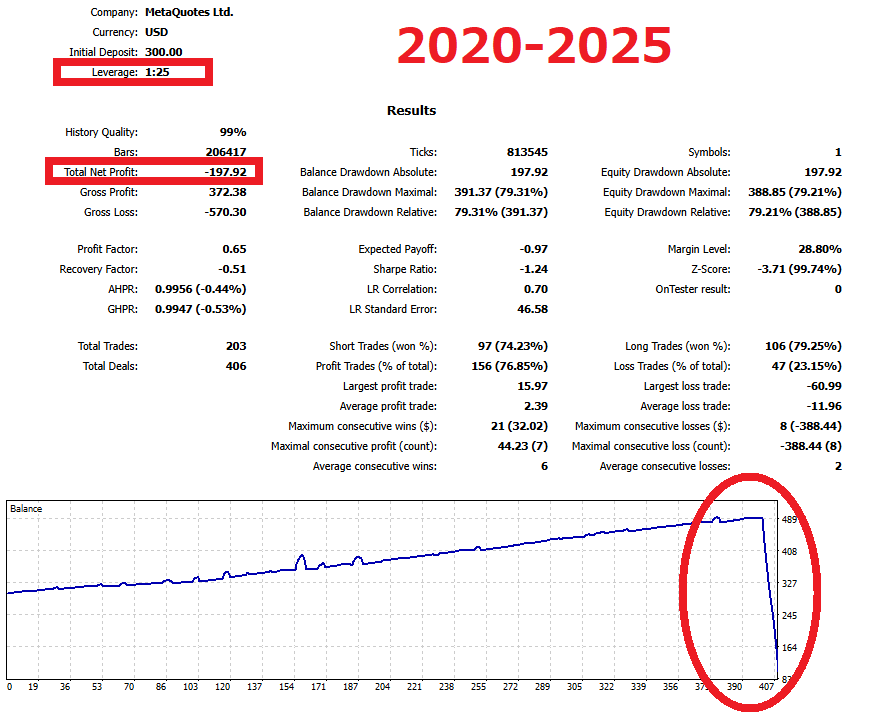
Next is a sample grid EA I built.
The key point: the same EA can look smooth and profitable at 1:500, but at 1:25 it can fail because it can’t keep adding positions.
Grid/averaging systems often add positions while sitting on floating losses, waiting for a reversal.
That usually requires a lot of free margin. With low leverage, you can hit a wall: “can’t add → bad positions stay open → forced liquidation.”
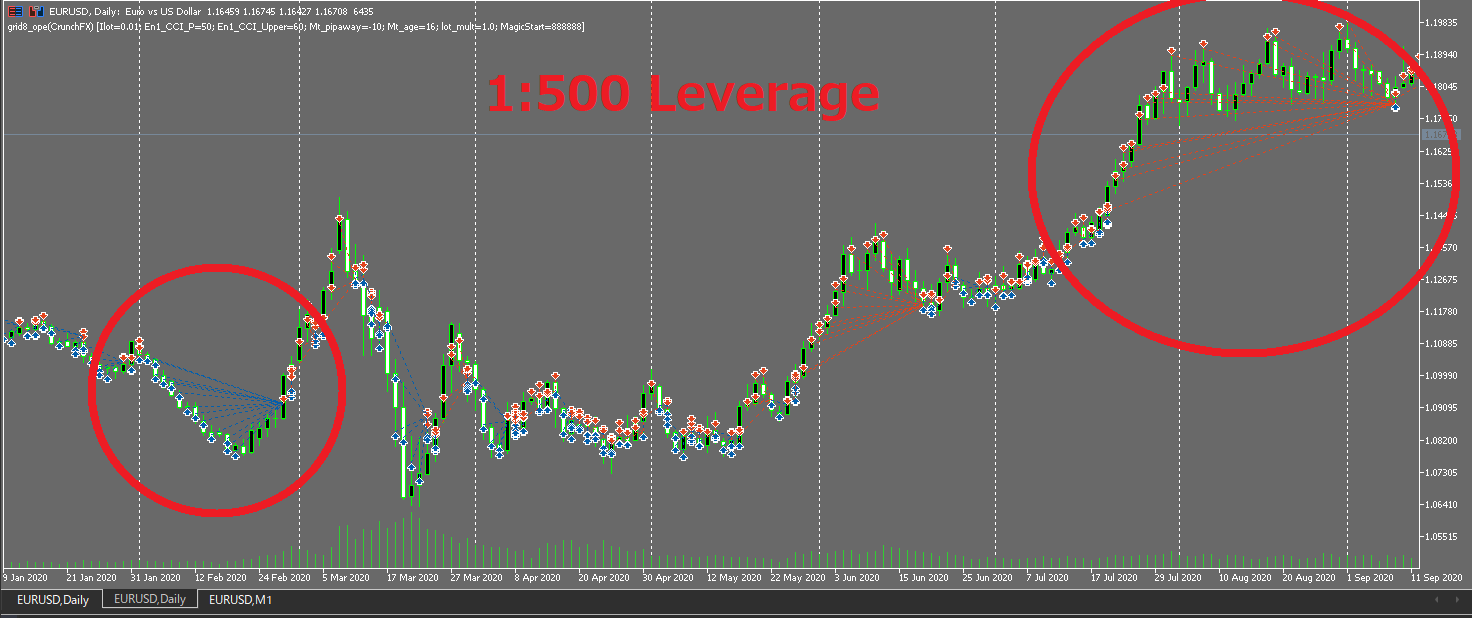
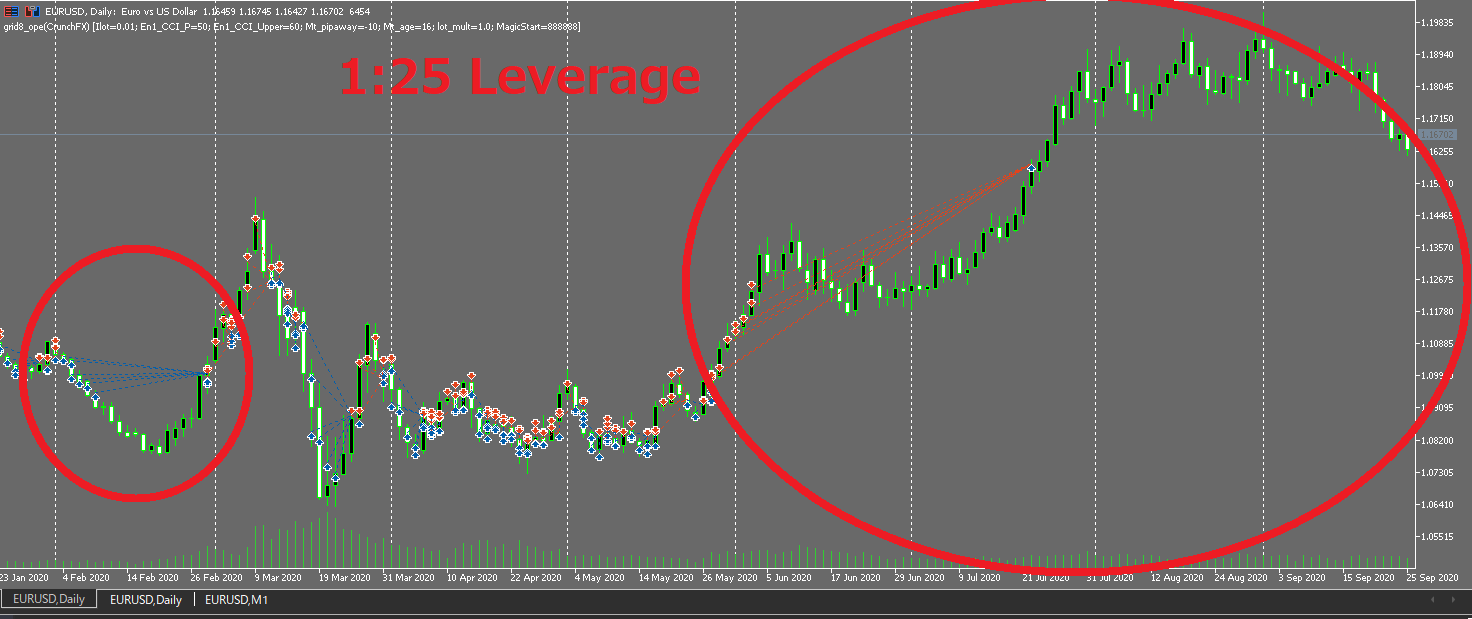
Trade history (plot) shows the problem: “Can’t add positions” = game over
In the trade history plot, you can see that at 1:500 it keeps adding orders, but at 1:25 the averaging stops.
When a strong trend continues, losing positions can get stuck and the system can’t “escape.”
That’s why these strategies claim “high leverage required.”
Their core logic depends on adding positions (which depends on free margin).
So: if it needs high leverage to function, that often goes hand-in-hand with blow-up risk.
Questions to ask the vendor before you buy (how to spot leverage dependence)
- What’s the minimum required leverage? (The higher it is, the more cautious you should be.)
- Is there always a stop-loss (SL)? (Server-side SL or “virtual” SL? What’s the worst-case loss during gaps?)
- Max open trades, max lots, and max floating loss (Is it “infinite averaging”?)
- Weekend rules? (Close positions before the weekend? Reduce risk around events?)
- Assumptions about stop-out level and negative balance protection (Does it only work if protections exist?)
To sum up: a safer EA often works even on low leverage (low leverage dependence).
But grid/averaging/martingale systems often “need” high leverage to keep adding positions.
So when an EA pushes “high leverage required,” treat it as a major risk signal.
How to Choose Leverage: Decide Based on Whether You Can Control Position Size
If you’re unsure about leverage, remember this:
If you can keep risk per trade small and fixed, leverage isn’t the main issue.
Leverage doesn’t create P&L—lot size and stop-loss size do.
Basics: Low leverage (like 1:25) can still work fine
If your strategy keeps risk per trade small and always uses a stop-loss, 1:25 can be enough.
In fact, safer EAs often remain stable even when you change leverage.
Don’t choose a broker just because they advertise “high leverage”
Some brokers advertise extreme leverage like 1:2000, but don’t pick a broker based only on that.
What matters more is execution quality, spread/commissions, slippage, stop-out rules, and policy details (negative balance, etc.).
If you can choose leverage, going lower (1:25–1:50) can be a smart “safety brake”
If your account lets you choose leverage, setting it to 1:25 or 1:50 can make sense.
With EAs, unexpected things can happen:
- Lot sizing “runs away” due to a bug or settings mistake
- A broker rule change affects lot calculations
- VPS or connection issues trigger repeated orders
Lower leverage can sometimes cap position size because margin requirements rise, which may reduce damage (it’s not perfect, but it can act as a “brake”).
(Not recommended) If you still choose grid/martingale, higher leverage often makes it “easier to run”
I do not recommend grid/averaging down/martingale.
They tend to add exposure while holding floating losses, and a strong one-way trend can cause a fast collapse.
That said, if you insist on using them, higher leverage can make it easier to keep adding positions, so it may look like it “works” in the short run.
But that doesn’t mean it’s safer—often it just makes the danger harder to see.
Related articles:
Don’t Get Fooled by Grid (Averaging) EAs — Why Accounts Blow Up and How to Spot the Risk (Tested with my own EA)
Don’t Get Fooled by Martingale EAs — Blow-up Risk and How to Spot It (With Tests)
Quick rules when you’re unsure
- Stop-loss + fixed risk per trade (0.5%–1%) + max lot cap → 1:25 is often enough
- You worry about mistakes or runaway lots → choose 1:25–1:50 as a “safety brake”
- Grid/martingale (not recommended) → higher leverage may run “more easily,” but blow-up risk also grows
“High Leverage Is Dangerous”—Myth vs Reality (Where the Real Risk Is)
High leverage isn’t automatically dangerous.
The problem is that high leverage makes it easier to create oversized positions.
Common myth vs reality
- Myth: Raising leverage is dangerous by itself
- Reality: The danger comes from raising lot size (position size)
Patterns where high leverage “looks dangerous”
-
- Increasing lot size (bigger loss per trade)
- Holding more positions at once (total risk grows)
- Averaging down / adding positions (floating loss grows)
- Widening or removing stop-loss (worst-case loss becomes unclear)
Same Lot Size, Same Outcome
The conclusion is simple:
Even if leverage is different, the profit/loss per trade is the same if your lot size and stop-loss distance are the same.
Only required margin and free margin change.
Example: Fix the conditions and confirm P&L stays the same
-
-
- Account balance: $5,000
- Risk per trade: 1% = $50
- Stop-loss size: 50 pips
- Pip value (assume 0.10 lots): $1/pip
- Lot size: 0.10 lots (50 pips × $1 = $50 risk)
-
P&L is determined by “lot size × stop-loss distance”
-
-
- Loss = pip value × stop-loss distance = $1 × 50 pips = $50
-
Whether leverage is 1:25 or 1:500, if lot size and stop-loss distance are the same, the loss is still fixed at $50.
Only the margin “buffer” changes
-
-
- High leverage: lower required margin → more free margin
- Low leverage: higher required margin → less free margin
-
This buffer difference affects the temptation to increase lots and how averaging-type EAs behave.
Safety rule: Keep a fixed “max lot” even if free margin increases
-
-
- Set a maximum lot size (e.g., never above 0.10 lots)
- Set a maximum number of open positions
- Fix risk per trade (0.5%–1%)
- Add rules for weekends and major news (auto-reduce or close positions)
-
Using an EA to automate position sizing and exposure rules can help you avoid breaking those rules emotionally.
When High Leverage Becomes Risky (Pay Attention Here)
1) More free margin makes you increase lots (the most common accident)
The bigger your buffer looks, the easier it is to think “I can go bigger.”
The cause isn’t leverage—it’s increasing lot size.
2) Weekend gaps can create losses beyond your stop-loss
Markets can open with gaps after weekends or holidays.
Your stop-loss can be skipped and filled at a worse price.
Bigger lots mean bigger damage.
3) Negative balance rules differ by broker
Negative balance protection is not universal.
Don’t assume “it will stop at zero.” Check the broker’s policy.
4) Averaging/grid/martingale often depends on high leverage
These systems often rely on adding positions and margin room.
Low leverage can stop them from adding (and they fail), while high leverage can let them keep adding—making risk harder to see.
5) Slippage during major news can hurt
During key releases, prices can jump and fills can slip.
Again, the damage comes from lot size, not the leverage ratio.
Minimum defenses (don’t skip these)
- Fix max lots and max open positions
- Set a weekend rule: reduce or close exposure
- Before major news: reduce lots or pause trading
- Confirm negative balance protection and stop-out rules
- Treat “high leverage required” as a risk signal for averaging systems
How to Think About Leverage (Beginner Guide): Decide in This Order
Many beginners start with “What leverage should I use?”
It’s safer to start with lot size (position size) instead.
STEP1: Set your maximum loss per trade
- Example: Account balance $5,000
- Risk per trade 1% → max loss per trade $50
STEP2: Set your stop-loss distance
- Example: Stop-loss distance 50 pips
STEP3: Choose lot size to fit that risk
- Max loss: $50
- Stop-loss: 50 pips
- Rule of thumb: If it’s $1/pip, use 0.10 lots
STEP4: Check required margin and free margin
Avoid trading with a buffer that’s always razor-thin.
Leave enough room for “unexpected moves” and normal drawdowns.
STEP5: Fix your caps
- Max lot size (e.g., never above 0.10 lots)
- Max open positions (e.g., 2–3)
- Risk per trade (0.5%–1%)
- Rules for weekends and major news
Summary: Leverage Matters Less Than Position Sizing
- The real danger isn’t leverage—it’s oversized positions (too many lots).
- If lot size and stop-loss distance are the same, P&L per trade stays the same even with different leverage.
- A safer EA tends to stay stable when leverage changes (low leverage dependence).
- Grid/averaging/martingale often depends on adding positions, so “high leverage required” is a warning sign.
- If you’re unsure, set risk per trade (0.5%–1%) and a max lot cap first—then 1:25–1:50 is often enough.
FAQ
- Q1. Is high leverage really dangerous?
- The danger isn’t the leverage ratio—it’s using too large a position size.
If your lot size and stop-loss distance are the same, P&L per trade is the same even with different leverage. - Q2. What leverage should beginners use?
- If you’re unsure, 1:25–1:50 is usually enough.
More important than leverage is fixing risk per trade (0.5%–1%), setting a max lot size, and always using a stop-loss. - Q3. Do I need to worry about leverage when using an EA?
- A disciplined EA (with a real stop-loss and position sizing rules) often stays stable even when leverage changes.
If an EA insists on “high leverage required,” it may rely on averaging/grid/martingale logic, so be cautious. - Q4. Is low leverage (1:25) a disadvantage?
- If you manage risk per trade and keep position size small, 1:25 can work fine.
Low leverage becomes a problem mainly for strategies that require adding positions to survive. - Q5. Should I choose a broker because they offer 1:2000 leverage?
- I don’t recommend choosing a broker based only on leverage.
Execution quality, trading costs, stop-out rules, and negative balance policies matter more. - Q6. If I can choose leverage, is there a benefit to setting it lower?
- Yes. If an EA “runs away” due to a bug or settings mistake, lower leverage can sometimes cap position size because margin requirements rise. It can act as a safety brake.
- Q7. When does high leverage become especially risky?
- Weekend gaps, news spikes and slippage, negative balance rules, and any situation where you increase lots because your free margin looks large.
- Q8. If I insist on using grid/martingale, is higher leverage better?
- I don’t recommend those strategies, but higher leverage can make it easier to keep adding positions.
That doesn’t mean it’s safer—often it only makes the risk harder to notice until it’s too late.
 MQL5
MQL5
 Myfxbook
 YouTube
 X
X
 GOGOJUN