

What Are Forex Trading Costs? Why They Matter for EA Trading
In forex trading, every time you open a position, you pay “invisible costs” behind the scenes.
The four main trading costs are:
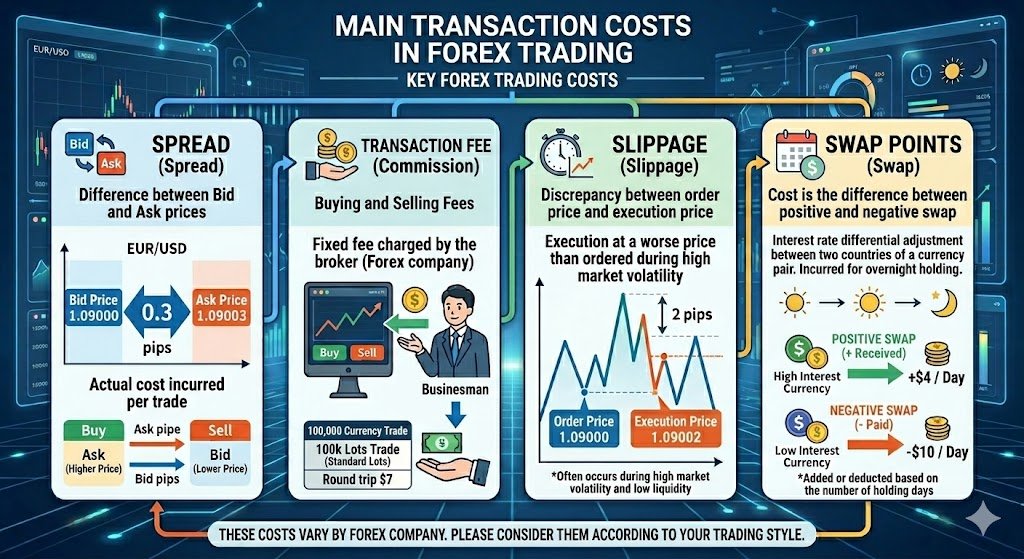
- Spread: the difference between the Bid and Ask price
- Commission: a trading fee charged on ECN-type accounts
- Slippage: the gap between your requested price and the fill price
- Swap: interest adjustment when you hold a position overnight
Even if each trade only costs a little, those small costs can become huge when an EA (Expert Advisor) trades repeatedly and automatically.
Especially if you run EAs on MT5, “cost resilience” often matters more than clever logic when it comes to keeping profits.
Related: What Is an EA? How Forex Automation Works and How to Choose One (Complete Guide)
Why EAs Are More Sensitive to Costs Than Manual Trading
With manual trading, many traders place only a few trades a day. An EA, on the other hand, follows its rules and keeps entering and exiting mechanically.
For example:
- Scalping EAs: 50–200+ trades per day
- High-frequency EAs: trades every few minutes
- Grid EAs: often hold multiple positions at the same time
The key point is simple: you pay trading costs on every single trade.
A human trader can choose to trade only “good-looking” moments. An EA can’t. If the conditions match, it will enter—so it tends to feel the impact of costs much more.
In short, EA trading is structurally more exposed to trading costs than discretionary trading.
Why Backtests and Live Results Often Don’t Match
“The backtest looked great, but the live account fell apart.”
In many cases, the difference comes down to trading costs.
In MT5 backtests, you can reproduce:
- fixed spreads
- configured commissions
But in live trading, you also face:
- spread spikes during news releases
- negative slippage
- execution delays
- price differences caused by server distance
- real-world swap changes
Slippage, in particular, is hard to reproduce perfectly in a backtest.
That’s why you often see a gap between:
- theoretical expectancy (backtest)
- real-world expectancy (live trading)
What matters isn’t whether you can win in a backtest—it’s whether the strategy still wins after paying real trading costs.
For EA trading, you must evaluate performance with costs included, not just the logic itself.
Spread|The “Invisible Fixed Cost” That Eats EA Profits
The spread is the difference between the Bid (sell) and Ask (buy). In forex, this gap acts like a fee—you effectively start a trade in the red the moment you enter.
For MT5 EA trading, where trade frequency can be high, small differences in spread directly affect results.
Ads like “minimum spread 0.0 pips” look attractive, but in real trading it’s far more important to focus on the average spread and how it changes by time and market conditions.
Why Spread Matters So Much for EA Trading
- It applies to every trade (it accumulates regardless of wins/losses)
- The impact is larger for scalping and high-frequency EAs (small profit targets are easily wiped out)
- During fast markets, news events, or low-liquidity hours, spreads often widen
How to Show and Check Live Spread in MT5
First, set MT5 to display the current spread in real time:
- Open Market Watch in MT5
- Right-click inside the window → Columns
- Enable Spread
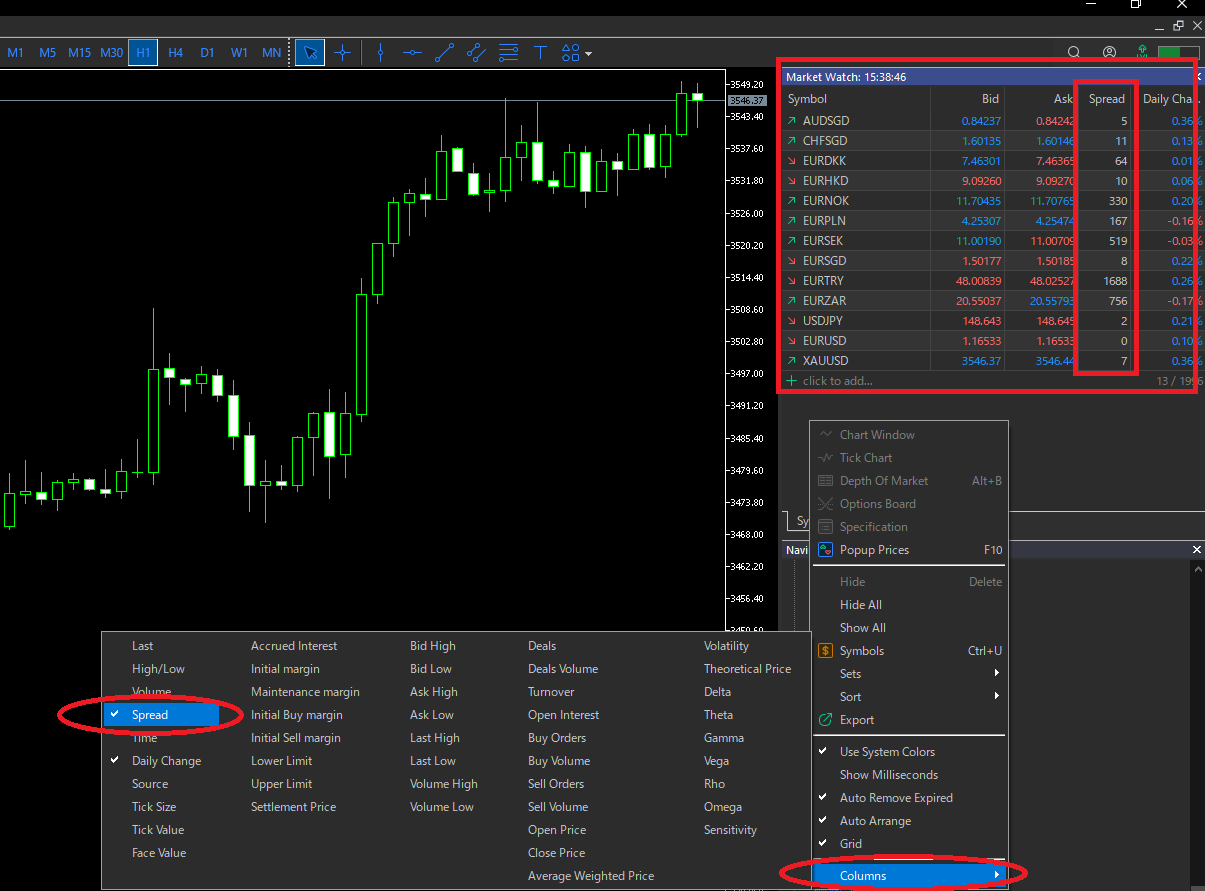
This is useful, but it only shows the spread “right now.” For EA trading, spreads fluctuate with time and volatility—so it helps to understand what spread looks like under real conditions.
A More Realistic Approach: Check Bid/Ask Differences by Time of Day
Spreads are not constant. Even on the same pair, they can change a lot depending on time and volatility.
If you want to compare brokers or accounts, these checks reduce surprises:
- Observe Bid/Ask differences using Ticks or M1 data
- Separate by session (e.g., London–New York overlap vs. early hours) and look for patterns
- Focus on the average, not the “minimum”
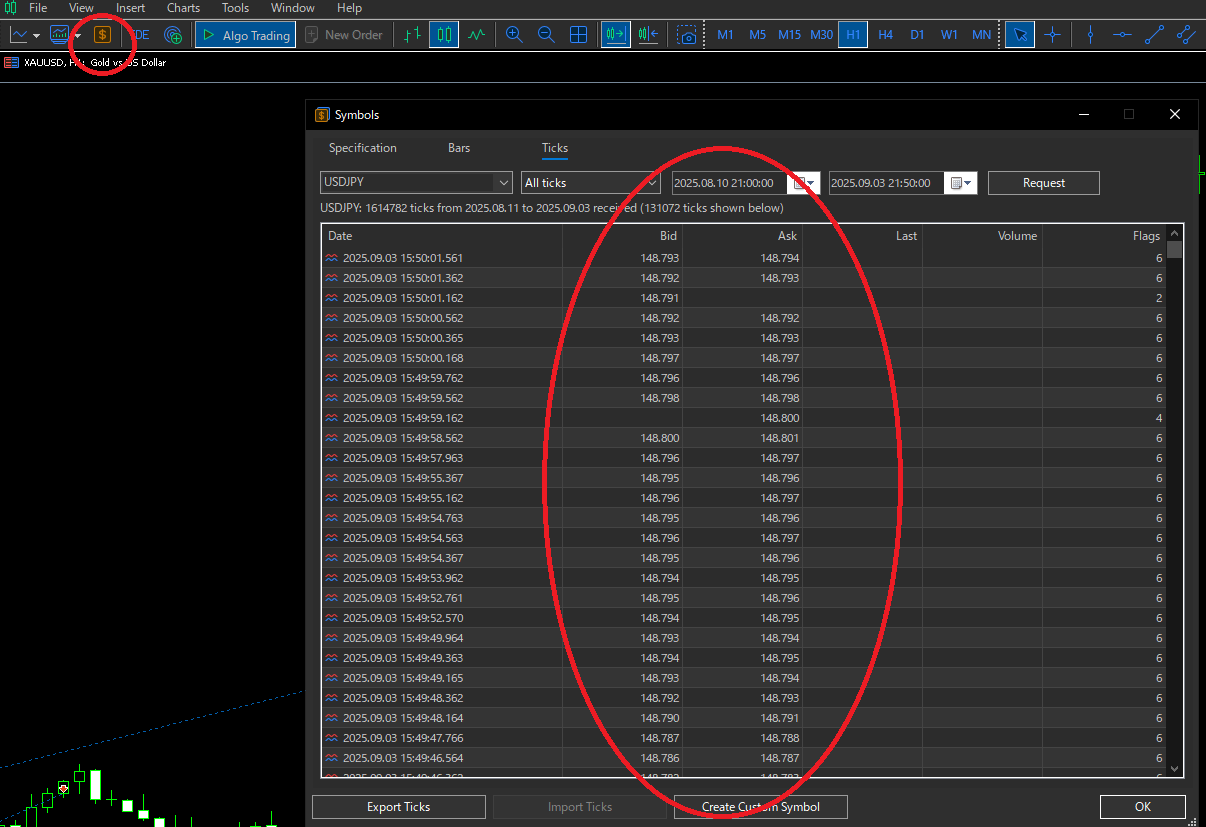
The key is to evaluate spreads during the hours your EA actually trades. If an EA trades late night or early morning, a wider spread in those hours alone can pull live profits below the backtest.
How to Apply Spread in Backtests: Floating + “Stricter Fixed” Stress Tests
Where to Check/Set Spread in the MT5 Strategy Tester
In MT5, the symbol details also display spread settings. Before you run a backtest, check the Spread value for the tested symbol to avoid bad assumptions.
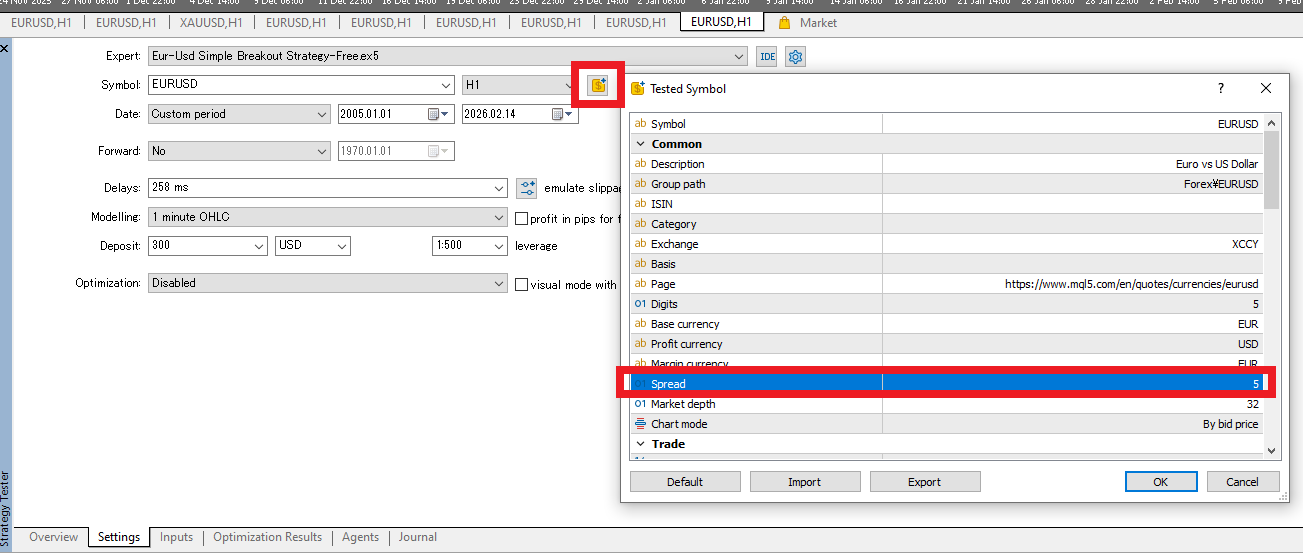
Because spreads change in live trading, it’s safer to test not only with floating spread but also with a stricter fixed spread and check your strategy’s “spread resilience.”
This matters because in real markets:
- spreads often widen around early hours and market reopen
- news and speeches can cause sudden spread spikes
- low-liquidity periods tend to be worse than the average
If your backtest uses overly “perfect” spreads, live performance can collapse. Spread resilience testing helps you confirm whether the EA still works under realistic conditions.
Test With Floating Spread First
Start with floating spreads that resemble your broker’s conditions to confirm normal behavior. But floating alone may not capture enough worst-case moments—so add a fixed stress test as well.
Then Test With a Stricter Fixed Spread
Next, re-test using a fixed spread that is slightly worse than your typical average to simulate harsher conditions:
- a bit wider than the usual average (e.g., average + extra)
- even wider to reflect thin liquidity or volatile periods
If performance breaks down with only a small increase, the EA may rely on “tight spreads” to survive. If results remain stable, the EA tends to be more resilient in live trading.
Commission|The “Hidden Cost” That Can Drain ECN Profits
If you choose a tight-spread account but profits still don’t grow as expected, commission is often the reason.
On ECN-type accounts, spreads are very tight, but you pay a fixed fee per lot. If you judge only by spread, you’ll underestimate the true cost.
How ECN Accounts Work: Why You Pay Commission
ECN (Electronic Communication Network) accounts aim to provide pricing closer to the interbank market. That’s why the spread can be extremely low—but you pay a clear fee per trade.
- Spread: tight (e.g., 0.0–0.3 pips)
- Commission: fixed per lot (e.g., $3.5 per side)
It may look cheaper at first glance, but what matters is total cost (spread + commission).
How to Check Commission in MT5
You can confirm commission not only on the broker’s website but also inside MT5:
- Right-click the symbol in Market Watch
- Select Specification
- Check the Commission field
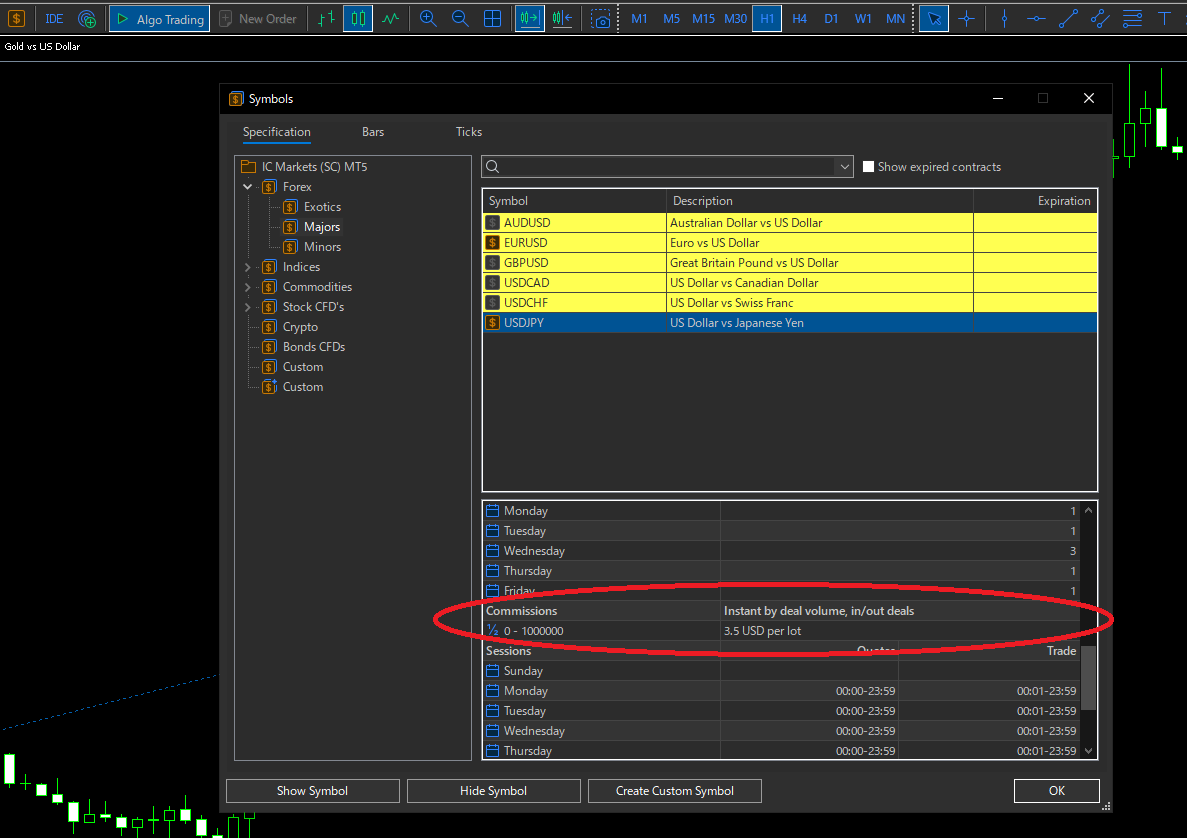
Be careful: the displayed value is often per side.
Always Calculate the Round-Trip Cost
A trade isn’t finished when you enter. One complete trade includes the exit.
For example:
- Per side: $3.5
Then:
Round-trip cost = $7.0 per 1 lot
If you skip this step, you won’t be able to judge your EA’s real expectancy.
Confirm Commission Is Correct in Backtests (A Common MT5 Pitfall)
MT5 backtesting is powerful, but there are cases where commission isn’t applied the same way as your live account.
If you trade an ECN setup (tight spread + commission), getting this wrong can distort your evaluation immediately.
Apply/Verify Commission in the Tester (Custom Settings)
In the Strategy Tester, you can check and adjust the commission table. Enable Use custom settings under Trade Settings, then confirm the Commission values match your broker’s conditions.
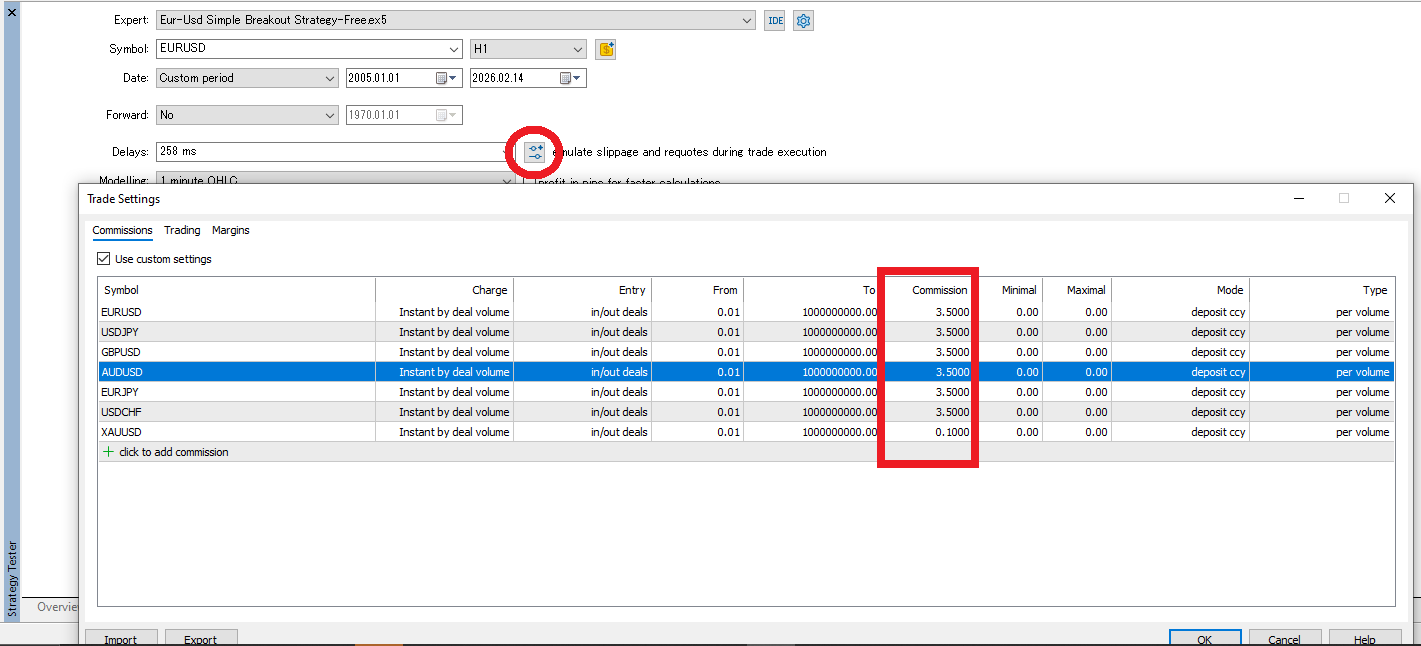
Before looking at PF or expectancy, first make sure your cost assumptions are correct.
What to Check
- Do the settings match your broker/account conditions?
- Is commission calculated correctly for your lot size (per lot vs. per volume)?
- Have you considered currency denomination (e.g., commission in USD converted into account currency)?
- Are you mixing up per-side vs. round-trip (e.g., $3.5 per side = $7 round trip)?
If this isn’t correct, your backtest becomes “performance without real costs,” and it won’t match live trading. In practice, you should judge PF and expectancy only after confirming spread + round-trip commission are applied properly.
Slippage|An Execution Cost That Backtests Can’t Fully Reproduce
Slippage is the difference between the price you request and the price you actually get filled at.
In forex, prices can move in an instant, so you won’t always get the exact price you expected.
This can look like a small “random error,” but EAs tend to trade more often. That means tiny gaps add up and can create a real performance difference.
Also, because backtests can’t reproduce slippage perfectly, it often becomes a cost you only notice in live trading.
Related: What Is Slippage? Why EAs Stop Working and How to Fix It (MT5)
Why Slippage Happens (What Causes the Price Gap?)
Slippage often shows up in situations like these:
- Prices move fast (news releases, sharp spikes, sudden drops)
- Liquidity is thin at that price level (not enough volume available)
- Execution takes time (network latency, VPS/PC performance, server distance)
- Market-type execution fills you at the next available price
The key point: slippage isn’t simply a “broker fee.” It’s a natural result of market conditions and execution mechanics.
Positive vs. Negative Slippage
Slippage isn’t always bad.
You can get filled at a better price (positive slippage) or a worse price (negative slippage).
- Positive slippage: filled at a better-than-expected price (lower cost)
- Negative slippage: filled at a worse-than-expected price (higher cost)
In real trading, during fast markets or low liquidity, the results often skew toward negative slippage, which drags down EA performance.
Why EAs Are More Exposed to Slippage
A discretionary trader can avoid times when slippage is likely—like right before major news—or wait until the market settles.
An EA doesn’t do that unless you program it. If the rules trigger, it trades.
Slippage tends to hit harder when you run:
- Scalping EAs (small profit targets)
- Breakout EAs (entries during sharp moves)
- Strategies that trade around news times
- High trade frequency systems (more chances to slip)
If you see “high win rate but profits don’t grow” or “live results look weaker than the backtest,” slippage is often the missing piece.
Why Backtests and Live Trading Differ (The Limits of Simulation)
MT5 backtesting is useful, but it can’t fully reproduce real-market slippage.
That’s because live execution includes factors like:
- real-time liquidity at the moment you trade
- server load and processing conditions
- network latency (PC/VPS/internet route)
- order priority when markets are crowded
That’s why strategies that “earn a few pips per trade” can break quickly in live trading once slippage is added.
Practical Ways to Reduce Slippage (MT5 + EA)
You can’t eliminate slippage, but you can reduce it:
- Run your EA on a VPS close to the broker’s server to reduce latency
- Avoid thin-liquidity hours and limit trading times
- Add a news filter to avoid major releases
- Don’t design systems with profit targets that are too tight—build room for slippage
Slippage isn’t something you “get unlucky with.” Treat it as a design constraint and your live performance becomes more stable.
How to Handle Slippage in Backtests: Simulate It with “Delay” in MT5
The MT5 Strategy Tester does not offer a direct way to reproduce real slippage (for example, “force +2 pips slippage every trade”).
That’s why backtests often underestimate slippage.
To reduce the gap, you can use a practical workaround: set execution delays and simulate slippage indirectly.
Use “Delays” to Simulate Slippage
In the Strategy Tester settings, you can set Delays (in milliseconds) to simulate the time between sending an order and getting filled.
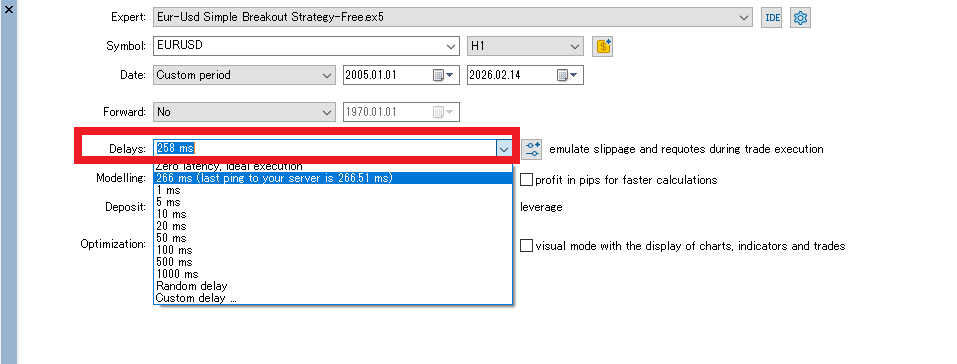
When prices move during that delay, your fills tend to land at worse prices—this becomes a practical slippage simulation.
A Simple Testing Workflow
- 1) Test with zero delay (ideal environment)
- 2) Re-test with realistic delay values (e.g., 50–300ms)
- 3) Try random delays and check how unstable results become
If results collapse with only small delays, the EA may rely too heavily on perfect fills.
Important: Delay Is Not a Perfect Slippage Model
Delays are only a simulation. Live trading also depends on:
- liquidity (market depth)
- execution priority
- spread spikes during news
- requotes or rejected fills
So even with delays, you won’t get a perfect match. The goal is not a “perfect backtest,” but to confirm the EA still works when conditions get worse.
When you evaluate spread, commission, and slippage together, your backtest becomes much closer to real trading.
Apply and Stress-Test Swap in Backtests: Check “Swap Resilience”
If your EA holds positions for long periods, you should include swap in your backtests. It may look small day to day, but it can reshape results when positions run for weeks or when many trades overlap.
In real trading, swap conditions can change or become less favorable. That’s why it’s smart to stress-test swap settings and check whether the strategy still holds up.
Open the Swap Settings in MT5 Backtests
In MT5 Strategy Tester, open the Tested Symbol settings and review the Swaps section.
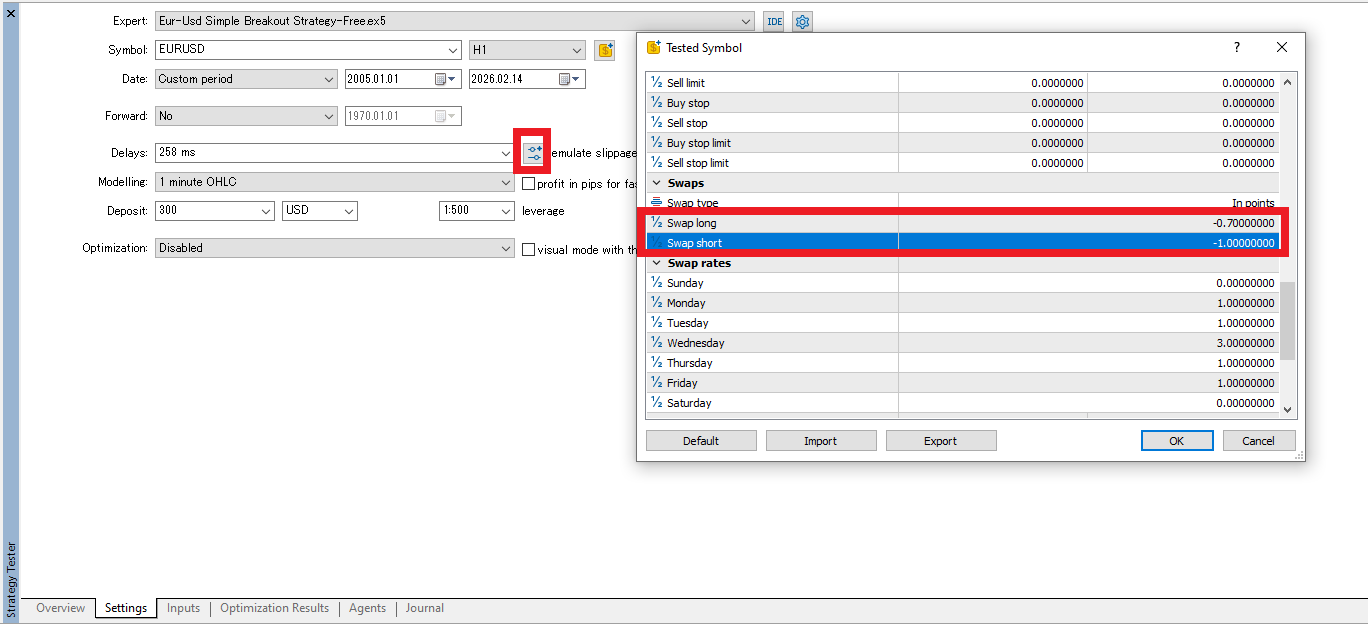
On this screen, review:
- Swap type: points/currency calculation style
- Swap long: swap for buy positions
- Swap short: swap for sell positions
- Swap rates: weekday multipliers (e.g., Wednesday = 3)
Stress Tests: Make Swap Harsher on Purpose
Try these stress-test ideas:
- Increase negative swap (assume higher financing costs)
- Reduce positive swap (assume less credit, or near zero)
- Swap long/short values (assume the direction becomes unfavorable)
A strategy that “looked fine” with positive swap can break if conditions shift slightly. For grid and long-hold systems, this check is especially valuable.
What to Watch When Swap Changes
- Does net profit shrink sharply once swap is included?
- Do long-hold trades deteriorate the most?
- Does drawdown increase (long floating loss + swap charges)?
- Does performance become unstable around Wednesday’s multiplier?
Because swap often behaves asymmetrically, it can quietly become a major drag. Don’t test only under “today’s conditions.” Check whether the EA survives if swap turns worse.
How to Build a Low-Cost Setup|Practical Ways to Protect EA Profits on MT5
EA results are not determined by logic alone. The environment you run it in can change outcomes dramatically.
Spread, commission, slippage, and swap all vary by broker and setup. In other words, building a low-cost environment is part of the strategy.
1) Choose the Right Broker and Account Type (Judge Total Cost)
Start with the broker and account type. Even with the same EA, costs and execution quality can change depending on where you trade.
What to Check When Choosing a Broker
- Average spread (not minimum—focus on real conditions by time)
- Commission structure (per side vs round trip, per lot vs per volume, account currency impact)
- Execution quality (slippage tendency, stability during news)
- Swap conditions (long/short asymmetry, how often rates change)
- Server location (directly affects latency if you use VPS)
If you choose based only on “0.0 minimum spread,” you may pay more on average or lose performance through poor execution. With EAs, small differences grow into big differences over time.
Account Type: Compare Spread + Round-Trip Commission
- Standard account: wider spread, no commission
- ECN account: tight spread, commission charged
Don’t ask “which is cheaper in general.” Ask which fits your EA:
- Scalping EAs → prioritize the lowest total cost (spread + round-trip commission)
- Mid/long-hold EAs → swap conditions may matter more than spread
Always compare using spread + round-trip commission (e.g., $3.5 per side = $7 round trip).
2) Use a VPS to Reduce Execution Latency
To reduce slippage, it helps to run your EA closer to the broker’s server.
- Home PC: depends on your internet and power stability
- VPS: stable 24/7 operation and typically lower latency
Choosing a VPS near the broker’s server location (e.g., NY4 or LD4) can improve execution speed. You can’t eliminate slippage, but lower latency can make a real difference over time.
Related: How to Choose VPS Location for MT5 EAs: Latency Guide for NY4/LD4/TY3
3) Optimize Trading Hours
Spreads change by time of day:
- High-liquidity hours (London–New York overlap): usually more stable
- Early hours, holidays, around news: spreads often widen
If your EA includes a time filter, it can avoid unnecessary cost spikes and reduce the gap between backtest and live trading.
Environment Improvements Often Deliver Fast Gains
You don’t always need to rewrite the logic. Improving the environment alone can lift results.
- Broker choice (average spread, commission, execution, swap)
- Account type selection (judge total cost)
- VPS setup (reduce latency)
- Trading-hour optimization (avoid spread spikes)
These are the foundation for protecting EA profits.
EA Type Matters|Which Trading Costs You Should Watch
Not every EA is sensitive to the same costs. The strategy type determines which costs hurt the most.
1) Scalping EAs|Nearly All Costs Matter
Scalping systems take small profits many times. That makes them the most cost-sensitive.
Related: Do Scalping EAs Work? Why They Often Fail in Live Trading
- Spread: small targets are easily erased
- Commission: round-trip fees directly reduce expectancy
- Slippage: a few pips of drift can kill the edge
- Spread widening: performance can swing by time of day
For scalping EAs, total cost (spread + commission + execution quality) often decides whether the strategy lives or dies.
2) Breakout EAs|Watch Slippage and Spread Spikes
Breakout systems often trade during fast moves. Their biggest risk is execution.
- Slippage: fills can be far worse during sharp moves
- Spread spikes: costs can jump right before entry
For breakout EAs, realistic execution assumptions matter more than a “perfect” backtest. Re-test with delays and wider spreads to see whether the edge survives.
Related: Do Breakout EAs Work? A Practical Review with Pros, Cons, and Setup Tips
3) Grid / Averaging EAs|Swap Can Quietly Drain the Account
Grid and averaging strategies often hold positions for long periods and keep multiple trades open. That makes swap costs especially important.
- Swap: accumulates daily and can eat into profits
- Asymmetry: one direction can be much more expensive than the other
- Rate changes: swap conditions can shift over time
For grid systems, swap can matter more than spread. Stress-test swap settings and confirm the strategy still works under harsher financing conditions.
Related: Don’t Get Tricked by Grid EAs: How Accounts Blow Up and How to Spot the Risk
When you evaluate an EA, don’t look at PF or win rate alone. Always ask: Which costs is this strategy vulnerable to? That mindset leads to more stable long-term operation.
Conclusion|EA Profit Comes Down to “Logic + Cost Control”
EA performance isn’t determined by logic alone. Over the long run, how you manage trading costs—spread, commission, slippage, and swap—often decides the outcome.
EAs tend to trade more frequently, so even small cost differences can compound into a large gap. Before you judge PF or expectancy, confirm that your backtest assumptions reflect real costs.
- Test spread using both floating and stricter fixed values
- Set commission correctly and always calculate round-trip cost
- Use delays to simulate slippage sensitivity
- Stress-test swap conditions for long-hold strategies
- Compare brokers and account types by total cost
These steps shift your focus from “a perfect backtest” to a realistic evaluation.
Don’t judge EAs by logic alone. Evaluate them as a full system, including costs and execution. That perspective protects profits and improves long-term consistency.
 MQL5
MQL5
 Myfxbook
 YouTube
 X
X
 GOGOJUN