

Introduction: Are You Judging an EA Only by Backtest Results?
When people choose an EA (automated trading system), the first thing they often check is the backtest performance. A smooth equity curve and a high Profit Factor can make you think, “This EA must be great.”
But there’s a big trap here.
A backtest is still just a result from historical market data. By tuning parameters, it isn’t that hard to find settings that fit the past “perfectly.” The real question is whether those same settings will hold up in future market conditions.
That’s where Walk-Forward Analysis (WFA) comes in.
WFA is a testing method designed to check whether your optimization is repeatable when you shift the time period forward—rather than simply fitting the past.
In this article, you’ll learn:
- The difference between optimization and over-optimization
- How Walk-Forward Analysis (WFA) works
- How WFA differs from forward testing
- What EA buyers should check before purchasing
If you tend to think “good backtest = good EA,” this will help you avoid expensive mistakes.
What Optimization Means: EAs Are Tuned Using Past Market Data
Most EAs are built and adjusted using historical price data. The key is understanding the difference between Optimization and Overfitting (Curve Fitting).
Even if an EA looks strong in the past, it doesn’t guarantee the same results in the future. That’s why Walk-Forward Analysis (WFA) is so useful.
Optimization means changing EA parameters (for example: periods, thresholds, TP/SL values) and searching for combinations that perform well in past data.
- During EA development and testing, you first confirm whether the logic works and seems to have positive expectancy
- Then you adjust parameters to find a range where performance improves (optimization)
That part is normal. The real problem is what comes next.
Over-Optimization Can Fail in Future Markets
Overfitting happens when parameters are tuned too tightly to match only the past data.
Think of it like memorizing answers from old practice tests. You might score high on those exact questions, but you struggle when the real exam changes even slightly.
In EA trading, overfitting often shows up like this:
- The backtest equity curve looks beautiful, but live performance collapses
- Small parameter changes cause massive performance swings (a “lucky fit”)
- The trade count is low, so a few lucky trades can make results look better than they really are
Related article: What Is EA Overfitting? How to Spot It + A Pre-Purchase Checklist
What Is Walk-Forward Analysis (WFA)?
Walk-Forward Analysis (WFA) is a method that doesn’t stop after one optimization. Instead, it repeats optimization and validation multiple times while shifting the time window forward.
The key is not optimizing across the full backtest period and calling it done. In WFA, you:
- Optimize on one period (In-Sample)
- Validate on the next period (Out-of-Sample)
- Move the window forward and repeat
This process checks whether the optimization stays reliable over time.
In-Sample (IS) vs Out-of-Sample (OOS)
WFA splits the data into two parts:
- In-Sample (IS): the period used for optimization (training period)
- Out-of-Sample (OOS): the period used to validate whether the optimized parameters still work (validation period)
If an EA is truly robust, the parameters that perform well in IS should also perform reasonably in the next OOS segment.
If IS looks great but OOS breaks down, that’s a strong sign of curve fitting.
The Basic Walk-Forward Workflow
WFA repeats these steps over time:
- Optimize (IS): Example: optimize parameters on the past 2 years
- Validate (OOS): Example: test performance on the next 3 months
- Move forward: slide IS and OOS forward by a fixed step and repeat
- Aggregate OOS results: check stability, drawdowns, and worst-case outcomes
This repetition helps you filter out EAs that only worked in one lucky period and focus on those that are less likely to break across different market regimes.
Three Common WFA Patterns (Single Split / Rolling / Anchored)
There are three common ways to do WFA-style validation, depending on how much effort you can spend and how strict you want to be.
- Single Split: Split the full period once into IS (optimize) and OOS (validate), e.g., optimize on the first 70% and validate on the last 30%. It’s quick, but results can depend heavily on that one split, so it’s best as a basic filter.
- Rolling: Keep the IS window length fixed and slide it forward (e.g., last 2 years → move forward by 1 month → last 2 years again). This method adapts well to changing conditions and is often used for short-to-medium-term EAs or high trade-frequency systems.
- Anchored: Fix the start point and expand the IS window over time (e.g., 2015–2016 → 2015–2017 → 2015–2018…). As the sample grows, estimates can become more stable. This can suit long-term logic or lower trade-frequency EAs.
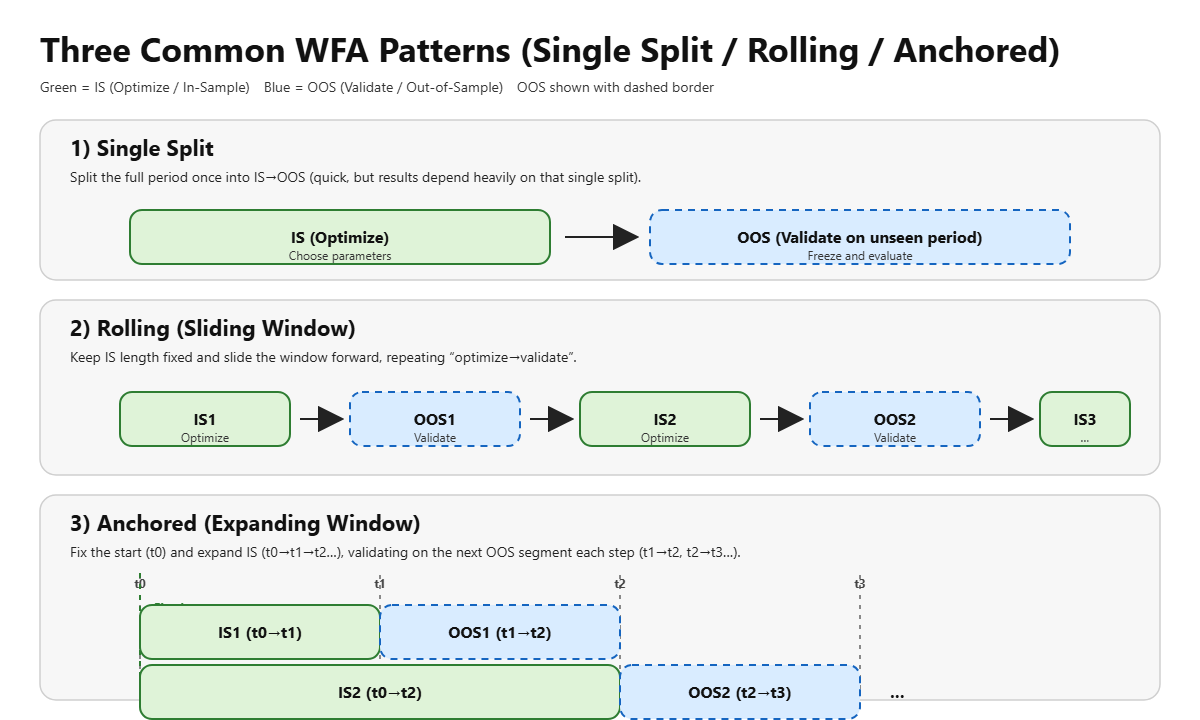
There’s no single “best” choice. Pick based on the EA’s style (short-term vs long-term, high frequency vs low frequency) and how much testing time you can invest. A practical approach is:
start with Single Split to remove obvious failures, then use Rolling or Anchored to reduce “lucky” results.
Why WFA Matters
EA performance can change dramatically depending on optimization. In other words, aggressive tuning can easily create an EA that’s built to match the past.
WFA helps you check whether the optimization process itself still works as you move forward in time. That makes it closer to real-world decision-making than relying on a single backtest.
WFA vs Forward Testing: What’s the Difference?
These terms sound similar, but they serve different purposes. Put simply:
WFA checks repeatability on historical data, while forward testing checks real performance in future market conditions.
Forward Test
- Run the EA on a demo or live account and evaluate performance over a future period
- Biggest strength: it includes real-world factors like spread, slippage, execution quality, and latency
- Downside: it takes time (usually weeks to months)
Walk-Forward Analysis (WFA)
- Split historical data into IS (optimize) and OOS (validate) to test robustness on unseen segments
- True WFA repeats the process by shifting the time window forward, not just doing one split
- Downside: it’s still based on historical data, so it can’t fully recreate real execution conditions
In practice, the ideal workflow looks like this:
- Use WFA to filter out EAs that look overfit
- Then use forward testing to confirm it doesn’t break under real-world execution
MT5 Forward Optimization: A Simple Way to Do WFA-Style Testing
MT5 (MetaTrader 5) Strategy Tester includes a feature called Forward Optimization.
It splits the test period into an optimization part and a forward (unseen) part, so you can see forward results alongside optimization results.
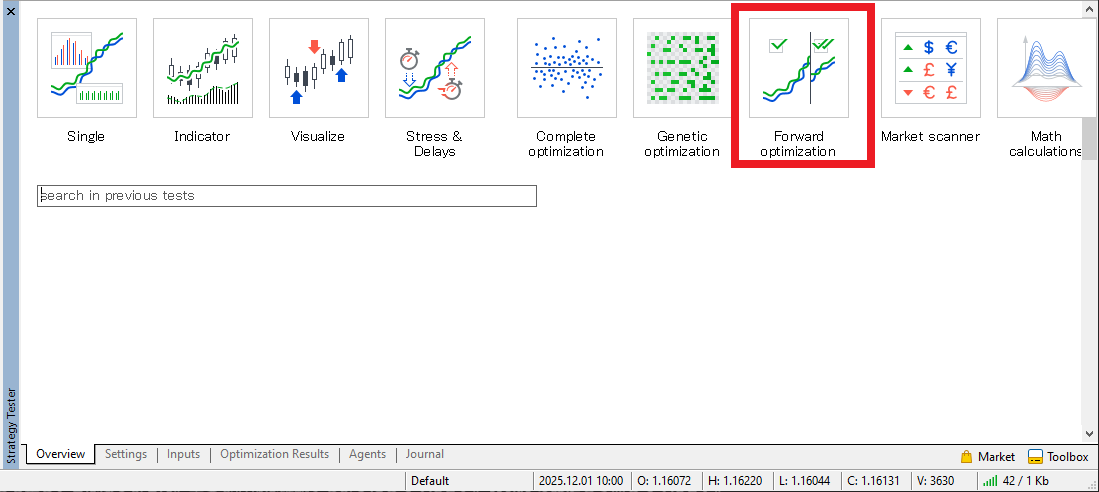
Settings: Choose a Forward Split (1/2, 1/3, etc.)
When you enable Forward, you can select a split ratio such as 1/3.
This means “use the last 1/3 of the period as the forward (unseen) segment.”
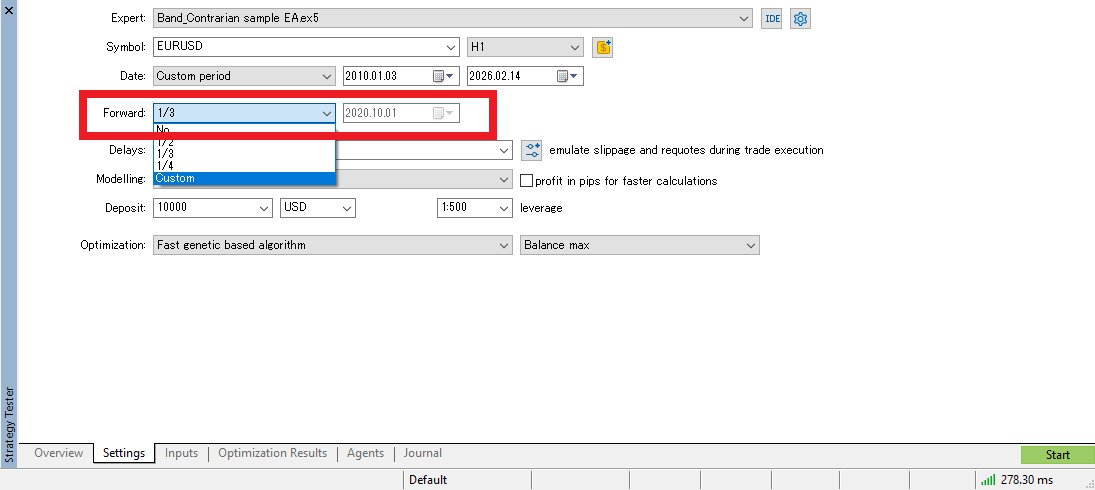
Note: MT5 Forward Optimization is convenient, but compared with strict WFA (repeating many rolling steps), it’s a simplified version.
Still, it’s a very effective first step for spotting over-optimization.
Results: Compare “Optimization Results” vs “Forward Results”
When you run optimization with Forward enabled, MT5 displays Forward Results.
This makes it easier to spot settings where “the optimized backtest looks great, but the forward segment collapses.”
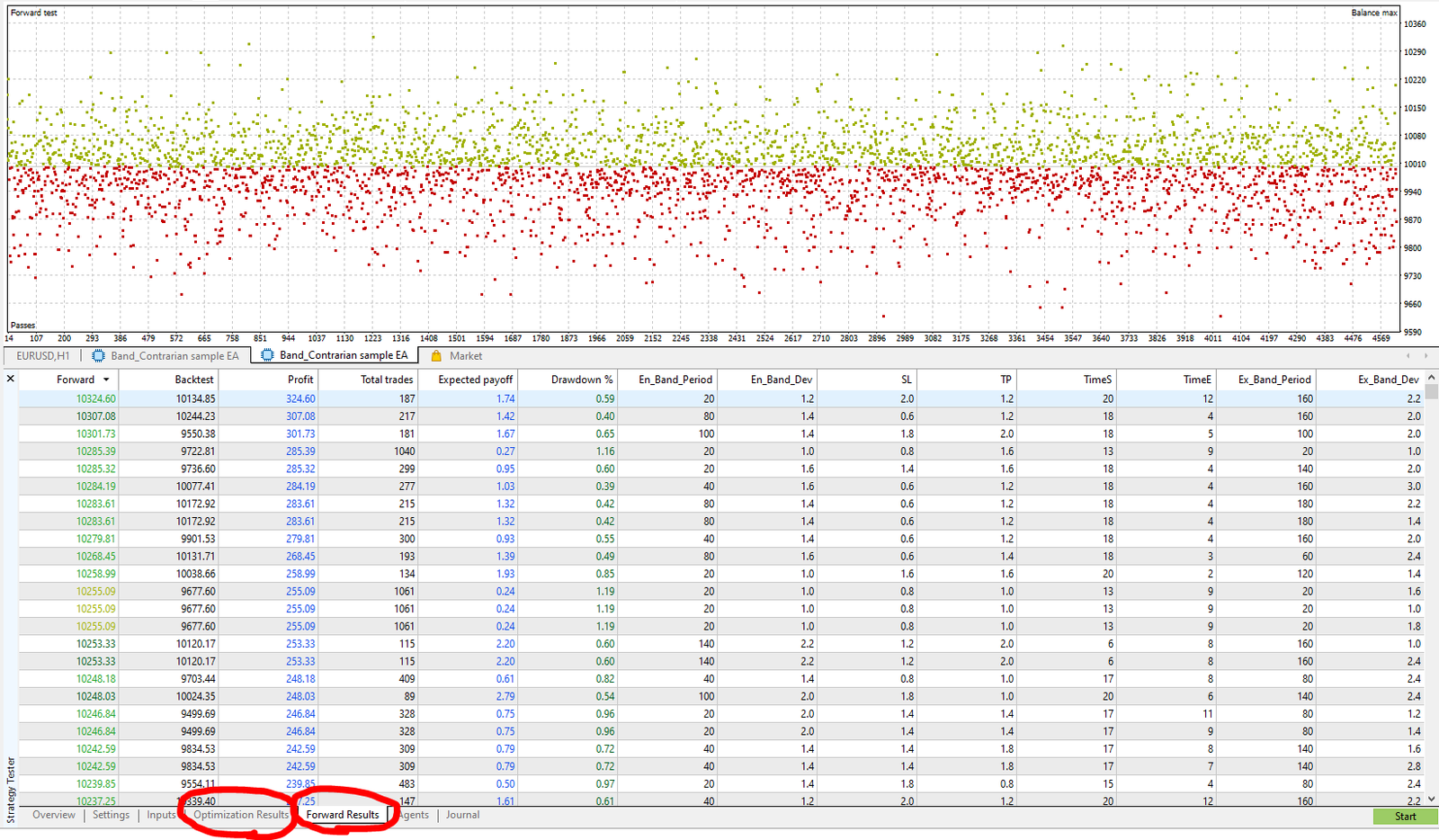
How to Read Walk-Forward (Forward Optimization) Results: A Practical Pass/Fail View
If you’re not sure which numbers matter, this simple order helps you stay consistent.
Minimum Requirement: The Forward Segment Shouldn’t “Break”
- The forward period should not show an extreme equity collapse
- Avoid settings where optimization looks amazing but forward results are a disaster (huge performance gap)
A strong optimization result is expected (you optimized for it). What matters is whether performance remains reasonably consistent in the forward segment.
Make Sure the Trade Count Isn’t Too Low
- With too few trades, a strategy can look strong just from a couple of lucky wins
- Check whether the validation period has a meaningful sample size
Check Drawdown and Expected Payoff for “Realistic” Levels
- Even if it makes money, a huge max drawdown can be hard to survive in live trading
- If Expected Payoff is unusually high, the results may be overly condition-dependent (possible curve fitting)
A “Wide Plateau” Beats a Single Lucky Sweet Spot
Ideally, optimization results show a wide plateau, where many nearby settings perform reasonably well.
If only one narrow point looks outstanding, it may be fitting noise rather than capturing a real edge.
Common Failure Patterns (How WFA Can Still Mislead You)
Walk-Forward Analysis is powerful, but if you design it poorly or interpret it the wrong way, you can still end up with “WFA-tested” EAs that fail.
Here are the most common real-world traps. The more boxes you check, the less trustworthy the WFA result becomes.
Pitfall 1: Too Many Parameters Turns WFA Into Another Optimization Game
Even with WFA, if you optimize too many parameters or search too wide, you may end up just picking a winner in each step.
- Too many optimization parameters (combinational explosion)
- Search ranges are too wide (easy to find “good-looking” noise fits)
- Objective function is only net profit (likely to pick fragile solutions)
A few lucky OOS steps can make the whole result look “good enough.”
Pitfall 2: OOS Is Too Short (Not Enough Trades)
If OOS is too short and trade count is low, the conclusion becomes statistically unstable.
- Only a handful of OOS trades
- One big win/loss decides the step result
- Win rate and Profit Factor swing wildly
In this situation, metrics can jump easily, and it’s easy to mistake noise for robustness.
Pitfall 3: Data Snooping (Cherry-Picking Good Periods)
If you choose a “good-looking” market period first, WFA can look strong almost automatically.
- Testing only high-volatility periods
- Testing only strong trending periods
- Unknowingly excluding bad regimes
WFA checks time robustness, but if the dataset selection is biased, the conclusion will be biased too.
Pitfall 4: Too Much Overlap Between Steps
If the step size is too small or IS/OOS windows overlap too heavily:
- It looks like multiple validations, but you’re effectively reusing the same market moves
- The “stability” you see may not be independent confirmation
Pitfall 5: Unrealistic Trading Cost Assumptions
Because WFA uses historical data, your assumptions for:
- Spread
- Commission
- Slippage
matter a lot. If those settings are too optimistic, results can look far better than reality.
This is especially true for short-term EAs, where a small increase in costs can wipe out the edge. A simple check is: “Does OOS still hold up if you make costs slightly worse?”
Pitfall 6: Passing Based on Average Only (Ignoring the Worst Case)
Even if the average looks okay, live trading can fail if:
- The worst OOS step is catastrophic
- Drawdown spikes in OOS
- Multiple losing OOS steps occur in a row
In practice, “average positive” matters less than surviving the worst case.
Pitfall 7: One Lucky Step Drives the Whole Result
Even if total WFA P/L is positive, you should be cautious when:
- Most OOS steps are small wins or small losses
- One step accounts for most of the profit
That often means you caught one specific market regime rather than a consistent edge.
Pitfall 8: Overtrusting WFA Through Major Market Changes
WFA checks robustness inside past data. But large structural shifts—rates, liquidity, broker conditions—can still break a strategy that looked stable in historical OOS.
That’s why forward testing remains essential after WFA.
Minimum Checklist to Avoid Being Misled
- Are the number of optimized parameters and search ranges kept reasonable?
- Is the OOS trade count large enough?
- Is the test period selection unbiased?
- Do steps have enough independence (not overlapping too much)?
- Does OOS survive slightly worse trading costs?
- Did you check worst-case OOS and drawdown, not just the average?
In the next section, we’ll connect WFA results to real operation (MT5, VPS, monitoring) and show how to move into forward testing.
Buyer’s View: You Can’t Tell If the Developer Really Did WFA
An EA that claims “WFA tested” can look professional. But from a buyer’s perspective, there are real limitations:
- Even if a sales page says “optimized” or “great backtest,” you usually can’t see how far the testing went or which conditions were used
- WFA is still historical testing, so with enough trials it’s possible to find lucky fits even in WFA
- It’s hard to know whether the developer ran WFA carefully or cherry-picked only favorable results
WFA is valuable, but “WFA done” doesn’t automatically mean safe or high quality. Blind trust can lead to poor risk decisions.
That’s why buyers should focus on what they can verify.
What to Check Before Buying: Forward Test Results Must Be Public
Your strongest defense as a buyer is to review forward test performance (live or demo track record). A forward test reflects results in “unknown” market conditions, so strengths and weaknesses tend to show up more clearly.
At minimum, a forward test should be publicly available.
Forward tests are commonly published via Myfxbook or MQL5 Signals.
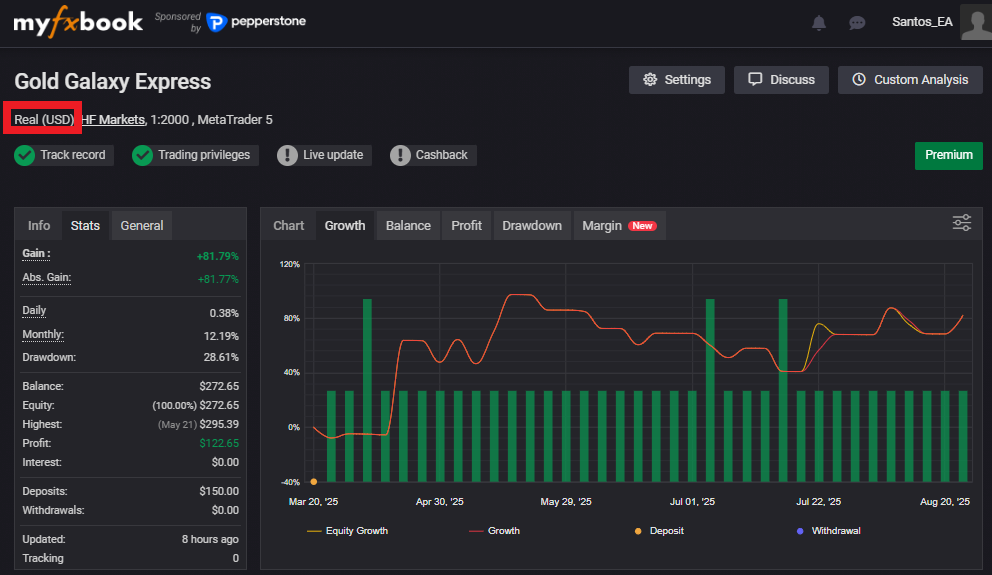
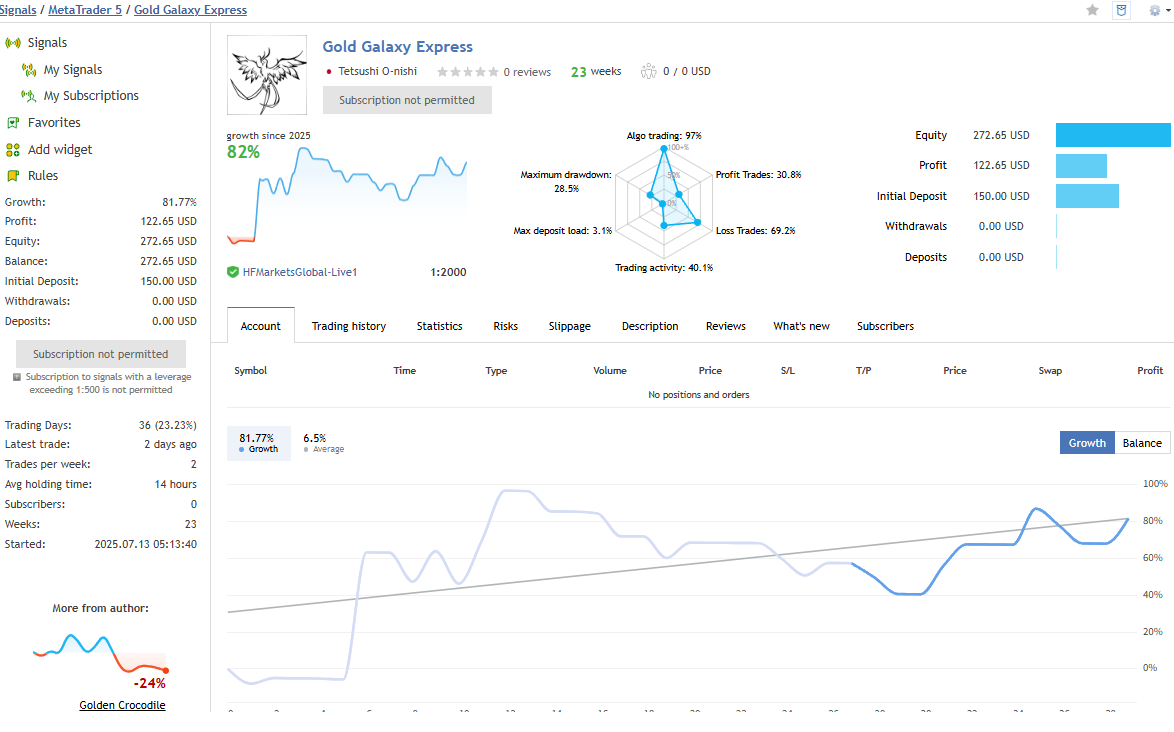
If there’s no public forward test, you can’t verify whether performance is reproducible in future markets.
However, even if results are public and look good, don’t relax yet. You still need these checks:
- Is the track record long enough? (Don’t judge from a few days or weeks.)
- Is it a real account? Which broker, and under what conditions? (spread, execution, leverage, etc.)
- Don’t rely on the upward curve alone—check drawdown and trade behavior
- Is a high-risk approach hidden (grid, martingale, etc.)?
- Is it a “small wins, big losses” profile (blows up eventually)?
For a detailed step-by-step review process, see:
How to Read Myfxbook: A Checklist to Spot EA Risk and Reproducibility (Balance/Equity, Margin, History)
Summary: WFA Reduces Over-Optimization by Testing Closer to “Future Conditions”
- EAs are built on historical data, so some optimization is unavoidable
- But too much optimization often fails in future markets (overfitting)
- WFA separates an optimization period and an unseen period to test robustness
- MT5 Forward Optimization offers a simplified but practical reproducibility check
- Since buyers can’t fully verify the developer’s testing, they should rely on publicly available forward test results
 MQL5
MQL5
 Myfxbook
 YouTube
 X
X
 GOGOJUN