

I keep seeing “requote.” What exactly is happening?

A requote is when your order can’t be filled at the price you clicked, so the platform shows a new price instead.
It happens more often on Instant Execution / Request Execution accounts. And with EAs, you usually won’t see a popup—so it may be handled as a failed (not filled) order.
In this article, I’ll explain how requotes work, how they differ from slippage, how to check your execution mode in MT5, and practical ways to reduce them—using beginner-friendly language.

What Is a Requote? When One Click Turns Into a Different Price
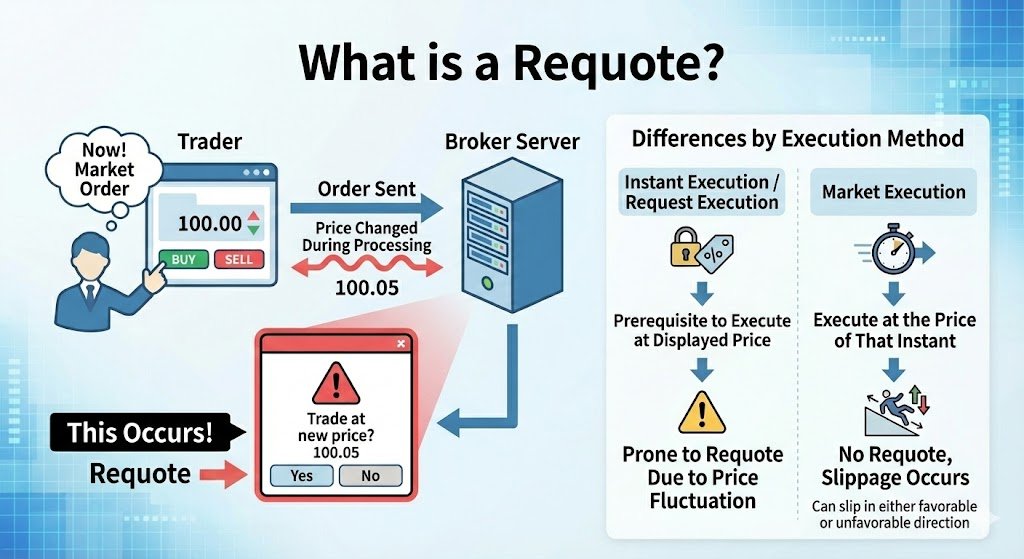
You hit a market order at the perfect moment—then instead of an instant fill, MT5 asks, “Accept the new price?”
That is a requote.
Here’s the key point for beginners: a requote is usually not “your mistake.”
It happens because of the combination of your account’s execution mode (Execution) and current market conditions.
How often you see requotes depends mostly on your broker, your account type, and the symbol’s execution mode.
| Execution mode | What it prioritizes | What tends to happen | What you feel |
|---|---|---|---|
| Instant Execution / Request Execution | Tries to fill at the price shown on screen | If price moves during processing, a requote is more likely | You often see “Accept the new price?” (EAs may receive a not-filled error) |
| Market Execution | Fills at the best available price at that moment | Requotes are rare (but slippage is more common) | No confirmation popup, but the fill price may differ (positive or negative) |
In simple terms: with Instant/Request Execution, price can move between order send → server processing.
If the original price is no longer available, the server offers a new price (that’s the requote).
With Market Execution, MT5 doesn’t stop to ask. It fills at the current tradable price (that’s slippage).
Slippage is usually negative, but you can sometimes get positive slippage as well.
Related: What Is Slippage? Why EAs Underperform and How to Reduce It (MT5)
Common Misconceptions About Requotes and Execution Modes
On social media, people often call requotes “scams” or “dirty tricks.”
First, it helps to recognize that a requote is often a normal outcome of how execution works.
Misconception 1: “A requote means the broker is cheating me.”
A requote happens mainly because Instant Execution / Request Execution tries to fill at the displayed price.
If the market moves and that price can’t be filled, the server offers a new price.
Most of the time, it’s simply market movement + execution mode.
But if it happens constantly, treat it as a warning sign
If requotes are frequent or happen much more at certain times, it’s a signal to review your setup:
account type, symbol, trading hours, and connection quality.
“Possible by design” and “too frequent to trade comfortably” are not the same thing—separate those two.
Misconception 2: “Market Execution is always better.”
Market Execution avoids requotes in many cases, but you must accept slippage.
The goal isn’t “zero requotes.” The goal is better overall P/L and stable fills for your strategy.
Bottom line:
“Requotes are bad” and “Market Execution is the answer” are both oversimplifications.
Check whether your strategy (scalping, day trading, swing) matches your account’s Execution using the Strategy Tester and logs.
Requote vs Slippage: What’s the Difference?
People mix these up all the time. Here’s the simple rule:
Requote = the order pauses and asks for confirmation.
Slippage = no confirmation; it fills immediately at a different price.
| Item | Requote | Slippage |
|---|---|---|
| What happens? | The order stops, and you must accept a new price | It fills immediately at a different price |
| Common with | Instant Execution / Request Execution | Market Execution (in general) |
| Positive/negative? | Often feels worse (better prices are less common) | Both are possible (including positive slippage) |
| User action | You must accept/decline (EAs often get a not-filled error) | No action required |
| How it feels | “Rejected” / “Price changed” | “Filled, but at a different price” |
Easy way to remember:
Stops + asks = requote / Doesn’t stop + fills = slippage
Neither is “good” or “bad” by itself. Your strategy and execution mode decide what works better.
When Do Requotes Happen? 5 Situations Where They’re More Likely
Requotes don’t come out of nowhere. They tend to show up in predictable conditions.
If you know these, you can avoid a lot of stress and bad fills.
- 1) Right after major news releases (fast market)
CPI, NFP, central bank comments—when price jumps quickly, the rate can change during order processing. - 2) Low liquidity periods
Late sessions, holidays, year-end periods—fewer counterparties can make fills harder at your clicked price. - 3) Large order size
Bigger volume is harder to fill at one price, increasing the chance of requotes, partial fills, or rejections. - 4) High latency or unstable connection
If your VPS or home internet is slow or drops briefly, the order reaches the server later—by then price may have moved. - 5) Symbol/account constraints
Instant/Request Execution is structurally more prone to requotes.
Some symbols also have stricter rules (e.g., Freeze Level, Stop Level), which can make orders harder to place.
Quick memory: requotes increase when price is fast, liquidity is thin, orders are big, connections are slow, or rules are strict.
How Requotes Affect Your Trading
A requote isn’t “just a popup.” It changes your entry price, timing, and decision-making.
Over time, it can reduce your expected value.
- 1) Missed opportunities
You don’t enter at the planned price (or you don’t enter at all), which can break your setup and reduce edge. - 2) Delayed fills
While you’re deciding, price keeps moving—often you miss the best timing. - 3) Mental pressure
Requotes can trigger panic clicks and rule-breaking. This is one of the biggest hidden costs. - 4) Potentially brutal for scalping and EAs
When you target a few pips, not-filled orders, delays, and broken entry rules can destroy performance.
(Related: Common Pitfalls of Scalping EAs)
Example:
You planned to buy at 1.10000, but the requote offers 1.10050.
That can distort your stop distance and take-profit distance (your risk-to-reward).
The larger your position size, the more that small difference matters.
MT5 Check: Are You on Instant/Request Execution or Market Execution?
Whether you see requotes depends heavily on Execution.
In MT5, you can check it in a few minutes.
1) Check the symbol’s execution mode in Specification (most important for real trading)
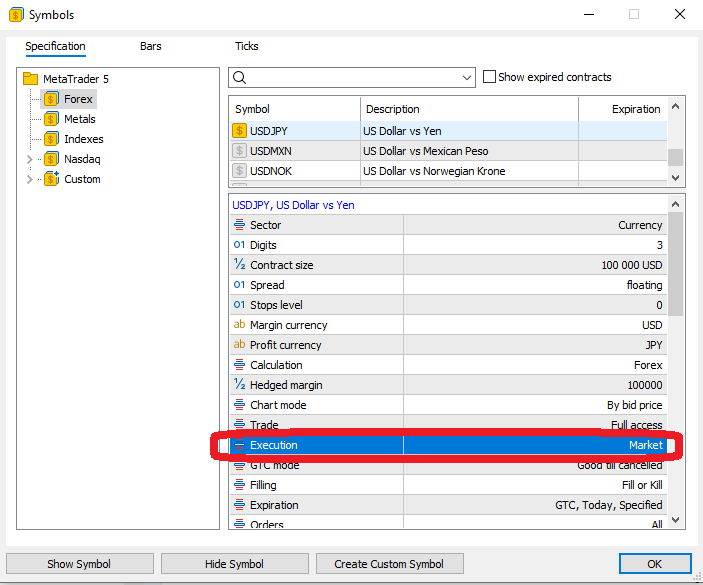
Figure 1: Checking Execution mode in MT5 Specification (example: Market Execution)
- Open Market Watch and right-click the symbol you trade.
- Click Specification.
- Find Execution. You may see: Request / Instant / Market / Exchange.
- Rule of thumb:
Market → fewer requotes (more slippage)
Instant / Request → more likely to see requotes
Note: Even with the same broker, Execution can differ by account type and symbol.
Always check the exact symbol you plan to trade.
2) Switch execution mode in Strategy Tester and compare behavior
Important: If you trade on an Instant/Request account, test with the same execution mode
If you plan to run an EA on an Instant Execution / Request Execution account, make sure your backtest uses the same Execution mode.
MT5 lets you switch Execution in the symbol settings—so don’t rely only on Market Execution test results.
If an EA is not designed to handle frequent not-filled situations (requotes), its live performance can collapse—simply because orders don’t get filled when the market is moving.
Bottom line:
Backtest under the same conditions you will trade live: account type, symbol, and Execution mode.
That’s how you avoid surprises.
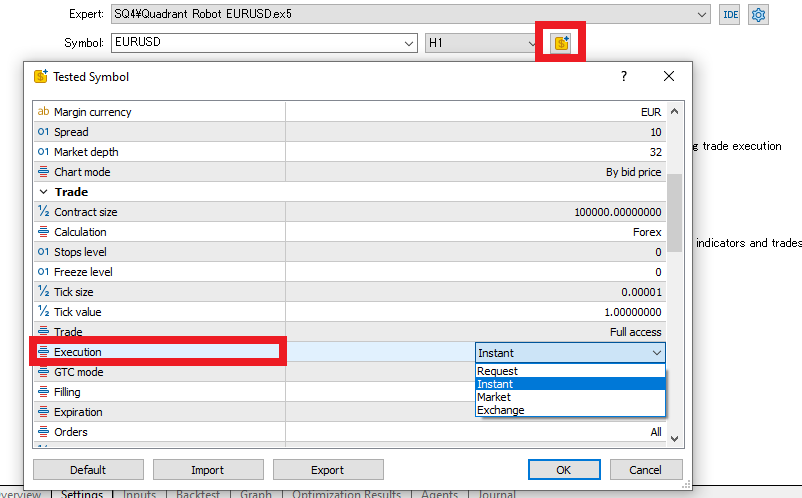
Figure 2: Switching Execution mode in MT5 Strategy Tester symbol settings
- In Strategy Tester, open the symbol settings (the $ icon).
- Change Execution between Request, Instant, and Market.
- With the same EA and the same test period, you’ll often see:
Instant/Request → more requotes / rejections
Market → more slippage
3) Confirm requotes in the backtest log (Journal)
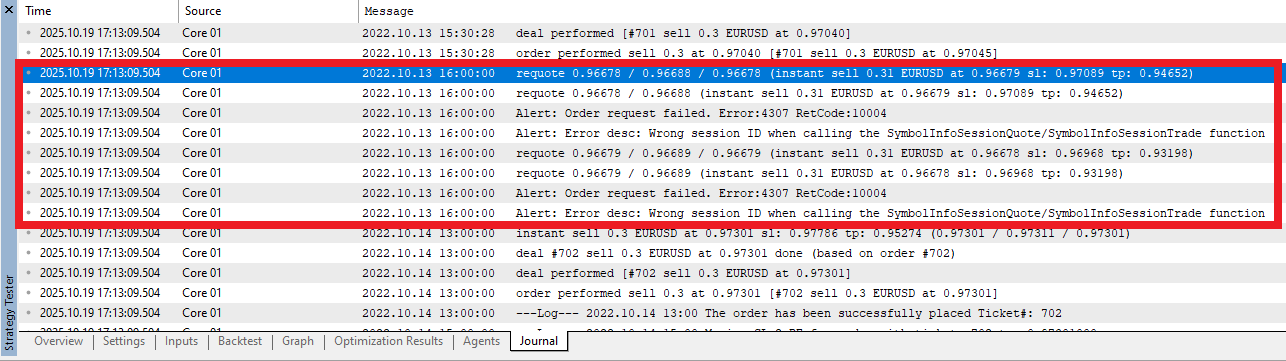
Figure 3: Journal log showing “requote” and “TRADE_RETCODE_REQUOTE (10004)”
When a requote happens, you’ll often see entries like requote or TRADE_RETCODE_REQUOTE (10004) in the Journal.
Don’t rely on “feel” alone—use logs to confirm what’s happening.
What Happens to Your EA When a Requote Occurs? (3 Common User Symptoms)
With manual trading, MT5 asks you to accept a new price.
With an EA, you usually won’t get that popup—so you may not notice a requote in real time.
As a result, your EA can behave in ways that feel “off” from a user’s perspective.
Related: What Is an EA? How FX Automated Trading Works and How to Choose One
Common symptoms you’ll notice first
Symptom 1: You expected an entry, but no position opened
If the order is not filled due to a requote situation, no position opens.
This often explains “the signal fired, but the trade didn’t happen” or “live behavior differs from the backtest.”
Symptom 2: The entry arrives late and ends up worse than expected
In fast markets, fills may not happen smoothly. Even a small delay can hurt—especially for short-term (scalping-style) systems.
Symptom 3: Depending on the EA, retries can look unstable
Some EAs retry after a not-filled event. In certain conditions, that can look like “sometimes it enters, sometimes it doesn’t,” or fills become inconsistent.
(This depends on how the EA is built.)
How to confirm:
Check the Journal and Experts logs in MT5. If you see requote or TRADE_RETCODE_REQUOTE (10004), a requote-related not-filled event occurred.
Why does it happen? (User-focused causes)
Cause 1: Your account uses Instant/Request Execution
These modes try to fill at the displayed price, so when price moves during processing, requotes become more likely.
Cause 2: The market is fast or thin (news, low liquidity)
When price changes quickly, the server may no longer be able to fill at the original rate.
Cause 3: The EA’s price tolerance is too strict (Deviation/Slippage)
Some EAs allow settings like Deviation or Slippage.
If tolerance is too tight, the EA may fail to get fills more often. (Names and availability depend on the EA.)
What you can do as a user (no coding required)
Action 1: Match your EA and your Execution mode
Check the symbol’s Execution in Specification. Short-term systems are especially sensitive to execution mode.
Action 2: Set a realistic Deviation/Slippage tolerance (if your EA offers it)
Too strict → more not-filled events. Too loose → you accept too much slippage.
If you see many missed entries, tolerance may be too tight. If fill prices drift a lot, it may be too loose.
Action 3: Avoid high-risk hours (news, rollover) when possible
If your EA has a time filter or pause feature, use it. Avoiding a few dangerous windows can improve fill stability.
Action 4: Confirm in logs, then ask the provider the right questions
If you see missing entries or unstable behavior, confirm the logs first. Then ask:
- What account type is recommended (Market Execution only, or Instant/Request supported)?
- What happens on not-filled events (retry or stop)? How many retries?
- What Deviation/Slippage settings are recommended for this timeframe?
Fastest troubleshooting path:
(1) Check Execution → (2) adjust tolerance → (3) avoid dangerous hours.
This alone often explains why entries fail or results look unstable.
How to Reduce Requotes (Practical Steps)
You may not be able to eliminate requotes completely, but you can reduce them significantly by focusing on four areas:
account type, order approach, connection quality, and EA settings.
1) Revisit your account type and execution mode (biggest impact)
- Consider a Market Execution account (ECN/STP style)
It tends to produce fewer requotes, but you accept slippage as the trade-off. - If your broker publishes metrics like fill rate or average slippage, review them as a transparency signal.
2) Improve how you place orders (make fills easier)
- Split large orders
Smaller chunks can fill more smoothly than a single large order. - Avoid high-volatility windows
Major news and rollover hours often increase requotes. - Understand pending orders
Pending orders are placed on the server and are less likely to trigger requotes, but stops can slip, and limits may not fill unless price reaches them.
Related:MT5 EA Safety: Order Types, Server-Side SL/TP, Pending Orders, and Latency Risk
3) Reduce latency and stabilize your connection
- Use a VPS close to the broker’s trade server
Lower round-trip time helps your order arrive before price changes too much.
Related:VPS Location for MT4/MT5 EAs: Latency Targets, Equinix NY4/LD4/TY3, and How to Choose - Prioritize stability
Wired internet and avoiding Wi-Fi congestion can reduce drops and latency spikes.
4) Adjust MT5/EA settings (when available)
- Use a realistic Deviation setting
Too small increases not-filled orders; tune it to your timeframe and volatility. - Check how the EA behaves on failures
Good systems log failures clearly and avoid uncontrolled retry loops.
Suggested priority:
Start with (1) account/execution, then (3) latency, and finish with (2) order approach and (4) settings.
Summary: Stop Letting Requotes Control Your Trading
Requotes happen most often on Instant Execution / Request Execution accounts.
They’re usually not “fraud”—they’re the result of how Execution works combined with fast or thin market conditions.
To avoid getting burned by requotes, focus on these practical steps:
- Check Execution: In MT5 Specification, confirm whether your traded symbol uses Market, Instant, or Request execution.
- Review account type: If needed, consider switching to Market Execution. It reduces requotes but increases slippage—choose what fits your strategy.
- Backtest under real conditions (for EAs): Match your live account’s Execution in Strategy Tester and confirm behavior through logs.
- Avoid risky hours: News spikes, thin liquidity windows, and rollover hours increase requote risk.
- Improve order approach: Split large orders and use pending orders wisely to make fills easier.
- Improve connection: Reduce latency and instability with a good VPS and stable internet.
Instead of trying to eliminate requotes completely, aim to keep them within your expectations.
When you match your strategy to the right execution mode, you’ll usually see fewer missed entries, less stress, and more consistent results.
 MQL5
MQL5
 Myfxbook
 YouTube
 X
X
 GOGOJUN